25
Files
With the file manager, it is possible to manage and open com-
puter specific file formats. The system supports the following
file formats:
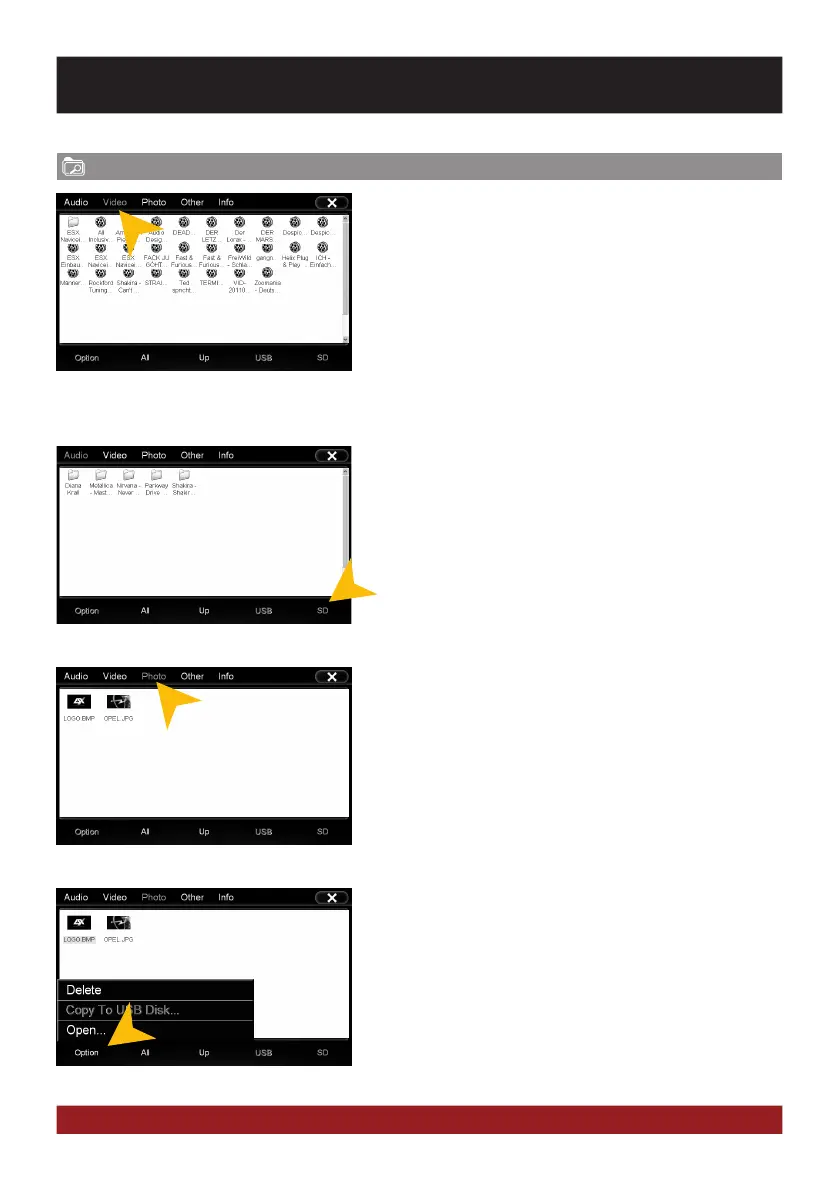
Tap on the upper bar to display the desired file category. Then
the filebrowser shows only the chosen files. Chose for example
„Photo“, then only all available photos including a preview will
be displayed.
Tap on the desired storage location to display the available and
compatible files.
Tap once to highlight a particular file. Tap twice (double-click)
to open the desired file.
Tap on „Option“ to perform file operations, such as deleting or
copying files.
With the copy function, it is possible to copy files to another
location or to another disk.
BASIC FUNCTIONS
Photo: BMP, JPEG, GIF, PNG
Video: MPEG (*.mpg, *.mpeg), AVI, RM (*.rm. *.rmvb),
WMV, MP4 (*.mp4, *.mov), MKV (*.mkv)
Audio: MP3, WMA, WAV, FLAC, AAC, Monkey Audio (*.ape)



 To Next Page