9
5
6
8
9
43
10
21
7
12 1311
MULTIMEDIA-PLAYER
By tapping on „Multimedia“ in the main menu, the source selection USB or SD opens for playing
audio and movie files. Push the „ “ button on the device and USB playback opens directly. Refer to
page 14 for CD Audio playback.
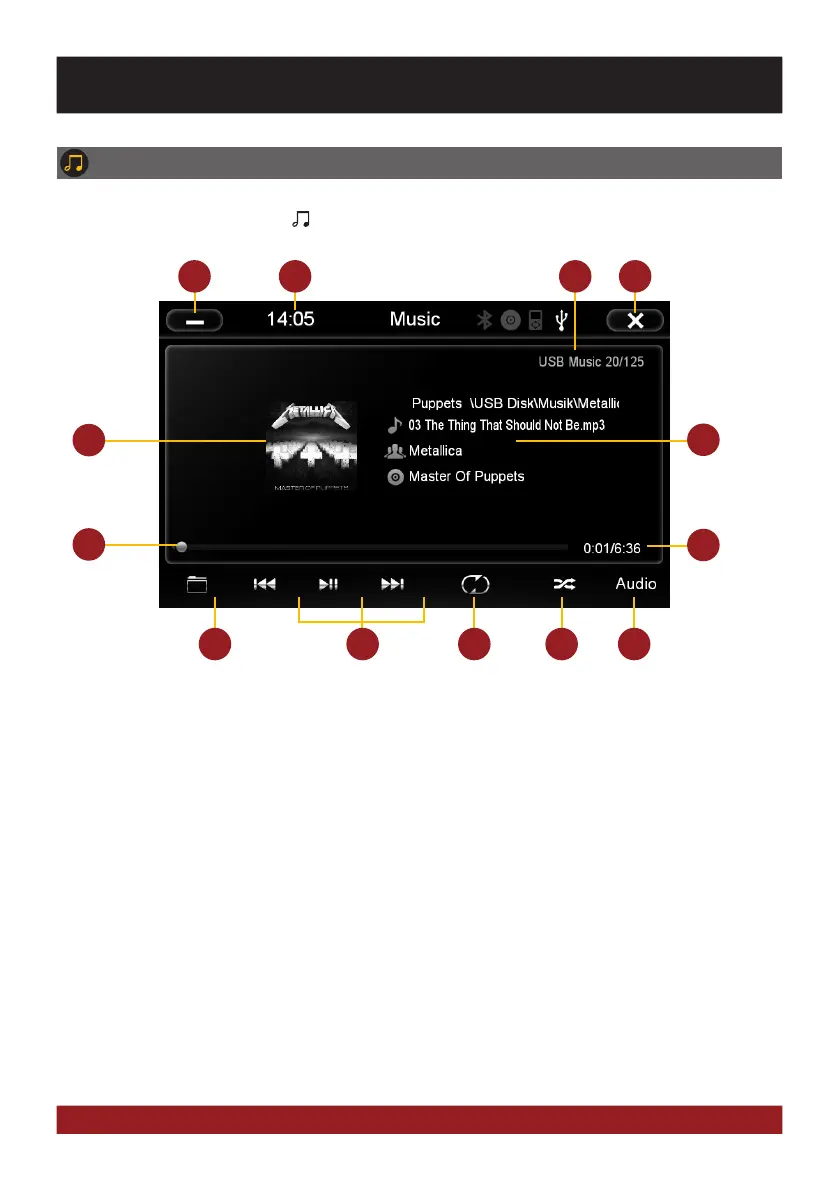
1. Tap here to enter the main menu without inter-
rupting the playback of the current title.
2. Current time.
3. Information about the current audio file.
4. Tap here to exit the application, the playback
will be interrupted.
5. ID3-Tag album cover of the current audio file.
6. Title/artist/album information of the current
audio file.
7. Progress bar of the currently playing audio file.
With the displacement of the knob you can
jump to another point in the track.
8. Elapsed time and the total time of the track.
9. Tap here to open folder list or to change the
play mode (music or video).
10. Playback controls for audio player
- Play previous track
- Start or pause playback
- Play next track
11. Repeat function
- Repeat all titles
- Repeat only the current folder
- Repeat single track
12. Tap here to start random playback
13. Tap on „Audio“ to open the audio settings.
BASIC FUNCTIONS



 To Next Page