6
13 14
21
6
4
8
10
12
3
5
7
9
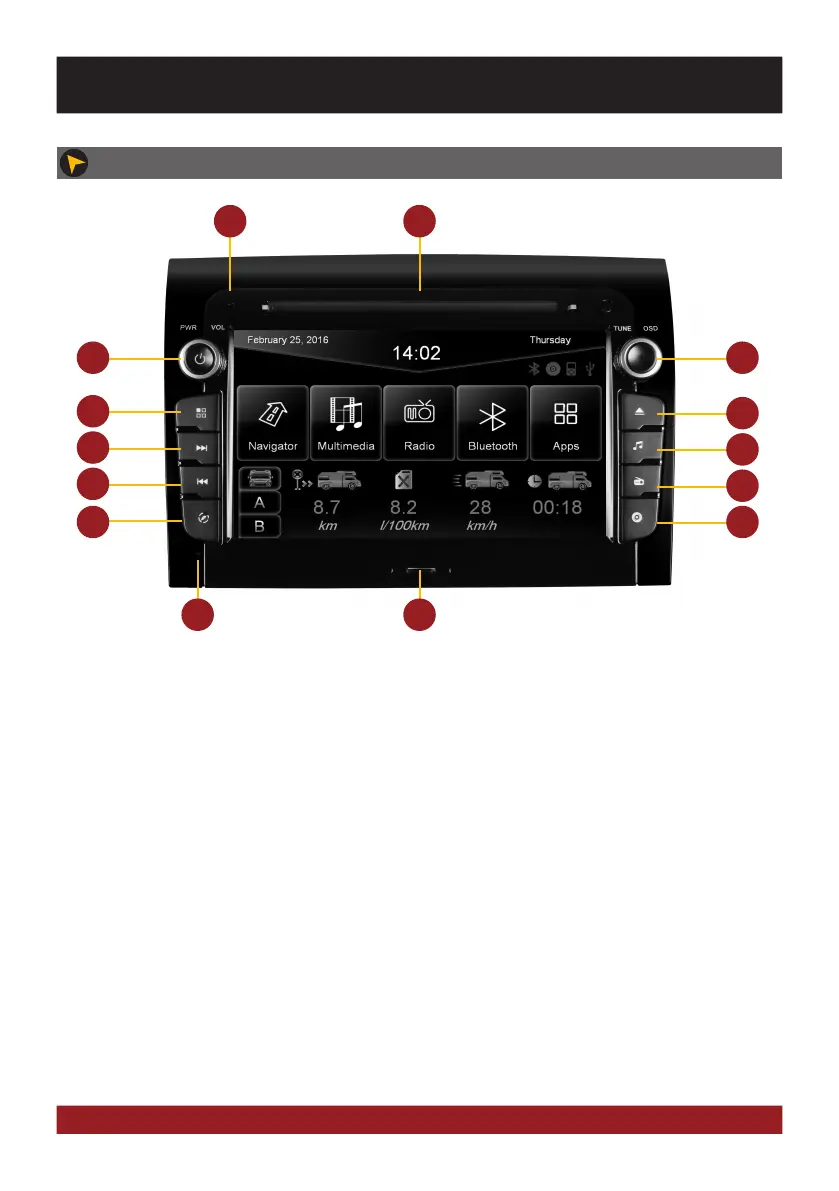
1. Internal Bluetooth microphone.
2. Slot for CD/DVD disks (Ø 12 cm).
3. Mute (short push) or the device switches to
stand-by (push and hold - no audio, display
darkens, running navigation stops, Bluetooth
connection interrupts).
Volume controller (rotate).
4. Controller knob for selecting or switching
in the user menus.
Push knob to open the audio settings
To display the rear view cam (if connected,
push on the knob shortly.
When ignition is off, press and hold:
Device turns on for 30 minutes.
5. Open the main menu (short push).
Open Voice Control (push and hold)
6. Eject the inserted CD/DVD.
7. Skip to the next track/title/station/chapter.
8. Start the USB media playback
9. Skip to the previous track/title/station/chapter.
10. Open the radio mode (short push) or open the
DAB+ radio if connected (push and hold).
11. Open the navigation system.
12. Start the DVD/CD player
13. Reset button
14. MicroSD card slot.
11
BASIC FUNCTIONS
OPERATING ELEMENTS



 To Next Page