7
2
1
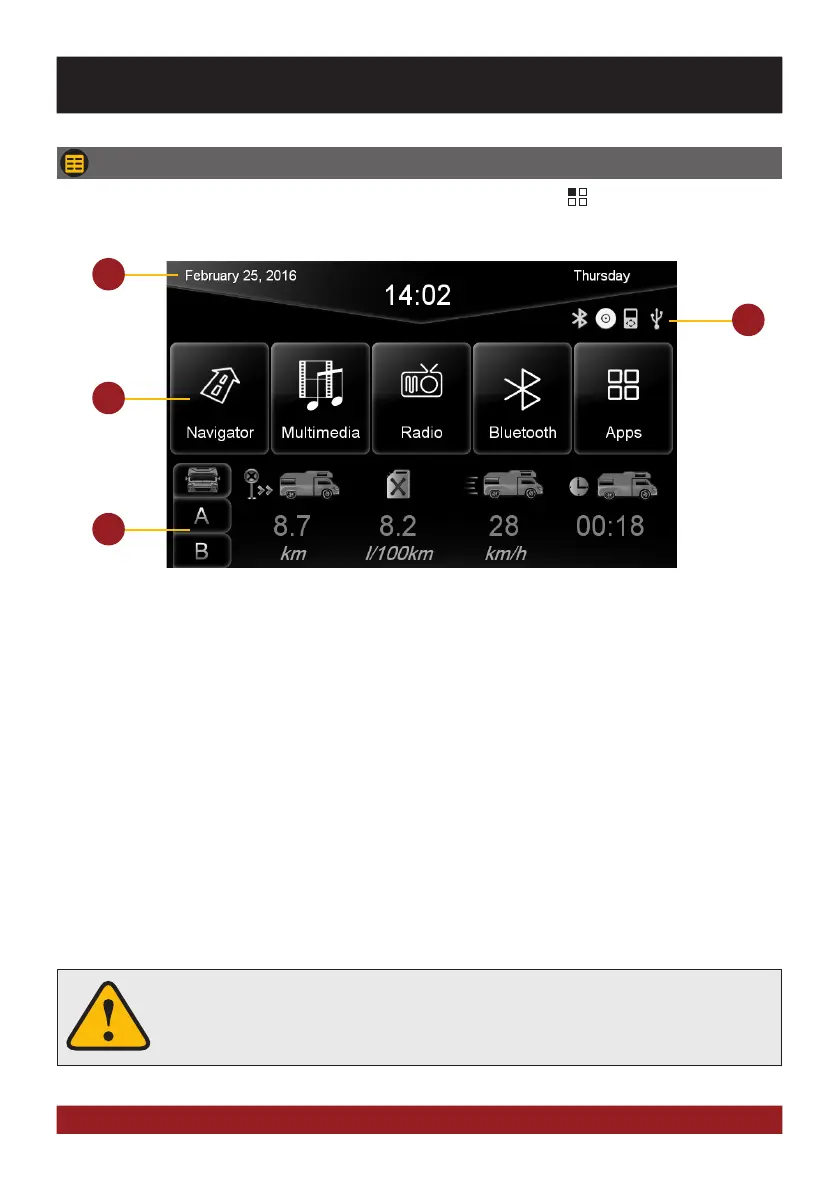
1. Depending on the selected design theme (Skin), the current date and time will be displayed here.
2. The four function icons are (depending on the skin) is highlighted in white and thus activated when the
corresponding function is in use, such as „Bluetooth connection“, „CD / DVD in the drive“, „iPod con-
nection“ or „USB connection“.
3. The main menu displays four to eight key panels, which start the selected application or lead to the
regarding sub menu. In chapter „CUSTOM SETTINGS“, section „Menu assignments“ (Pg. 29) shows
how to customize and arrange the key panels.
4. Here the driving data from the onboard computer (Trip Manager) like traveled distance or average fuel
consumption will be displayed. Under A and B you can choose between two profiles. This feature is only
available on the model Type 290 and a connected CANBUS - refer to the installation guide.
3
4
Basically, the device can operate several applications simultaneously. But if too
many extensive applications running at the same time, it can slow the operation
(not responding to your input) or even crash the system.
BASIC FUNCTIONS
MAIN MENU
After power on, the device starts with the main menu. By pressing the „ “ button on the device, you
can always get to the main menu too.



 To Next Page