ETAtouch controller [Aux.boiler] function block
7.8.1 Setting the charging times
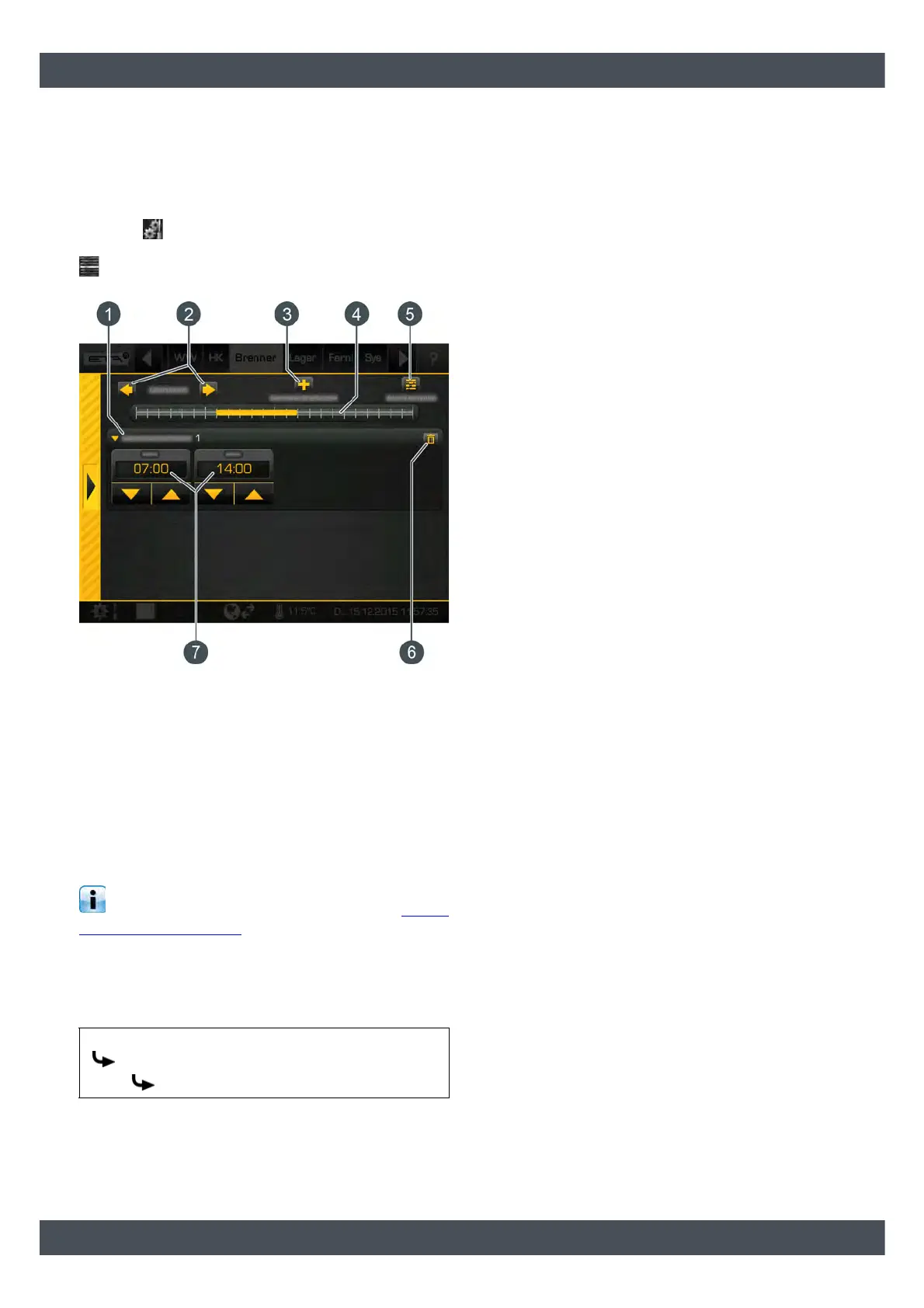
Open the overview screen of the standby time
settings
The standby times of the burner can be adjusted in the
settings ( button). To adjust, open the settings and
then open the standby times of any given day with the
[Stand-by times Daily plan] button. An overview
screen opens.
Fig. 7-74: Overview
1 Set time windows (standby times)
2 Select day of the week
3 Add another time window
4 Graphical representation of the time window
setting
5 Overview of all time windows for the entire week
6 Delete time window
7 Period of the time window
Setting the time window and copying to other
days of the week is described in chapter 7.1.6.6
"Setting a time window".
7.8.2 Text menu - Adjustable parameters
Adjustable parameters
Detailed descriptions of the parameters are provided
below.
Explanation of [Start lag]
This parameter is used to set the duration of a delay in
the operation of the auxiliary boiler after the ETA
control system has demanded it.
If there is still a demand by the ETA control system
after this period ends, then the auxiliary boiler will
begin operation.
Aux.boiler
Settings
Start lag


 To Next Page