38 www.eta.co.at
[BufferFlex] function block - log boiler ETAtouch controller
7.3 [BufferFlex] function block - log
boiler
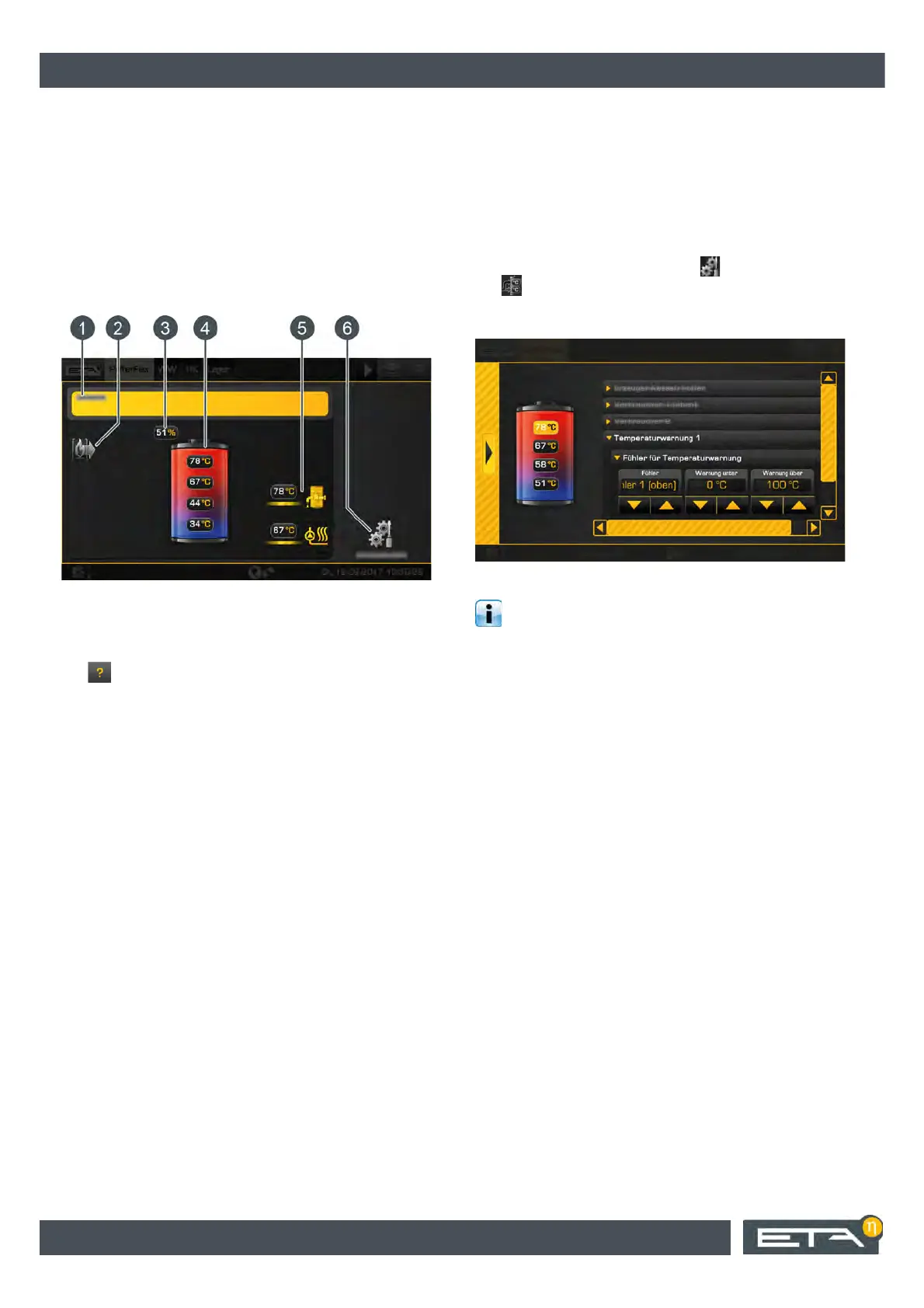
"BufferFlex" overview
The consumers appear in the overview with different
levels to the right of the buffer, and the heat producers
to the left of the buffer. The following graphic shows a
buffer with four temperature sensors and
two consumer levels.
Fig. 7-46: Overview
1 Operating condition and information.
A description of the operating conditions can be
found in the integrated Help menu by pressing the
button.
2 Producer for the buffer
3 Current buffer charging status
4 Temperatures of the buffer in the individual areas
5 Buffer consumers.
Both consumer levels are currently charged with
different flow temperatures
6 [Settings] button.
Temperature warnings for the buffer can be set in
this menu.
Mode of operation
By means of the temperature sensors on the buffer, the
current charging status is determined and displayed in
the overview screen. It is needed to determine the
correct amount of firewood to add. The buffer is
charged by the log boiler as soon as the buffer meets
the necessary criteria.
7.3.1 Setting warnings
Set temperature warnings
As an option, limit values can be set for two different
temperature sensors so that a warning is issued if they
are undershot or exceeded.
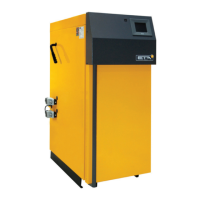
The [Service] access level is required to make modifi-
cations. Then open the settings ( button) and press
the [Sensor assignments] button. In the overview,
select [Temperature warning 1] or [Temperature
warning 2].
Fig. 7-47: Set temperature warnings
If the allocation is set to [no association], the
temperature warning is deactivated.
In the text menu, a delay time can be defined with the
[Duration until warning] parameter before the warning
appears.


 To Next Page