36 www.eta.co.at
[Boiler] function block – log boiler ETAtouch controller
7.2 [Boiler] function block – log
boiler
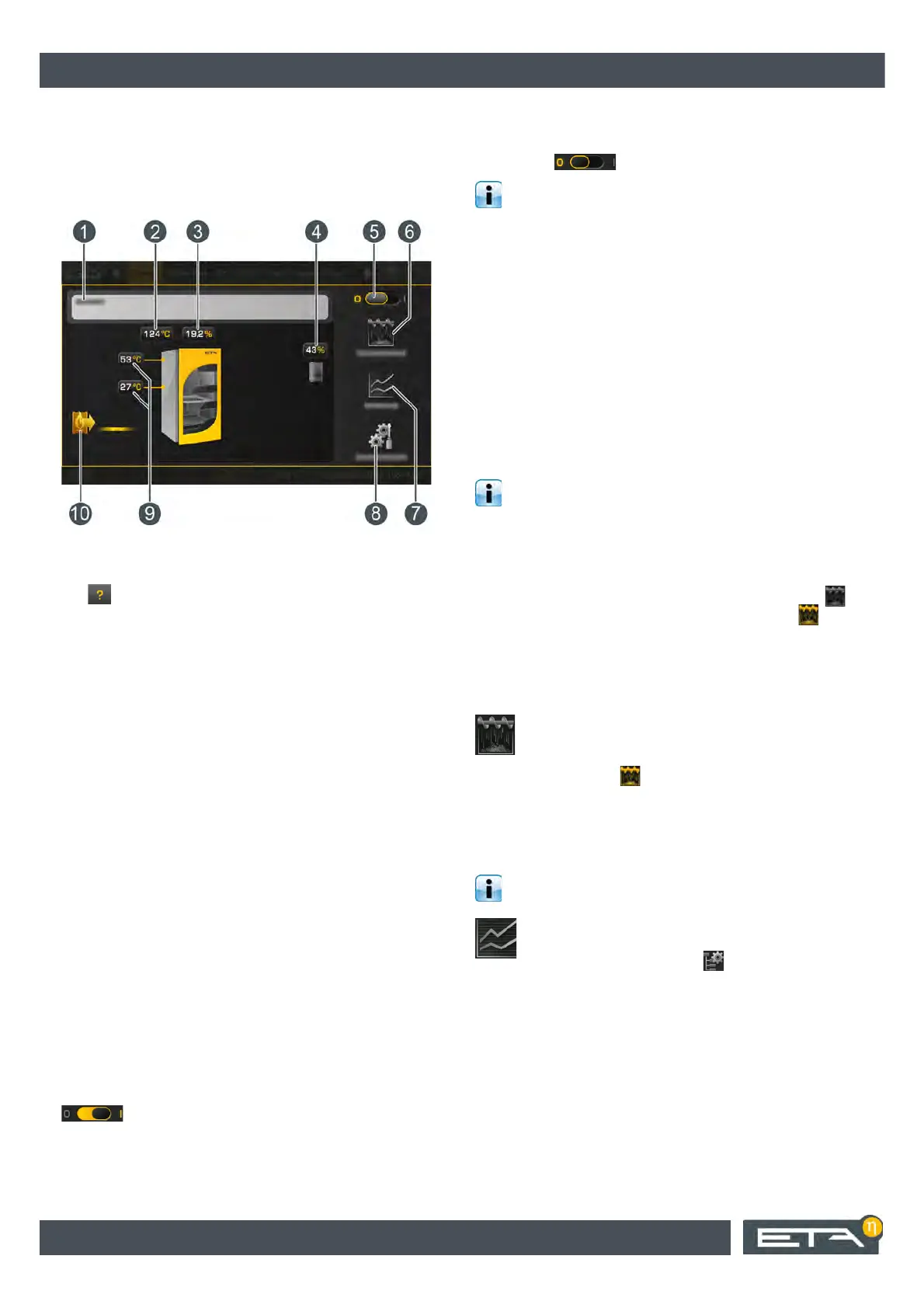
Boiler overview
1 Operating condition and information.
A description of the operating conditions can be
found in the integrated Help menu by pressing the
button.
2 Exhaust temperature
3 Residual oxygen content of flue gas
4 Buffer charging status
5 Switch off boiler.
This switch is used only to switch off the boiler
when it is not heated. The boiler is automatically
switched on by opening the insulation door.
6 [Ember burnout] button.
Thus, ember retention is deactivated and the boiler
performs a complete burnout.
7 [Measurement] button.
The menu for emission measurement of the boiler
is opened.
8 [Settings] button.
In this menu, the settings and functions most
commonly used can be stored.
9 Feed temperature and return temperature
10 Producer for the boiler (TWIN pellet burner)
This is only displayed if a TWIN pellet burner is ad-
ditionally installed.
Boiler functionality
When the insulating door is opened, the draught fan
starts automatically and the switch changes to the
setting. The operating condition changes
from [Ready] to [Insulation door open]. The open
insulation door is shown on the display. If the log boiler
is not being started up immediately, it can be switched
off with the switch.
If the insulation door stays open for more than
30 minutes, an error message appears on the
screen. If a TWIN burner is connected to the log boiler
and the insulation door stays open longer than
1 minute, the TWIN burner is switched off by the
control system, which assumes that the log boiler is
being started up.
Once the fuel is ignited and the exhaust temperature is
above 100 °C, close the ignition door and the
insulating door. The boiler switches to [Ignition] and
later to [Heating] mode.
After heating, if the fuel in the boiler has been burned
and the exhaust temperature drops below 80 °C, the
boiler begins a burnout and subsequently switches to
[Ready] mode.
After the heating operation, some charcoal and
embers will remain in the boiler by design so that
new fuel can be ignited more easily when it is added
later. This function is also called the "ember retention"
function. If this function is not desired, for example
because the boiler is to be cleaned afterwards, it can
be turned off (during heating) by pressing the
button. The button is then highlighted in yellow .
7.2.1 Operating elements
[Ember burnout] button
This button can only be pressed during heating
mode. It switches off the "ember retention"
function. When shut off, the button is
highlighted in yellow . The boiler then carries out a
complete ember burnout, so that no embers remain in
the fuel chamber.
[Measurement] button
For emission measurement, the wood chip boiler
must already be in heating mode.
When this button is pressed, a settings window
appears for the emission measurement. Using
the [Begin measurement] button, a date for
sweeping of the chimney can be selected. The boiler
must be heated up in time to reach the operating


 To Next Page