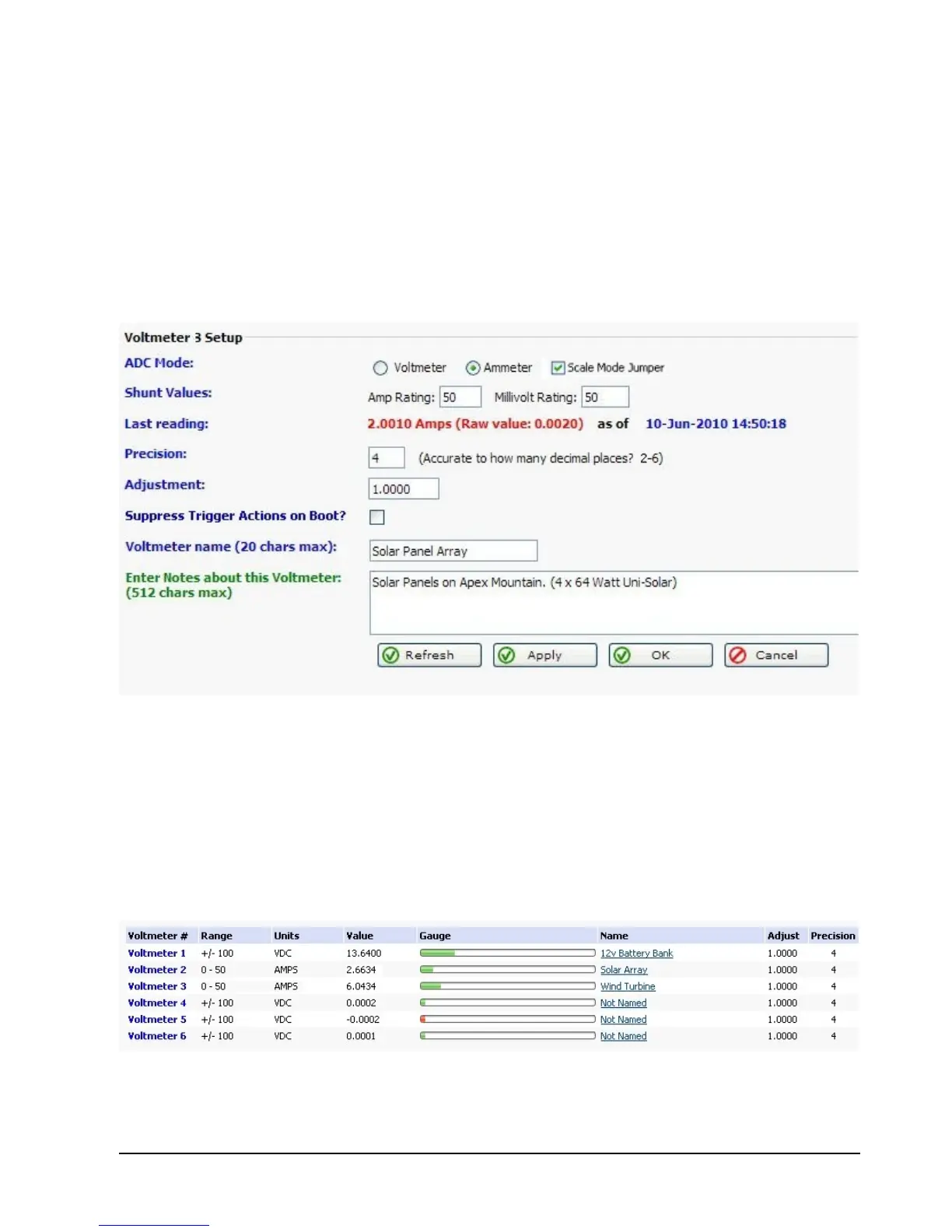
Below is a screen shot of how to setup Voltmeter 3 to act as an ammeter to show how much
charging is going into the batteries from solar panels. First, put Voltmeter 3 into ammeter
mode and click Apply. Next, enter valid shunt values (amperage rating, millivolt value), enter
name and notes and then click Apply or click Ok.
Note: For increased accuracy, remove the mode jumper on the corresponding voltmeter. This
puts the voltmeter in low voltage mode, in this mode the maximum voltage must not exceed
-2.0v to +2.0v.
If everything is hooked up correctly you should be able to see how much amperage is being
put into your batteries. In the screenshot below the 12 volt main battery bank is being charged
by both solar and wind. This technique can be used to measure DC current being put into
your batteries by solar panels, a wind generator, or a battery charger. RMS-200 can monitor
your voltage and amperage remotely and alert you to dangerous battery conditions.



 To Next Page