18 - e1 Assembly and User Manual
30596-02A
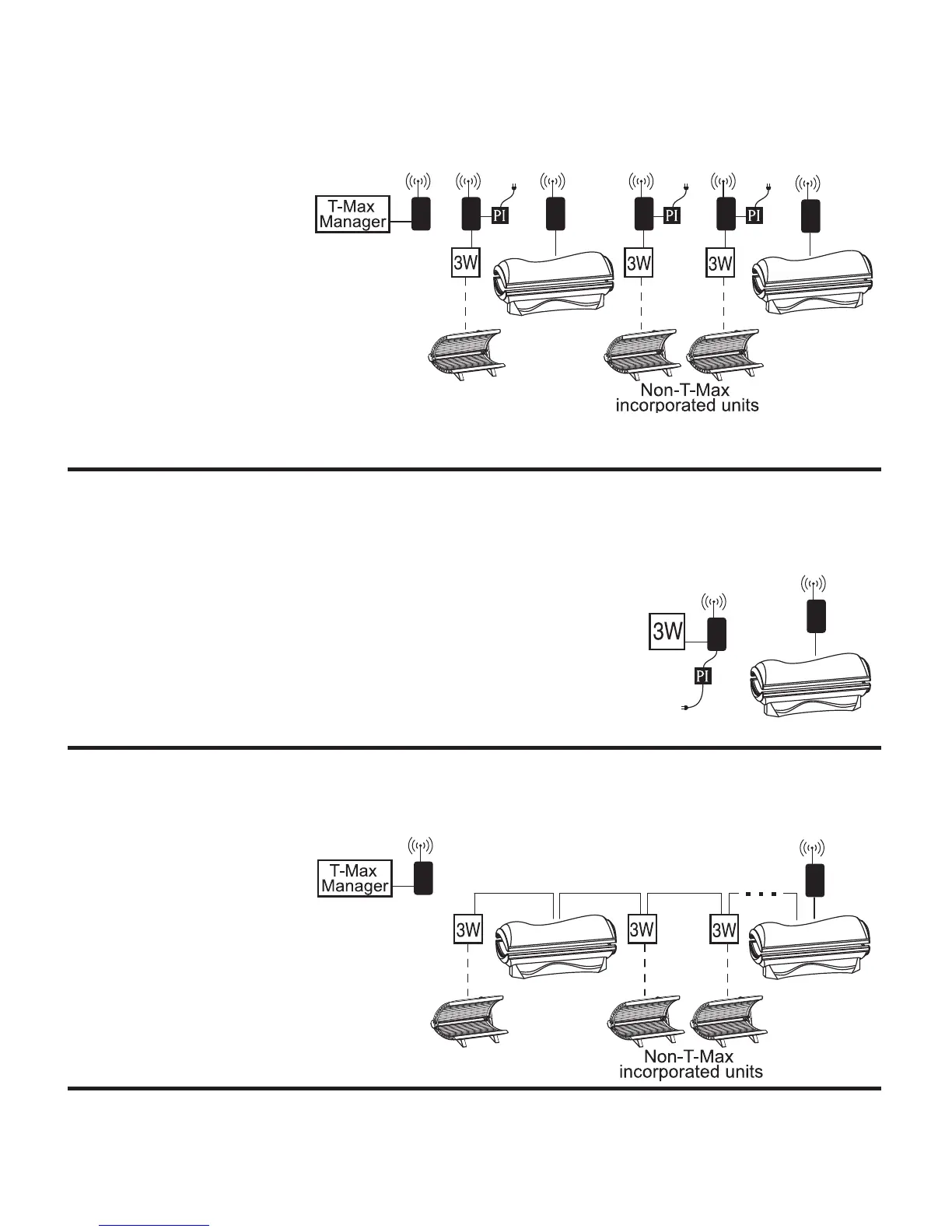
Scenario 1 - T-Max® Manager Series with Complete Wireless
Connect one G2 (with Power Injector) to the Manager and one
G2 to each of the tanning
beds. Install as many beds as
you like with this confi gura-
tion. Units that do not com-
municate with T-Max will
need a G2 and a 3W to operate.
If you have an older T-Max® Man-
ager that doesn’t support auto addressing,
set the address of each sunbed manually
as described in Setting the sunbed address
manually. You can place your sunbed at
any location in the series.
Scenario 2 - T-Max 3W with Wireless
In single sunbed installations, the T-Max® 3W can offer the same control
as the T-Max® Manager, eliminating the need for a Manager.
After you have set the T-Max® 3W’s, address to “0” (refer to your T-
Max® user’s guide) and the sunbed’s address to “1”, simply connect
one G2 to the T-Max® 3W and one G2 to the tanning bed.
Scenario 3 - T-Max® Manager Series with Wireless
combo
Connect one G2 to the
Manager and one G2 to a
wireless ready tanning bed.
The rest of the salon may
be “daisy-chained” together
and connected to the wireless
equipped tanning bed, eliminating
the need to wire the Manager to the
tanning beds.



 To Next Page