e1 Assembly and User Manual - 19
30596-02A
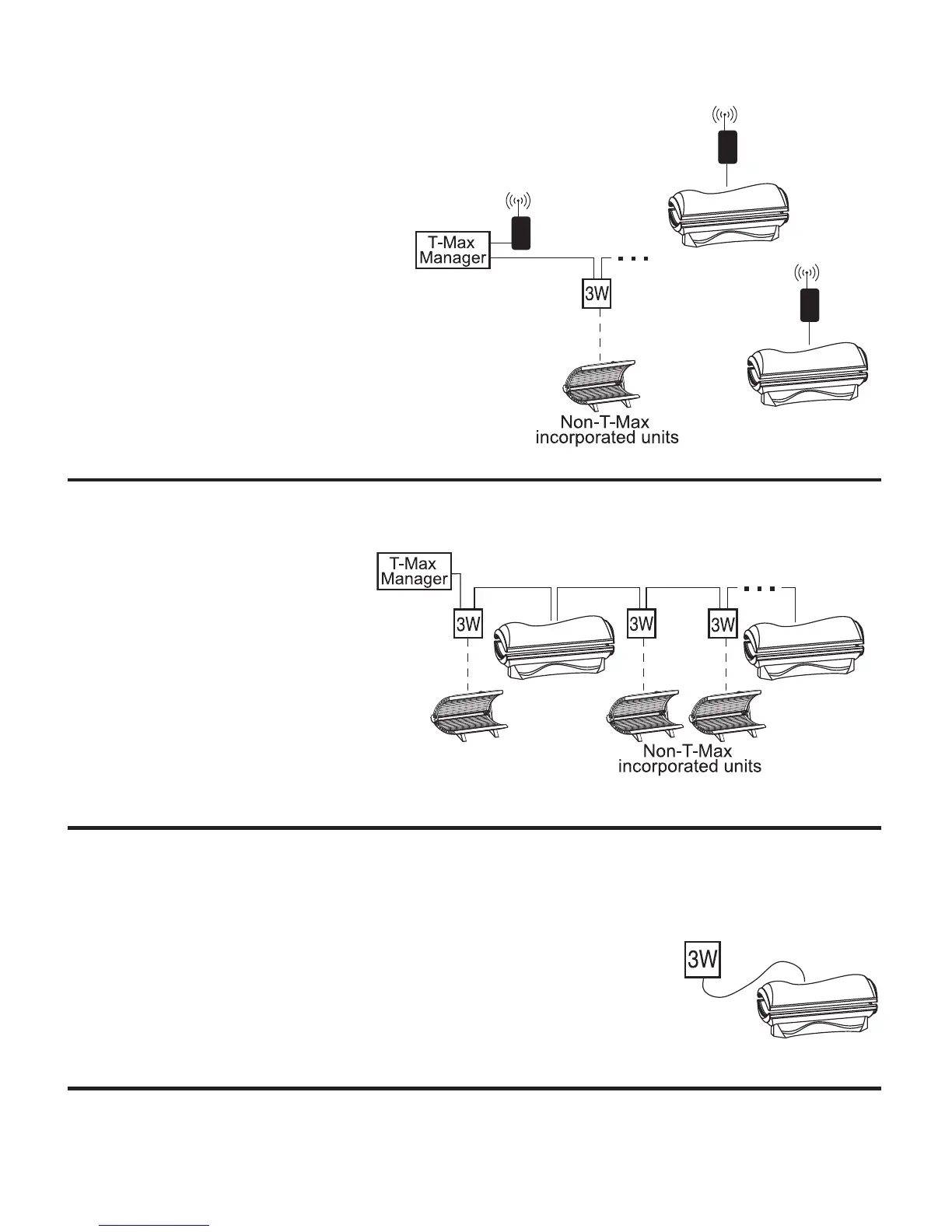
Scenario 4 - T-Max® Manager Series with
Wireless combo 2
Wireless can be easily added to an existing
salon already utilizing T-Max®. Connect
one G2 (with Power Injector) to the Man-
ager and one G2 to each wireless ready
tanning bed. The rest of the salon may be
“daisy-chained” together and connected
to the Manager.
Scenario 5 - T-Max® Manager Series with wires
As always, this tanning bed is fully
compatible with a wired T-Max®
system. Simply connect the RJ-22
modular cable(s), described in the T-
Max® Manager manual, into either
of the smaller remote port(s) located
on the back of the bed and follow
the instructions that came with your
remote system.
Scenario 6 - Single Bed wired to T-Max® 3W
In single sunbed installations, the T-Max® 3W can offer the same control
as the T-Max® Manager, eliminating the need for a Manager.
After you have set the T-Max® 3W’s address to “0” (refer to your T-Max®
user’s guide) and the sunbed’s address to “1”, simply connect the RJ-22
modular cables, described in the T-Max® user’s guide, directly into either
of the smaller ports located on the back of the bed and either port on the
back of the T-Max® 3W.



 To Next Page