20 - e1 Assembly and User Manual
30596-02A
Scenario 7 - Non T-Max® Remote System
wired to unit
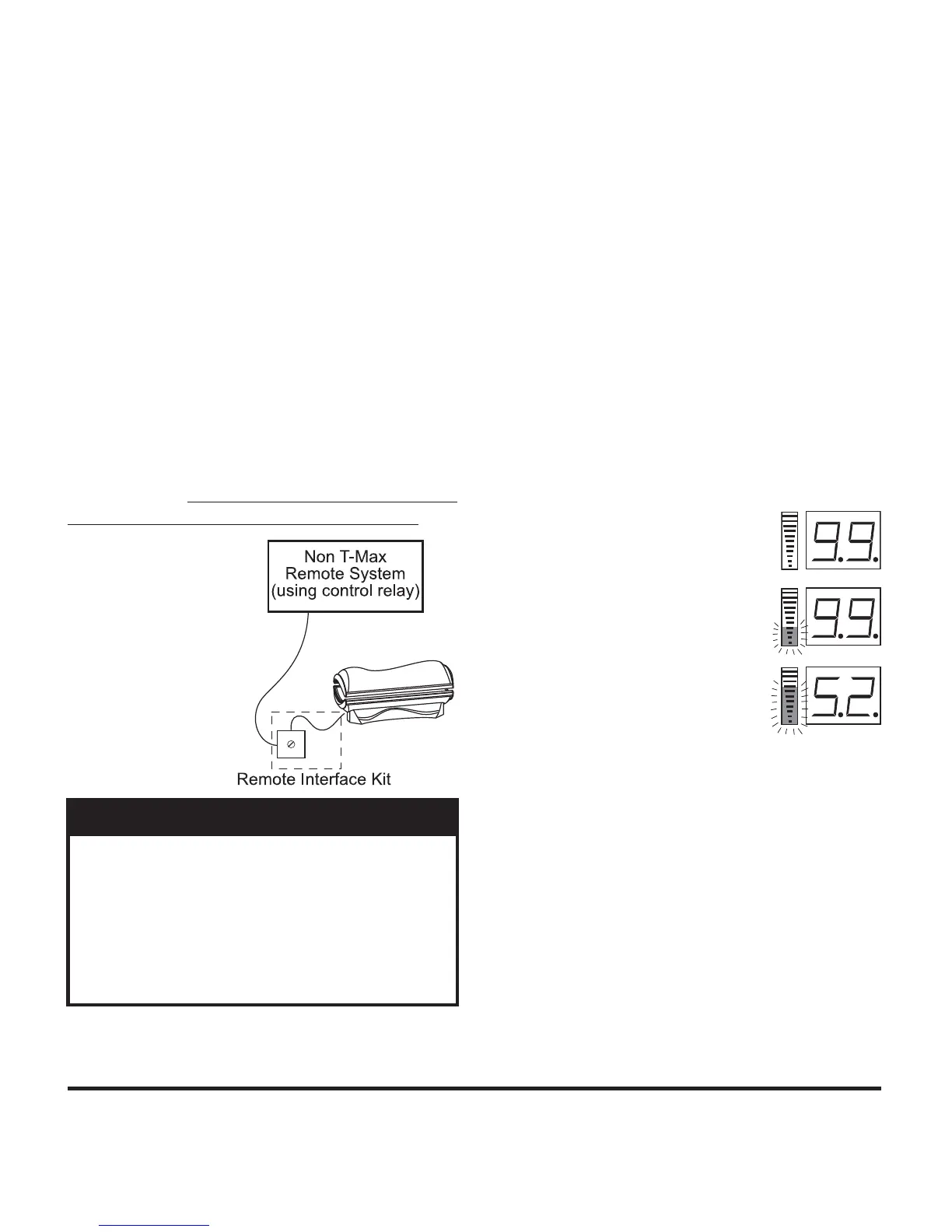
Most non-T-Max® remote systems control
the sunbed by the use of a relay. The relay
operates the sunbed by connecting and dis-
connecting a pair of wires leading from the
sunbed. Refer to the user manual provided
with your remote system to determine if it
operates in this way. To connect your sun-
bed to this type of system a remote interface
kit is required. Contact your place of pur-
chase to obtain the kit. The illustration be-
low details a typical connection. Follow the
instructions provided with the kit and from
the remote’s manual to make the necessary
connections.
You will also need to enable Pa-
rameter 19. See Parameters for instructions.
Setting the sunbed address manually
Before connecting your sunbed to the T-
Max® Manager or T-Max® 3W, the address
of your sunbed must fi rst be set. Set the “id”
manually as described below.
Setting the “id”
Make sure no cables are plugged into 1.
your sunbed’s remote ports.
Remove and reapply power to the unit.2.
Press and hold the stop button, located 3.
on the sunbed display, for three seconds
and release. The display should indicate
an “id” number from “oF” to “252”.
The remote connection is not designed to
supply or accept high voltage, nor can it
provide power to an external timer. The
sunbed’s remote interface circuitry operates
on 5 volts, attempting to connect it to any
higher voltages will damage the sunbed as
well as void your warranty.
CAUTION
If you are using a T-Max® 1A or 3A 4.
as a “master” remote, the “id” of the
sunbed must be set to “1”. If you are
using a T-Max® Manager each sunbed
must be assigned a different “id”. To set
the “id” press the timer button, to count
up, or the body fan control button, to
count down, until the desired number
is achieved.
Press the stop button to return to the 5.
normal display mode.
1-99
100-199
200-252


 To Next Page