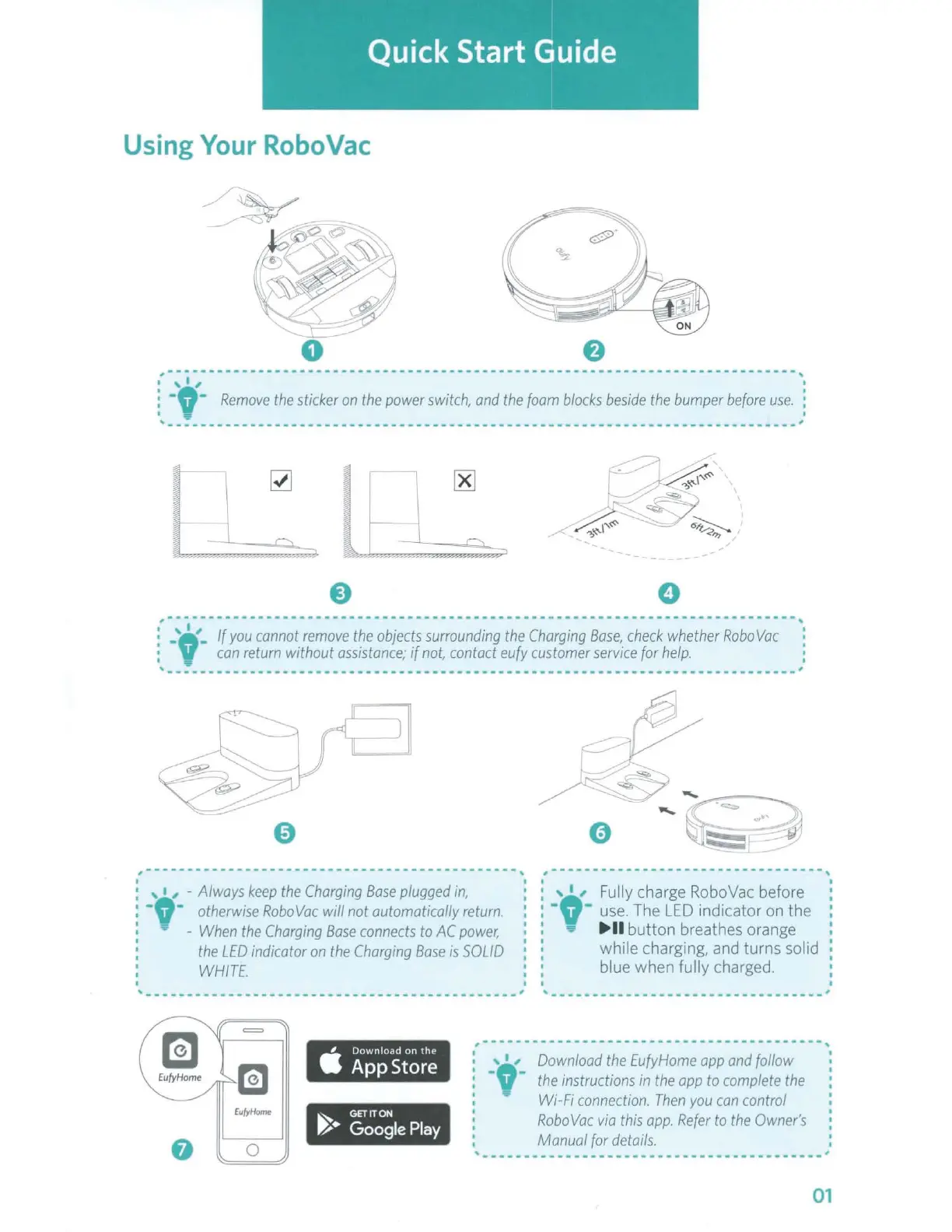
Using
Your
RoboVac
f)
,-
---
- - - - - - - - - -
-,
I ' I , I
: -
,-
Remove
the
sticker
on
the
power
switch,
and
the
foam
blocks
beside
the
bumper
before
use.
:
I 'Ii' I
'----------------------------------------------------------------
--
----------'
~
l
[8]
~ ~
---,
\"';
,,,~
-
,,,
~....._
d-
-
~~
~
,-.._.,
,,,~
:;;,,,_,
e 0
(
_,
, , '-
If
you
cannot
remove
the
objects
surrounding
the
Charging
Base,
check
whether
Robo
Vac
'.
:
can
return
without
assistance;
if
not,
contact
eufy
customer
service
for
help.
:
' ,
----------
--
----------------------------------------------------------------
0
,---
---------------
-- --
'
, • , -
Always
keep
the
Charging
Base
plugged
in,
-,
-
otherwise
RoboVac
will not automatically
return.
-
When
the
Charging
Base
connects
to
AC
power,
' : ,
0
,,
Fully charge RoboVac before
: • •
use.
The
LED
indicator on the
:
►
II
button breathes orange
the
LED
indicator
on
the
Charging
Base
is
SOLID
WHITE.
------------------------------------------
---'
' while charging, and turns solid
blue when fully charged.
'---------------------------------
,------------------------ - -
------------,
EufyHome
~
GETITON
~•
Google
Play
0
,
_____
_
Download
the
EufyHome
opp
and
follow
the
instructions
in
the
opp
to
complete
the
Wi-Fi
connection.
Then
you
can
control
RoboVac
via
this
opp.
Refer
to
the
Owner's
Manual
for
details.
.
I
I ------- _____________________ ,
01



 To Next Page