APOLLO user manual
Issue G
16
Installing a processor
The standard and Gigabit variants of the APOLLO board have a zero insertion force PGA
socket soldered to the board that accepts a range of Pentium M and Celeron M FC-PGA
processors. For a list of PGA processors, see page 91
.
To install a processor into the socket, follow these steps:
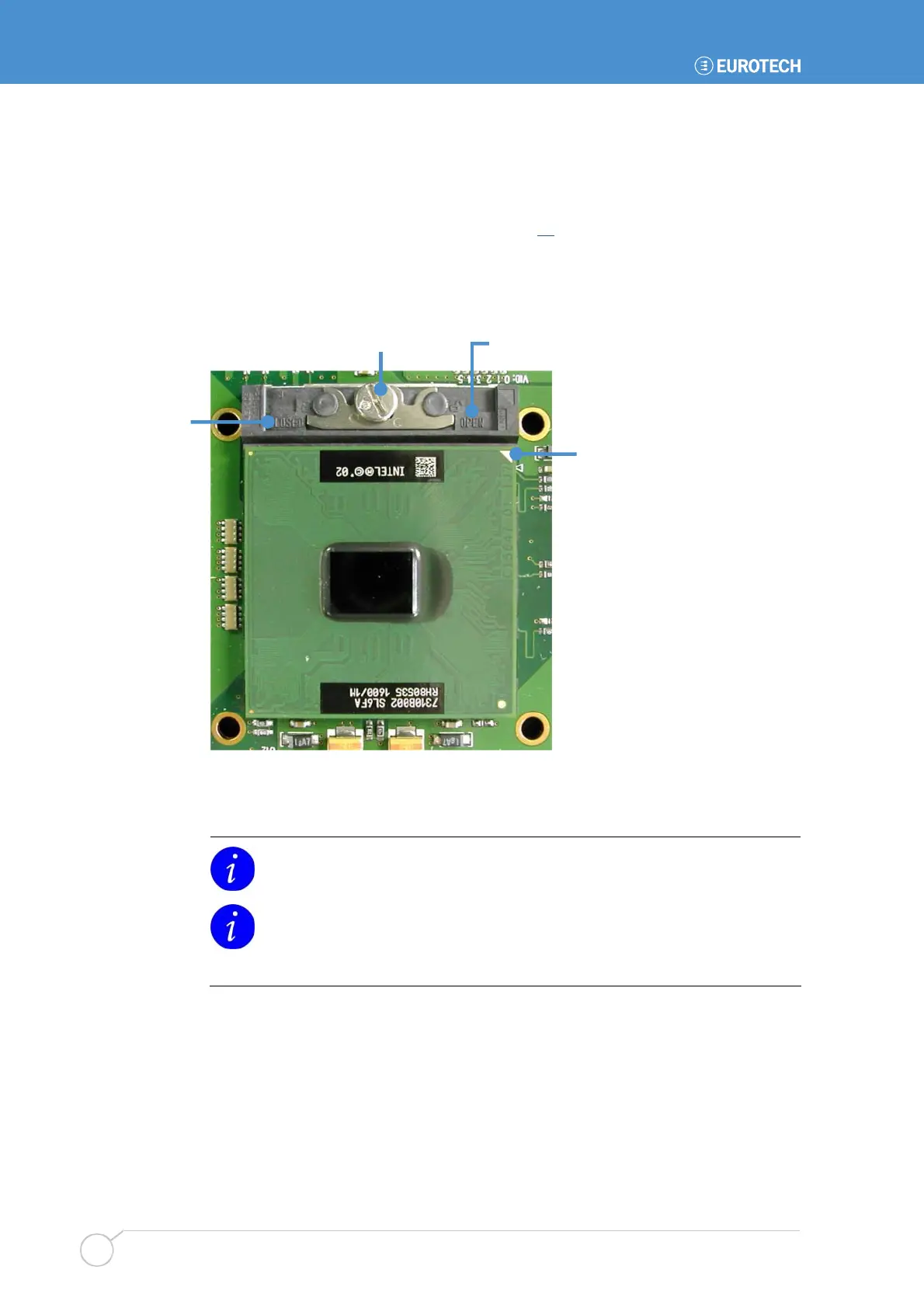
1 Check that the socket actuator is in the OPEN position, as shown by an open
padlock symbol:
Socket actuator Open position
2 Align the small triangle on the top side of the processor with the A1 pin
position on the socket. A small triangle on the socket shows this position, as
does the APOLLO board silkscreen.
The µFC-PGA processors are designed to only fit into the socket in one way.
You should not have to press down on the processor to get it to fit into the
socket. If the processor does not drop completely into the socket, check the
orientation. If orientation is correct, turn the actuator on the socket until the
processor drops in completely.
3 Gently hold the processor down and secure it in the socket by using a
screwdriver to turn the actuator to the Closed position. This is shown by a
closed padlock symbol.
4 Mount a suitable cooling solution to contact the exposed processor die before
the board is powered on. The BIOS automatically determines the processor
installed and adjusts the settings accordingly. No BIOS modifications are
required.
Closed
position
Processor A1
position



 To Next Page