76
77
4
4
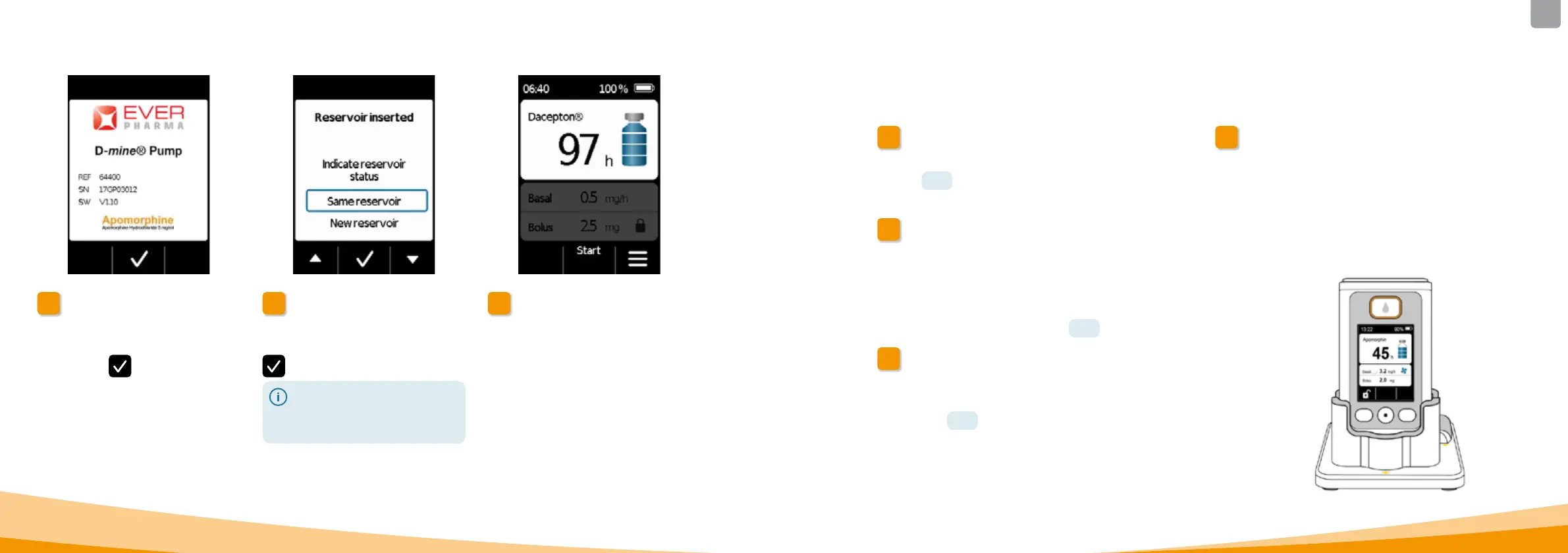
Greeting
The pump will display a greeting
screen when switched on.
Confirm with
.
5
Selecting a reservoir
If a reservoir is inserted, then select
"Same reservoir" and confirm with
.
If the same reservoir will continue
to be used after changing the
battery and restarting the pump,
then select "Same reservoir".
6
Starting drug delivery
The pump will display the main screen
again. Do not forget to restart drug
delivery to proceed with treatment.
4.8
REMOVING AND
RECHARGING THE PUMP
1
Stopping drug delivery
Stop drug delivery.
Section
3.4
2
Remove the infusion set
Remove the infusion set from your body and from the
reservoir and dispose of it in accordance with the
instructions for use of the infusion set.
Check whether the pump is contaminated. If so, follow
the cleaning instructions in Section
9.3 .
3
Removing the reservoir
Remove the reservoir from your pump and
dispose of it with the household waste in accordance
with Section
9.5 .
4
Placing the pump in the docking station
Place your pump in the docking station. The device will
switch on the screen and emit a confirmation signal that the
rechargeable battery is being recharged in the pump. The
rechargeable battery symbol on the screen and the signal
light on the docking station will light up yellow.



 To Next Page