96
97
6
1
2 3
654
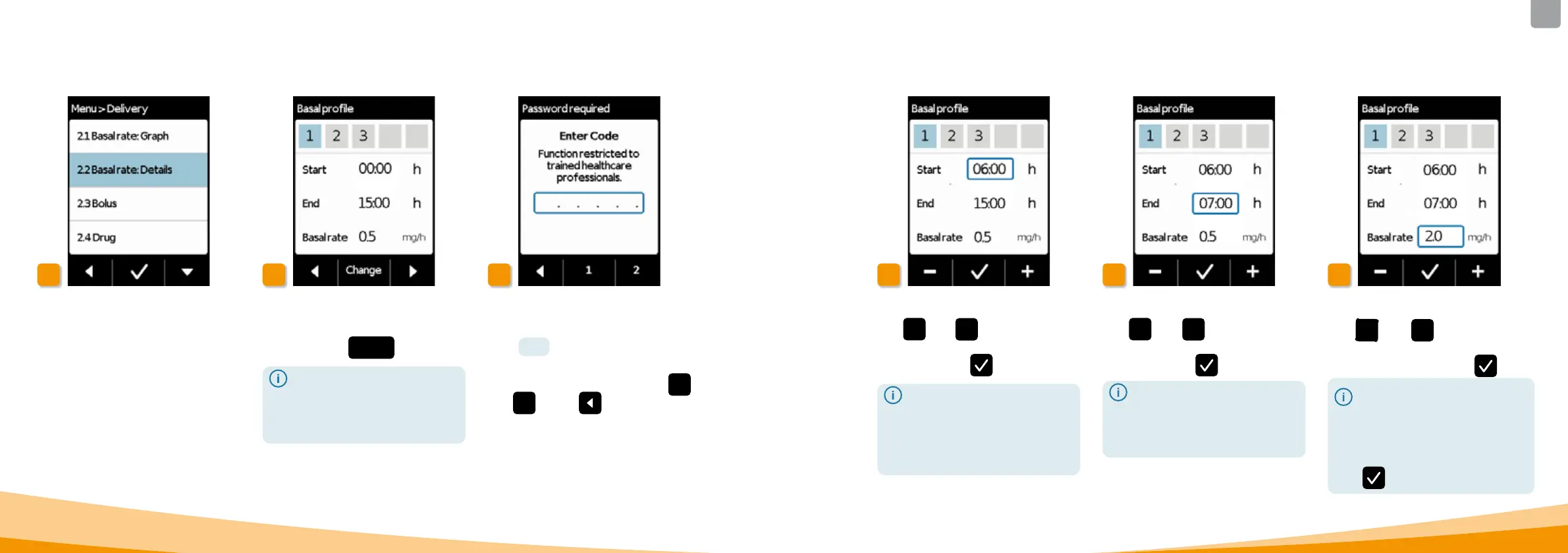
Select change
Basal period 1 is already automatically
selected. Press
Change .
It does not matter how many
periods have already been set.
The subsequent time periods are
adjusted per your specifications
during programming.
Enter code
Enter the release code.
Page
161 .
Set the release code for changing
delivery settings using buttons
1
and
2 . Press
to return to the
delivery settings screen.
6.1.2 SETTING BASAL PERIOD 1
Select Basal rate: Details
Select the Basal rate: Details item in
the Delivery settings menu.
Set start
Use
+ and
– to set the start of
basal period 1 (for example: 6:00 AM)
and confirm with
.
For security reasons, the device
will lock automatically after 3
minutes of inactivity. Any previous
entries will be deleted. Repeat
programming starting with Step
1in this section.
Set end
Use
+ and
– to set the end of
basal period 1 (for example: 7:00AM)
and confirm with
.
If basal period 1 is also the last of
the day, then the end time should
be set to match the start time. Any
previous basal periods will then
be overwritten.
Set basal rate
Use
+
and
–
to set the basal
rate for basal period 1 (for example:
2.0mg/h) and confirm with
.
If the new value deviates
significantly from the previous
one, then the pump will display a
message to this eect. Check to
ensure that the value is correct
and confirm the message with
.



 To Next Page