56
57
3
6 7
8
Press
Stop as soon as the liquid
reaches the needle on the infusion set.
If you do not press a button, the
process will stop after a few seconds.
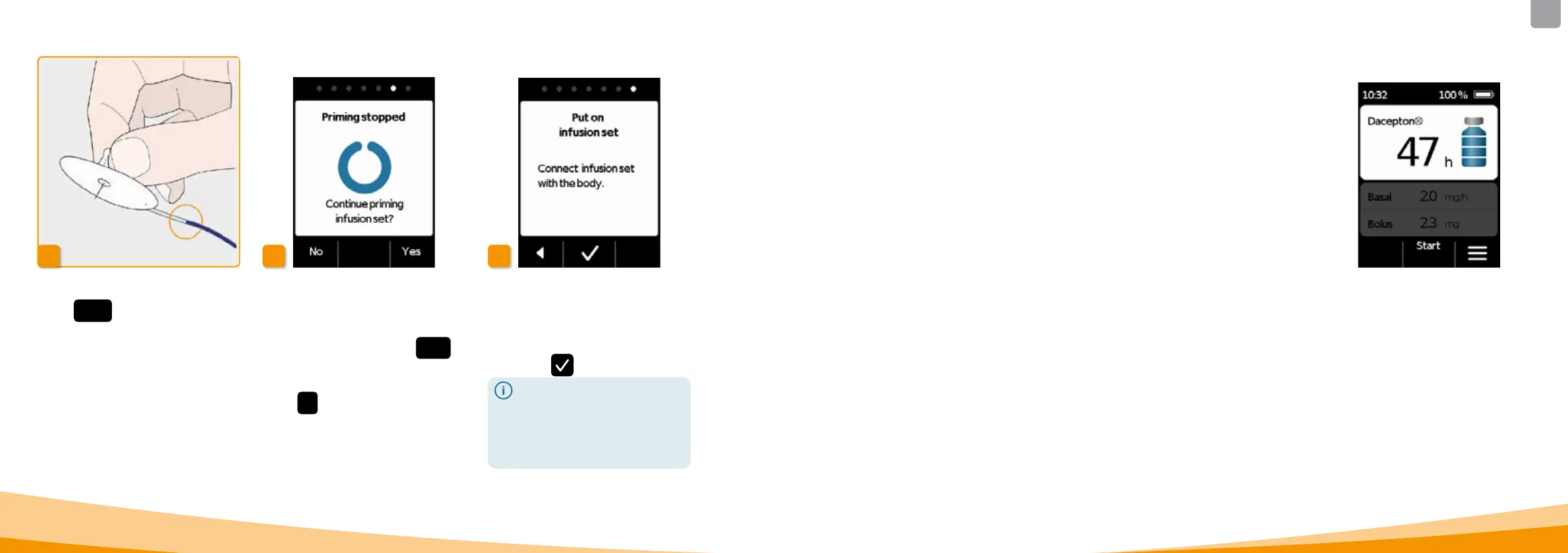
Continuing the priming cycle
If the priming cycle stops, but the
liquid is not yet visible at the needle on
the infusion set, then press
Yes to
restart the priming cycle.
Press
No to continue putting on the
infusion set.
Put on infusion set
Now, connect the infusion set with
your body. To do so, refer to the
instructions for use of the infusion set.
Then press
.
Check from time to time to
ensure that the infusion set is
properly connected to the
reservoir and that none of the
drug solution is leaking at the t
hreaded connection.
BEFORE YOU CAN START DRUG DELIVERY, THE
RESERVOIR MUST BE FILLED WITH THE DRUG AND
THE PUMP MUST BE CONNECTED TO YOUR BODY.
CHECKING THE READINESS OF THE
PUMP
Check the following points by referring to the information
on the main screen:
• The time that has been set is correct
• The battery is adequately recharged
• The device does not indicate any errors
• The displayed delivery settings are correct
• The displayed remaining amount of the drug
(hours until the reservoir is empty) is sucient for
you
• The middle function key displays "Start"
• The amount of drug in the reservoir matches the
amount displayed.
3.3
CHECKING THE READINESS
OF THE PUMP



 To Next Page