88
89
5
3
2
4
5.3
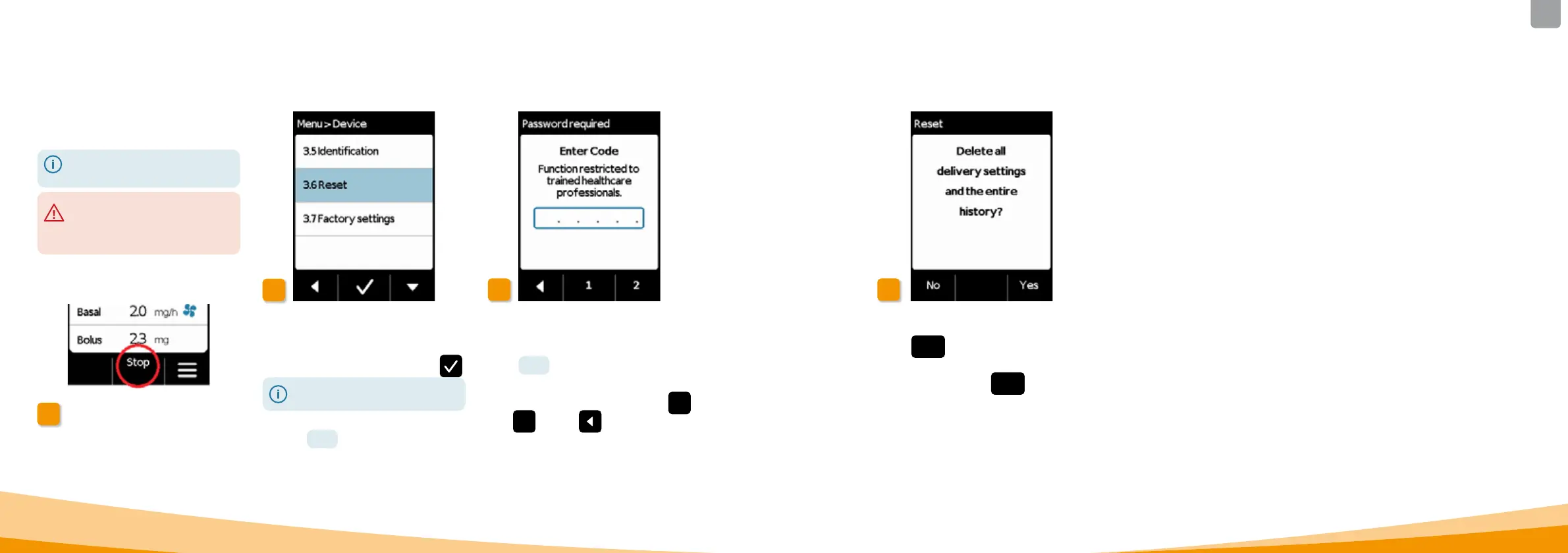
RESETTING THE SETTINGS
1
Take o pump
Stop the pump and take it o before
resetting the settings.
Reset function
Select the Reset function in the
Device settings menu and press
.
The settings can only be reset if
delivery has been stopped.
Section 3.4
Enter code
Enter the release code.
Page
161
Set the release code for changing
delivery settings using buttons
1
and
2 . Press
to return to the
delivery settings screen.
Confirm reset
Press
Yes
if you wish to permanently
delete the delivery settings and the
entire history. Press
No to return to
the Device settings menu.
The basic settings should be
adjusted by medical professionals.
When the settings are reset, all
delivery settings and the entire
history are permanently deleted.
The settings cannot be restored.



 To Next Page