86
87
5
2 3 1
2 31
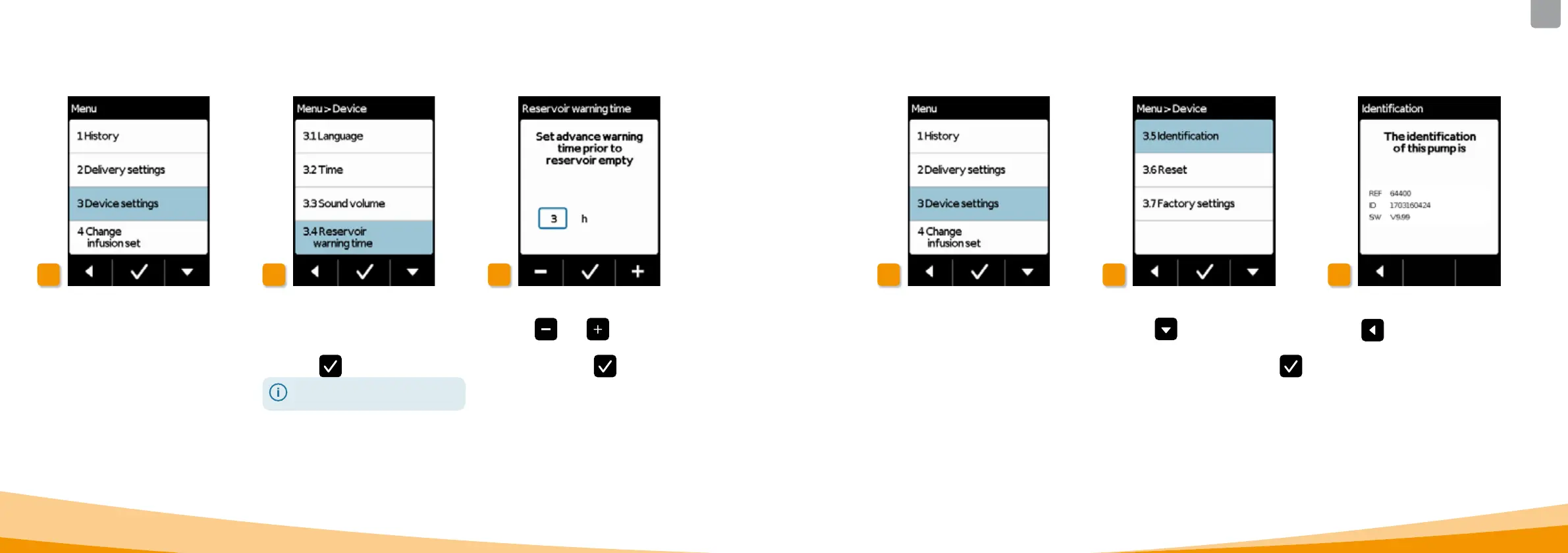
The Reservoir warning time function
allows you to set the time when your
pump will emit the Reservoir almost
empty warning. The reservoir warning
t
ime is the amount of time you have
left when the message appears
until you have to change the reservoir.
This does not take into account the
maximum number of boluses.
Select reservoir warning time
Select the Reservoir warning time
function in the Device settings menu
and press
.
You can select between 1 h and
max. 8h.
Set advance warning time
Use the
and buttons to set
the desired advance warning time and
finalise by pressing
.
5.2.3 SETTING THE ADVANCE WARNING TIME FOR THE RESERVOIR
Select identification function
Use the
button in the Device
settings menu to scroll to the
Identification function and press
.
Display identification function
Press
to exit the screen.
5.2.4 DISPLAYING THE DEVICE IDENTIFICATION



 To Next Page