68
69
4
4 5
6
Press
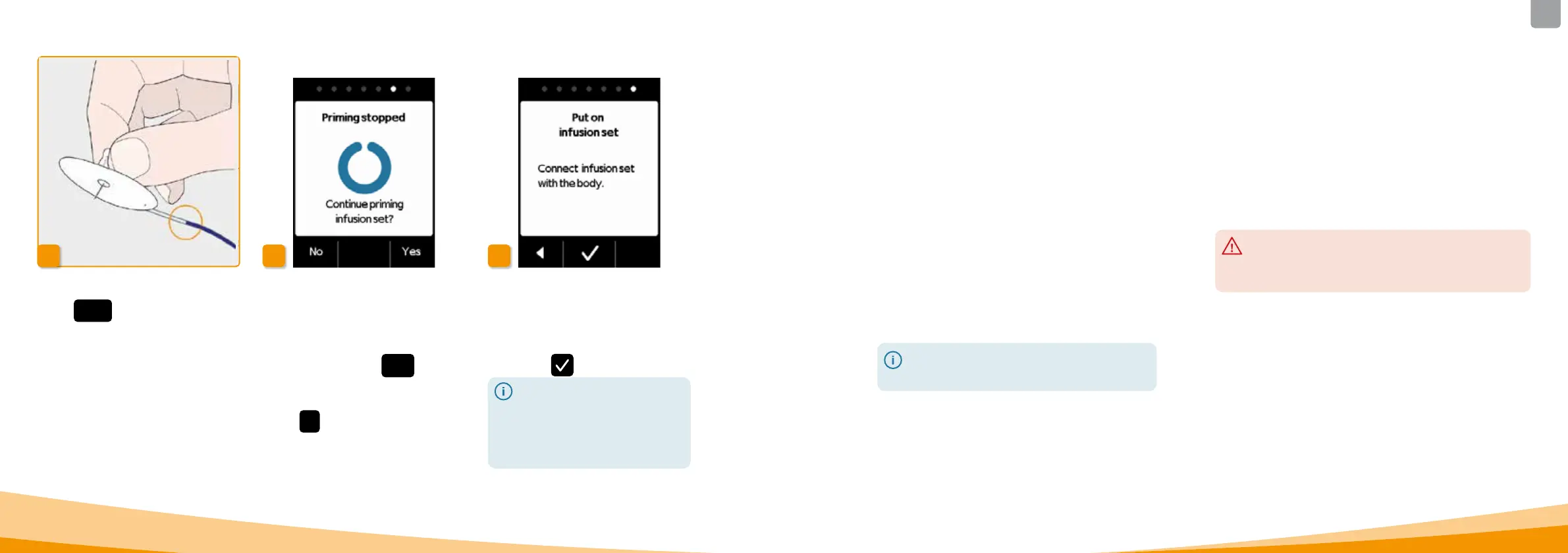
Stop as soon as the liquid
reaches the needle on the infusion set.
If you do not press a button, the
process will stop after a few seconds.
Continuing the priming cycle
When the "Priming stopped" message
is displayed, please check to ensure
that the infusion set is completely
filled, otherwise press
Yes to restart
the priming cycle.
Press
No to continue applying the
infusion set.
Put on infusion set
Now connect the infusion set with
your body. To do so, refer to the
instructions for use of the infusion set.
Then press
.
Check from time to time to
ensure that the infusion set is
properly connected to the
reservoir and that none of the
drug solution is leaking at the
threaded connection.
4.4
CHANGING THE RESERVOIR
To change the reservoir, you need:
• a new vial with apomorphine from EVER Pharma
• a new reservoir
• a new infusion set
• a docking station to maintain the pump upright
Check whether you have received the correct drug and
whether the vial is new.
Wash your hands thoroughly before working with sterile
parts.
Only use completely filled apomorphine vials in accordance
with your prescription. The use of expired, incompletely
filled or damaged vials can impair the ecacy of the
therapy and endanger your health.
Leave the used reservoir in the pump until you
insert a new one. This protects the pump from
contamination and damage.



 To Next Page