100
101
6
31 2
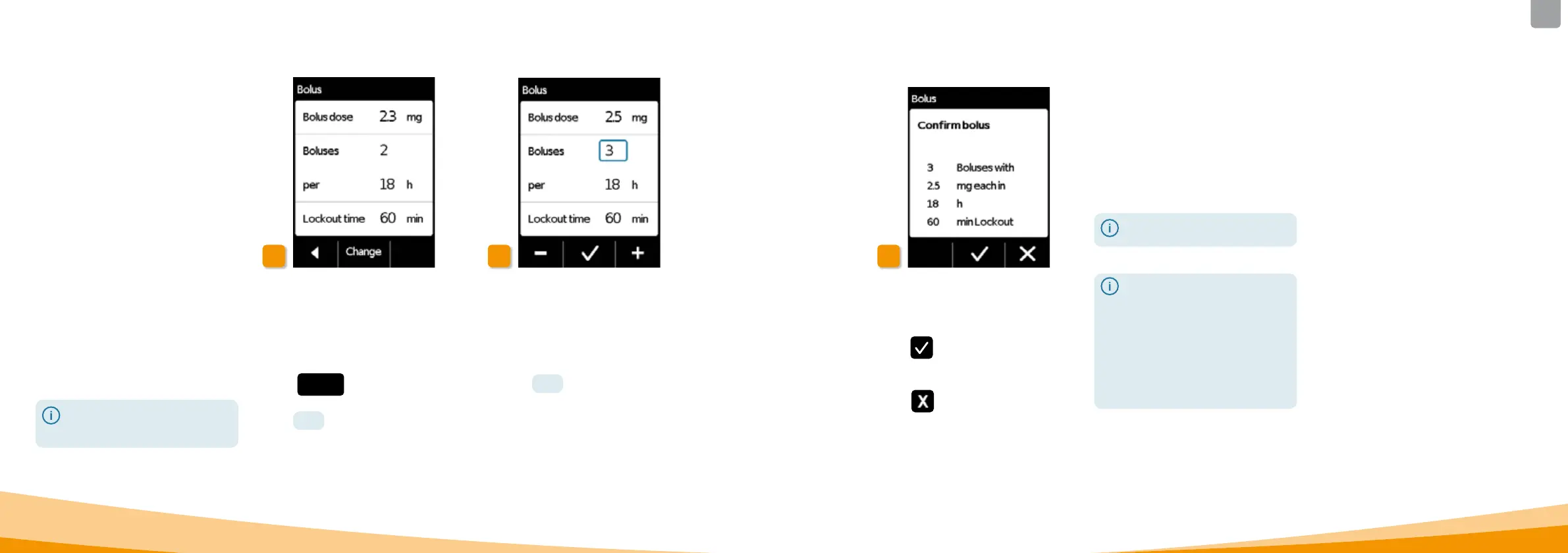
Confirming the bolus settings
Check to ensure that the displayed
bolus settings are correct. If yes,
press
.
If the displayed settings are not correct,
press
. This will return you to the
"Delivery settings" where you can
define the bolus settings again.
The bolus comprises of three
settings:
• The bolus dose, i.e. the amount
of apomorphine delivered as an
additional dose each time you
press the bolus button.
• The maximum number of boluses
allowed per day, though you
can define the length of a
day
(per time period) in the range
from 6to 24hours.
• The minimum lockout time
after delivery of a bolus.
The "Change" button is only
enabled when drug delivery
has been stopped.
Navigating to the bolus settings
display
Navigate to the Delivery settings
in the menu and select Bolus.
Press
Change and enter the release
code.
Page
161
Define the bolus settings
Define the bolus settings in the same
way as when preparing the device for
first time.
Section
4.5
6.2
SETTING THE
BOLUS
Start drug delivery on the main
screen to continue the therapy.
It may be advisable to select a
bolus dose that will bridge any
planned breaks in continuous
medication.
Example: basal rate 3mg/h, bolus
dose 1.5mg, lockout time 30min.
A bolus delivery replaces the
amount during a break of 30
minutes, e.g. to have a shower.



 To Next Page