EVERFOCUS ELECTRONICS CORPORATION
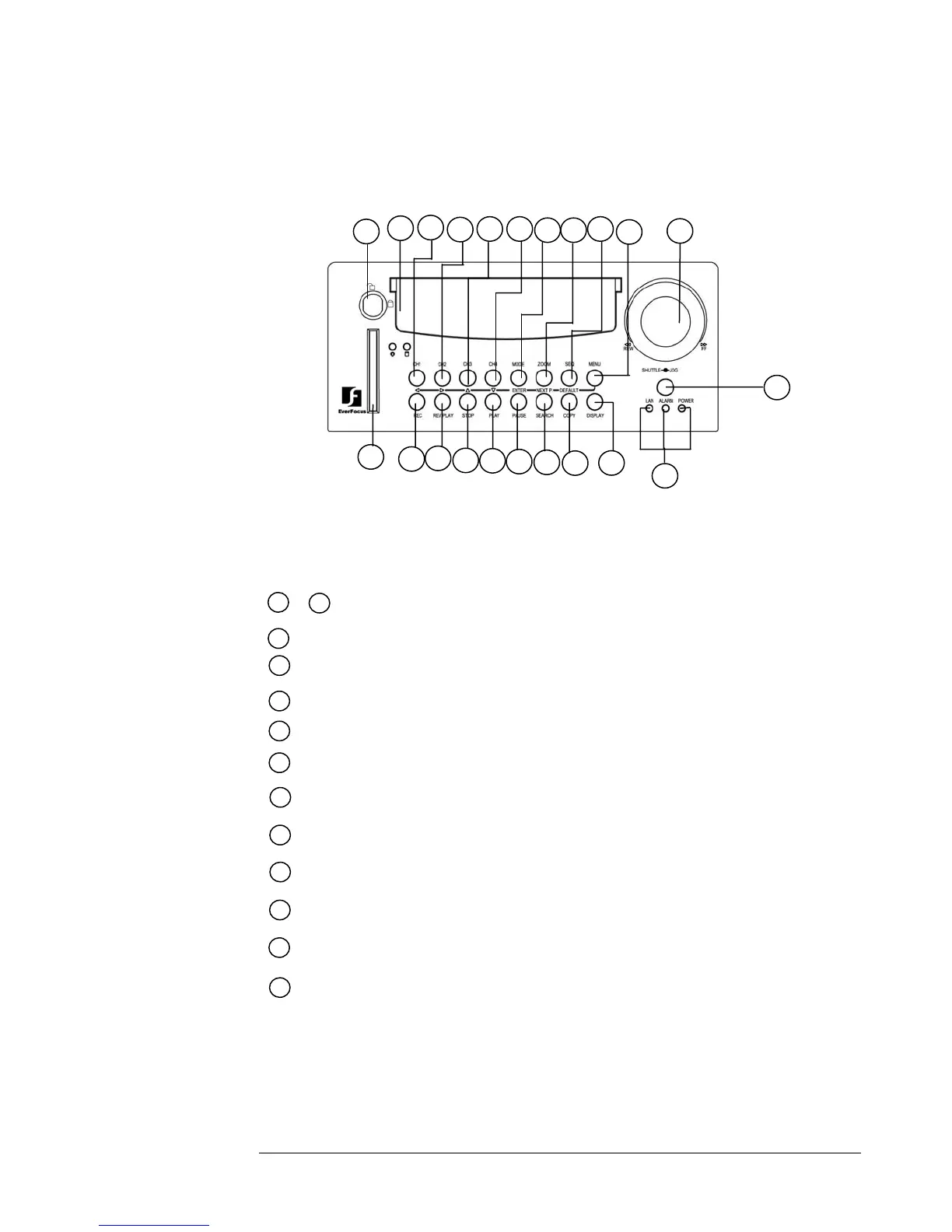
Front Panel Keypads
Keys:
20
10
9
12
11
13
14
16
21
19
18
17
15
22
2
1
43 7
5 6
8
CH1 ~CH4:
1
4
Press channel key (1~4) to display the video image in full screen
format for the channel specified.
~
SEQ:
Press this key to enter the auto sequential switching mode.
7
6
ZOOM: Pressing this key while viewing a full screen image will display a magnified resolution
of the image on the monitor.
5
MODE:
8
MENU: Press this key to enter Setup menu.
STOP : Press this key to stop recording and playback.
PAUSE: Press this key to pause the playback picture.
SEARCH: Press this key to enter the Search Menu.
10
9
11
12
13
15
14
REC : Press this key to start recording.
COPY: Under PAUSE or PLAYBACK, Press this key to start copy still picture or video
stream onto a Compact Flash card.
REV. PLAY : Pressing this key will start reverse playback.
PLAY: Press this key to playback.
Press to switch between Picture-In-Picture and Quad modes.














 To Next Page