Home
eversense
Blood Glucose Meter
XL
Page 71
eversense XL - Page 71
164 pages
Manual
Save Page as PDF
To Next Page
To Next Page
To Previous Page
To Previous Page
Loading...
69
Ev
ersense XL CGM User Guide
8
2.
T
ap
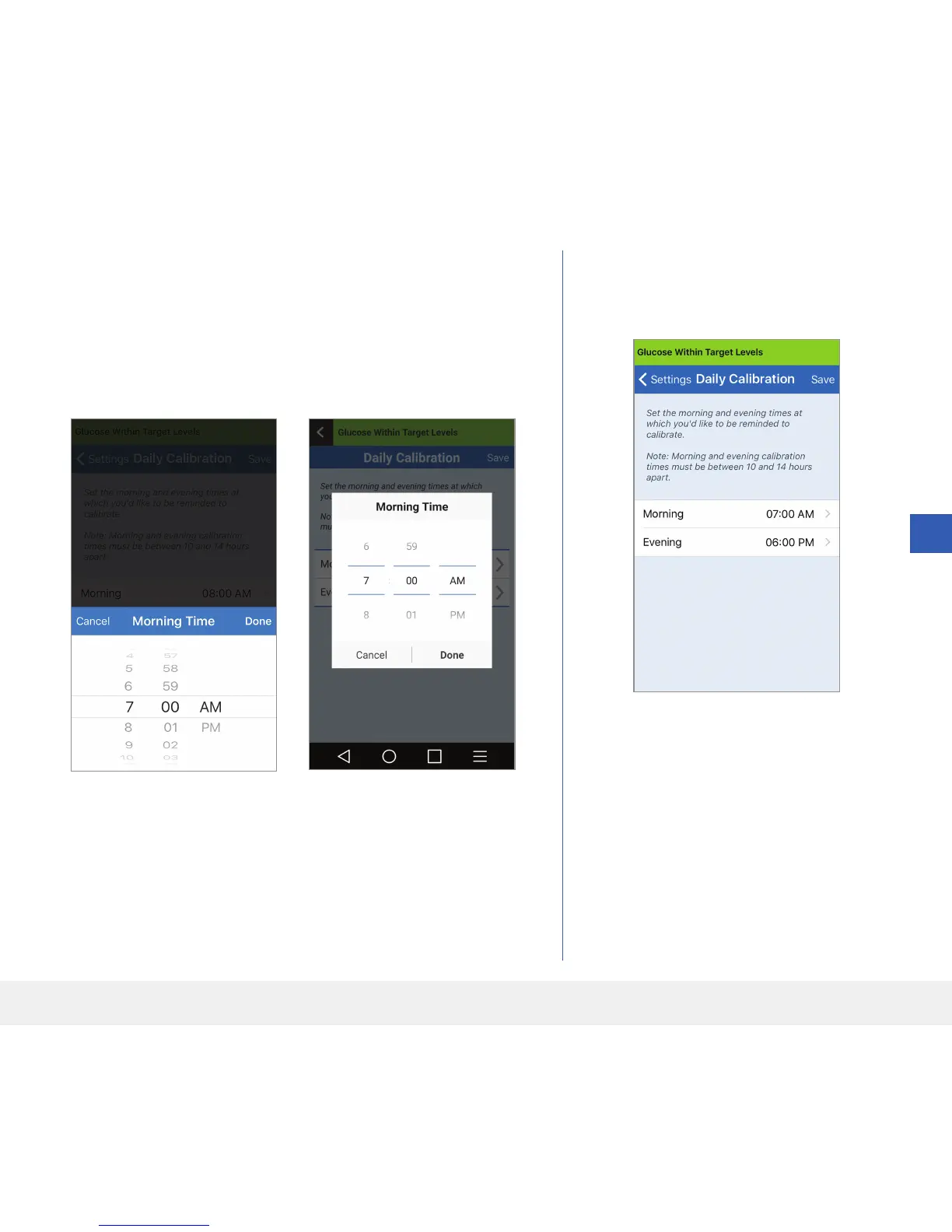
Morning
to set y
our morning calibra
tion time.
•
T
ap
Done
when complete
.
3.
T
ap
Evening
to set y
our ev
ening calibra
tion time.
•
T
ap
Done
when complete
.
4.
When both times are c
orrect,
tap
Save
.
iOS
Android
70
72
Table of Contents
Main Page
Default Chapter
4
Table of Contents
4
Glossary
7
1 Introduction
9
Help and Support
9
Eversense XL CGM System Components
10
System Requirements
14
End User License Agreement and Privacy Policy
14
Jailbroken Devices
14
Broken Screen or Button
14
Indications for Use
15
Contraindications
15
What Is Included in this Package
16
How to Use this User Guide
16
2 Benefits and Risks
17
Warnings
18
Risks and Side Effects
18
Cautions
20
3 Getting Started
22
Charge Your Smart Transmitter
23
Step 1. Download and Install the App
25
Step 2. Set up the App - Account Creation, Pairing and Settings
26
4 Inserting and Linking the Sensor
32
The Sensor
33
5 Using the Smart Transmitter
35
Daily Use
36
Secure the Smart Transmitter over Inserted Sensor
37
Turn the Smart Transmitter on and off
40
Smart Transmitter Care and Maintenance
41
Battery Indicator
41
LED Status Indicators
42
6 Calibrating the System
43
Calibration Phases
45
How to Calibrate
47
7 Using the App
52
Check Your Mobile Device Settings
52
Get to Know the "My Glucose" Screen
53
Trend Arrows
56
Trend Graph
57
Menu Options
58
8 Customising Your Settings
60
Setting Glucose Target Levels
62
Setting Glucose Alert Levels
64
Setting Predictive Alerts
66
Setting Rate of Change Alerts
68
Setting Daily Calibration Times
70
Setting System Information
72
Setting Mealtimes Schedule
73
Setting Sounds
74
Setting Temporary Profile
76
Logging out
79
9 Alert Descriptions
80
Alerts and Notifications
80
Alert History
81
Alert Descriptions and Actions
82
10 Event Log
98
Glucose
99
Meals
100
Insulin
101
Health
102
Exercise
103
11 Reports
104
Weekly Modal Summary
105
Glucose Pie Chart
106
Glucose Statistics
106
12 Share My Data
107
Eversense Data Management Software (DMS) Program
107
Sync
108
My Reports
109
13 Product and General Information on the App
110
14 Viewing Eversense XL Data on the Apple Watch
112
Glance View
113
15 About the Sensor
115
Insertion Steps
116
Removal Steps
117
16 Travel
118
17 Troubleshooting
119
Smart Transmitter Battery and Charging
121
Connection with Smart Transmitter
122
Calibration
126
Alerts and Notifications
128
Glucose Readings
129
Trend Arrows
130
Sensor
132
Events
134
18 Device Performance
135
Overall System Performance Compared to YSI
136
Clarke Error Grid Analysis
137
Consensus (Parkes) Error Grid Analysis
141
Calibration Performance
143
Smart Transmitter Wear
144
19 Technical Specifications
145
Smart Transmitter
146
Power Supply and Charger
147
Electrical and Safety Standards
148
Symbols on the Eversense Mobile App
151
Symbols on Packaging and Devices
153
Eversense Smart Transmitter Limited Warranty (Terms)
155
Legal Notices
158
FCC Information
159
Index
160
Other manuals for eversense XL
Insertion And Removal Instructions
168 pages
Related product manuals
eversense E3
241 pages
eversense CGM
213 pages
eversense 365
44 pages



 To Next Page