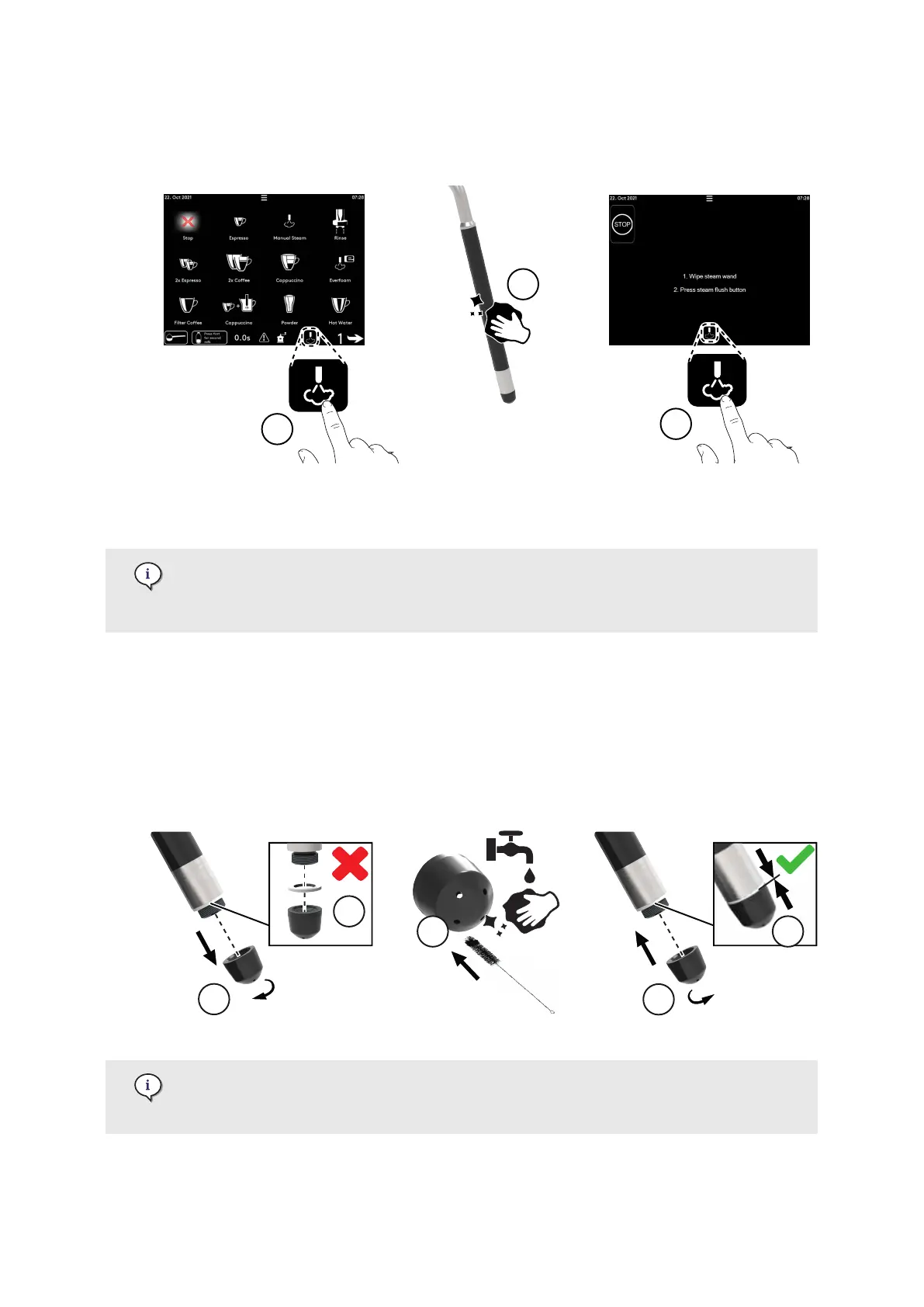
1. Press the blinking purge button on the main screen (1).
2. Wipe the steam wand with a damp cloth (2). Change cloths every day.
3. On the screen that displays, press purge (3).
7.4.6. Clean the steam nozzle
Depending on machine model and options, this feature may not be available. For
more information, contact your service organisation.
Only necessary to clean the nozzle monthly or if required.
Steam wand | Steam arm V1
1. Switch o (page 55) at the main power switch.
2. Remove the nozzle (1).
3. Ensure to not remove (2) the white seal.
4. Wash the nozzle with soft soap and clean water using a soft brush (3).
5. Tighten the nozzle (4).
6. Check that there is no gap between the seal and the nozzle (5).
For more information about steam wand versions, refer to TI-154 Enigma /
E'line - Steam Wand V2 that is available under the e'Support center (https://
support.eversys.com/hc/en-us).
Care
© Eversys S.A. Page 90 of 150 02.01.2023











 To Next Page