8. Troubleshooting
This chapter covers all user interface warning messages.
It is imperative to read and understand this manual before carrying out any
troubleshooting on the machine. In case of unclear information, please contact your
local service organisation.
Illustrations show software V3.17.
Illustrations show monochrome style.
8.1. Error message example
All Eversys coee machines are equipped with an internal troubleshooting and error message system.
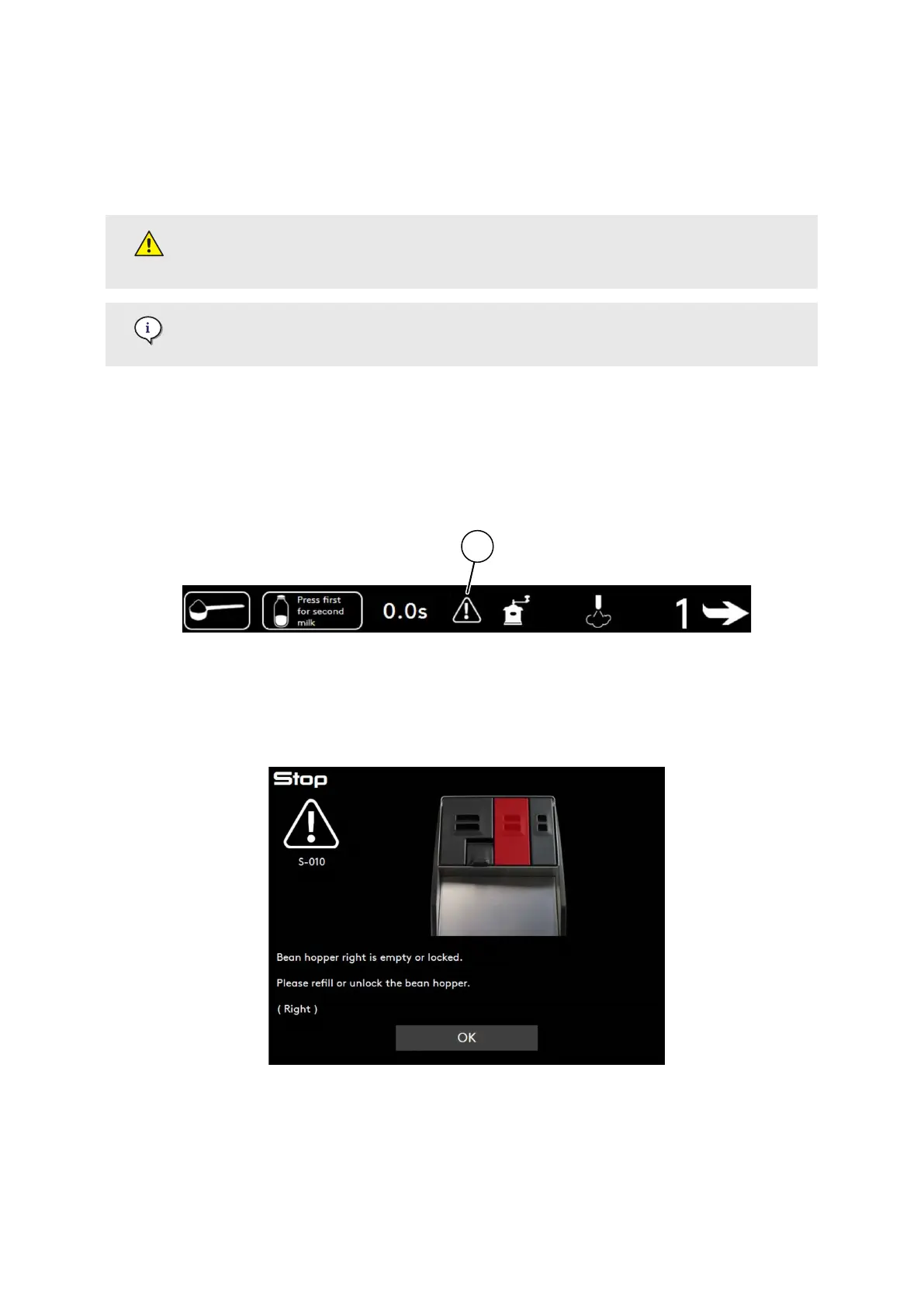
The following screen shows an example.
If an action of the user is required, the warning sign (1) is displayed.
1. Press the warning sign (1) to display the warning message and required action.
2. Follow the display message(s) to solve the problem and press OK when done.
3. Repeat the operations until the warning sign disappears.
8.2. Error messages codications
Error messages have a codication according to their typographies (e.g. E-XXX), their severity levels
(e.g. yellow colour) and their behaviours (e.g. visible for the user).
Troubleshooting
02.01.2023 Page 91 of 150 © Eversys S.A.











 To Next Page