HD9084 HDTV Caption Encoder Manual
OPERATION Page 3-5
3. OPERATION
3.1. FRONT PANEL CONTROLS
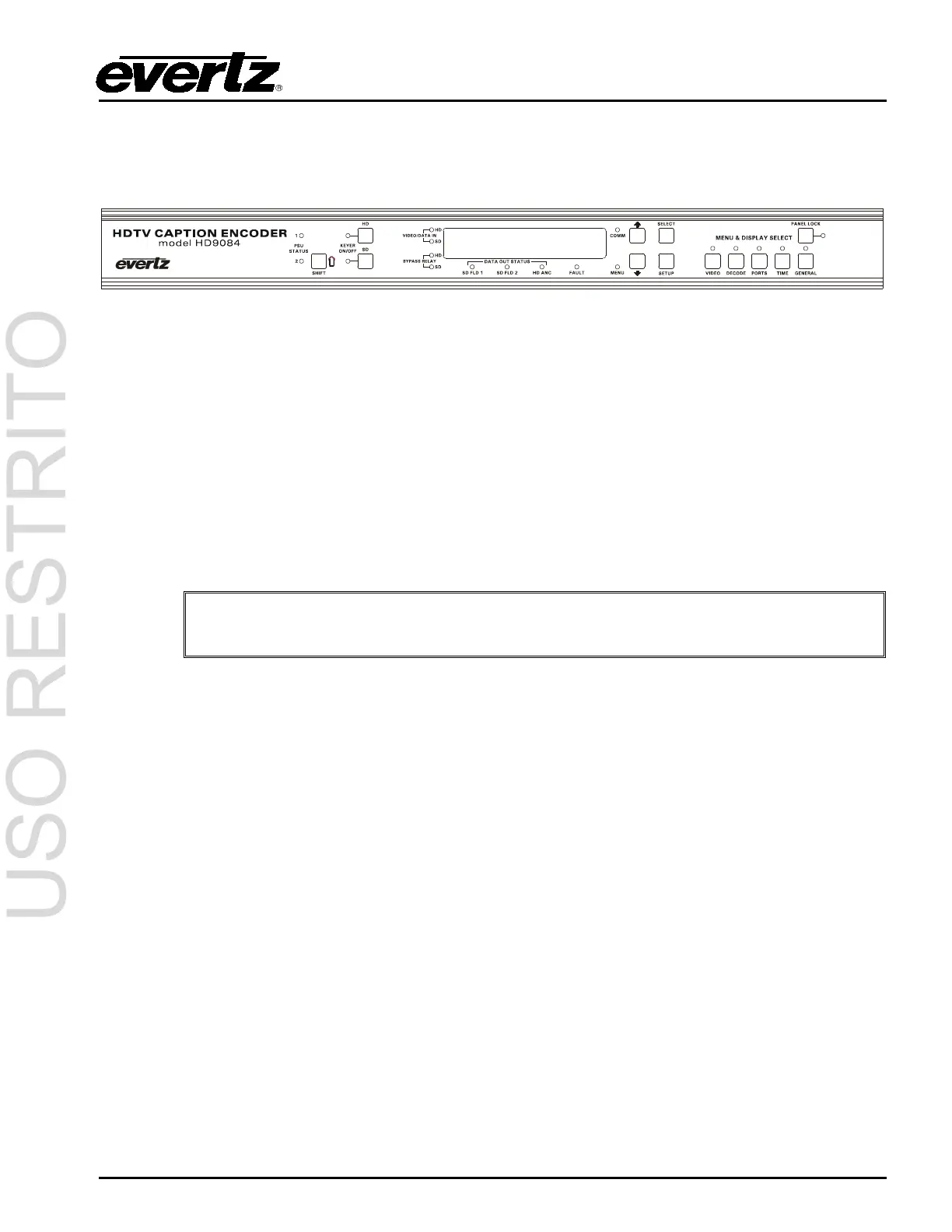
Figure 3-1: Front Panel Layout
3.1.1. Display Panel
The display panel consists of a 16 digit alphanumeric display. This allows the user to navigate through
different menu systems and to see the status of the HD9084. The display panel is located on the front
of the HD9084.
3.1.2. HD Keyer On/Off
The HD KEYER ON/OFF pushbutton toggles the High Definition Keyer on or off. When the Keyer is
off, the device will clock the video through its internal registers and route it to the video output. When
the Keyer is turned on, the HD ANC LED will indicate if the Ancillary data is present. The LED to the
left of the pushbutton will be illuminated to indicate operative status. The pushbutton is located to the
left of the display on the front panel.
Keyer will be OFF when Port B is in Grand Alliance or SMPTE-333 mode. If the HD
Keyer button is pressed, the front panel message will display “VANC Out SERIAL”
3.1.3. SD Keyer On/Off
The SD KEYER ON/OFF pushbutton toggles the Standard Definition Keyer on or off. When the Keyer
is off, the device will clock the video through its internal registers and route it to the video output. When
the Keyer is turned on, both the SD FLD 1 and SD FLD 2 LED’s will indicate if data is present. The
LED to the left of the pushbutton illuminates to indicate operative status. The pushbutton is located to
the left of the display on the front panel.
3.1.4. SHIFT ()
The SHIFT pushbutton is used to execute some functions that intentionally cannot be performed with a
single button so they can’t be executed accidentally. For example, pressing SHIFT in combination with
the KEYER pushbutton allows the user to toggle the bypass relay(s) On/Off. (See section 3.1.5)
3.1.5. HD/SD Bypass Relays
To toggle the HD Bypass relay on and off, hold the SHIFT key and press the HD KEYER ON/OFF
Button. The HD Bypass LED indicates the status of the bypass relay. By default, the bypass relay is
not active when the HD9084 is turned on, therefore HD processing is occurring. Once the HD bypass
relay is turned on, the upstream video will be sent directly to downstream. Both the SHIFT and HD
KEYER ON/OFF pushbuttons are located to the left of the front panel display. The same functionality
is available for SD using SHIFT and SD KEYER ON/OFF.



 To Next Page