6.1 Attaching the IR cut filter insertion/removal knob
The assembly in this chapter is not necessary if you are not observing fluorescence in the NIR (near infrared)
wavelength range. When using it, use a microscope that supports NIR observation.
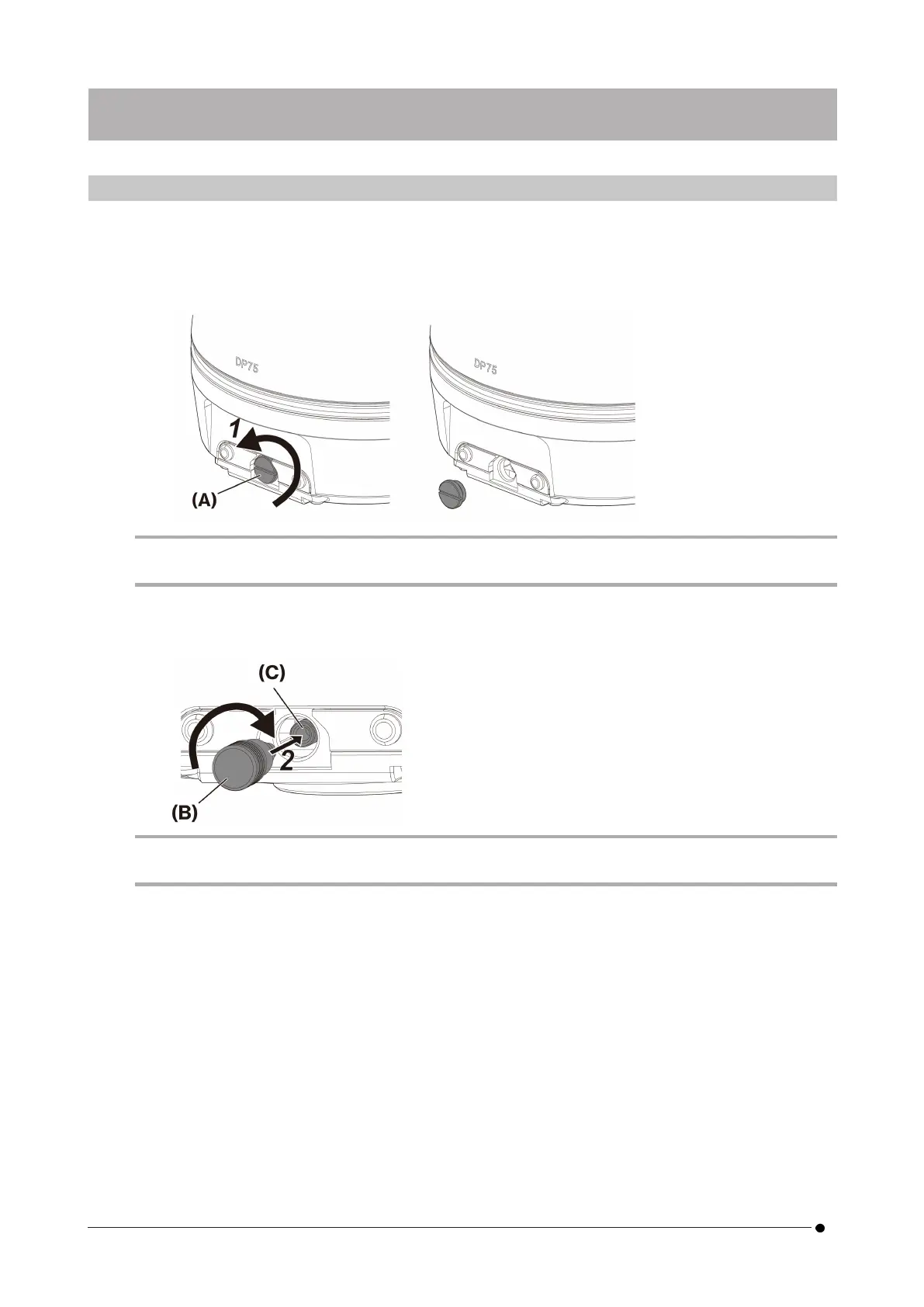
1. Use your flathead screwdriver (Tip thickness: about 0.7 to 0.9 mm) to remove the cap screw (A) attached to
the camera head by turning it counterclockwise.
NOTE:
l
Keep the cap screw in a safe place so that it will not be lost.
2. Attach the IR cut filter insertion/removal knob (B) to the IR cut filter slider bar (C) by turning it clockwise to
the end.
NOTE:
l
Screw the IR cut filter insertion/removal knob in firmly so that it does not become loose.
6. Assembly
14
6. Assembly 6.1 Attaching the IR cut filter insertion/removal knob



 To Next Page