DP75
6.3 Connecting the interface cables
CAUTION:
l
Be sure to turn off the power of the PC before connecting the interface cable.
l
Be sure to use the interface cable that comes with this product. Only then can the functionality of the product
and compliance with EMC basic standards be guaranteed.
l
Keep the interface cable well away from heat-generating equipment, such as the lamp house of the
microscope.
NOTE:
l
Do not apply excessive force to the interface cable as it is vulnerable to bending and twisting.
l
Connect the interface cable straight in the correct orientation without applying excessive force, paying
attention to the shape of the connector.
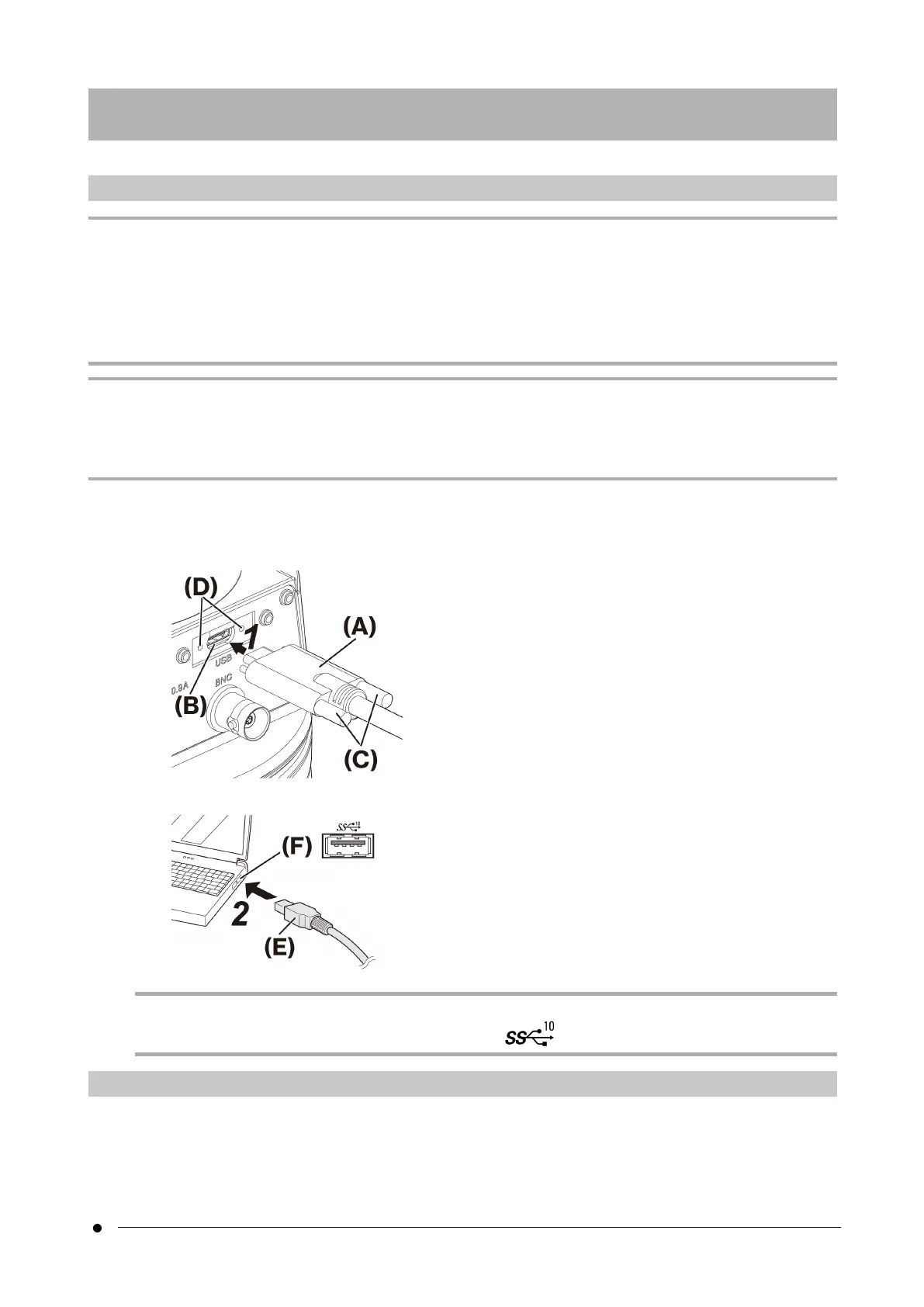
1. Push the threaded connector (A) of the interface cable into the USB connector (B) of the camera head. Then
turn the two screws (C) clockwise into the screw holes (D) to secure the interface cable.
2. Plug the other connector (E) of the interface cable into a USB port (F) on the PC.
NOTE:
Insert the interface cable into the USB port marked with .
6.4 Connecting external devices
Read this section when using the external trigger function.
For more information about the external trigger function, please refer to “External triggering function” (page 24).
17
6.3 Connecting the interface cables6. Assembly



 To Next Page