Evolis printer configuration settings
Page 17
5 - Evolis printer configuration settings
5.1 Access to the administration web page
Each printer has an embedded web server which can be used to display conguration data.
The administration page is reached by entering the IP address into your web browser. The address of the
printer’s integrated web server is determined as follows:
• The printer’s hostname must be entered in lower case.
° For example, for a printer having hostname «EVO_PR1_0023456», enter http://evo_pr1_0023456.
° The IP address may be entered if you don’t know the printer’s hostname, enter http://xxx.yyy.zzz.
ttt (i.e. 192.168.2.13).
If you don’t know the hostname or the IP address, please refer to the TCP/IP Protocol subsection of this
section for further details on how the hostname is structured.
5.2 Viewing the settings
Some of this data can also be changed using this same interface.
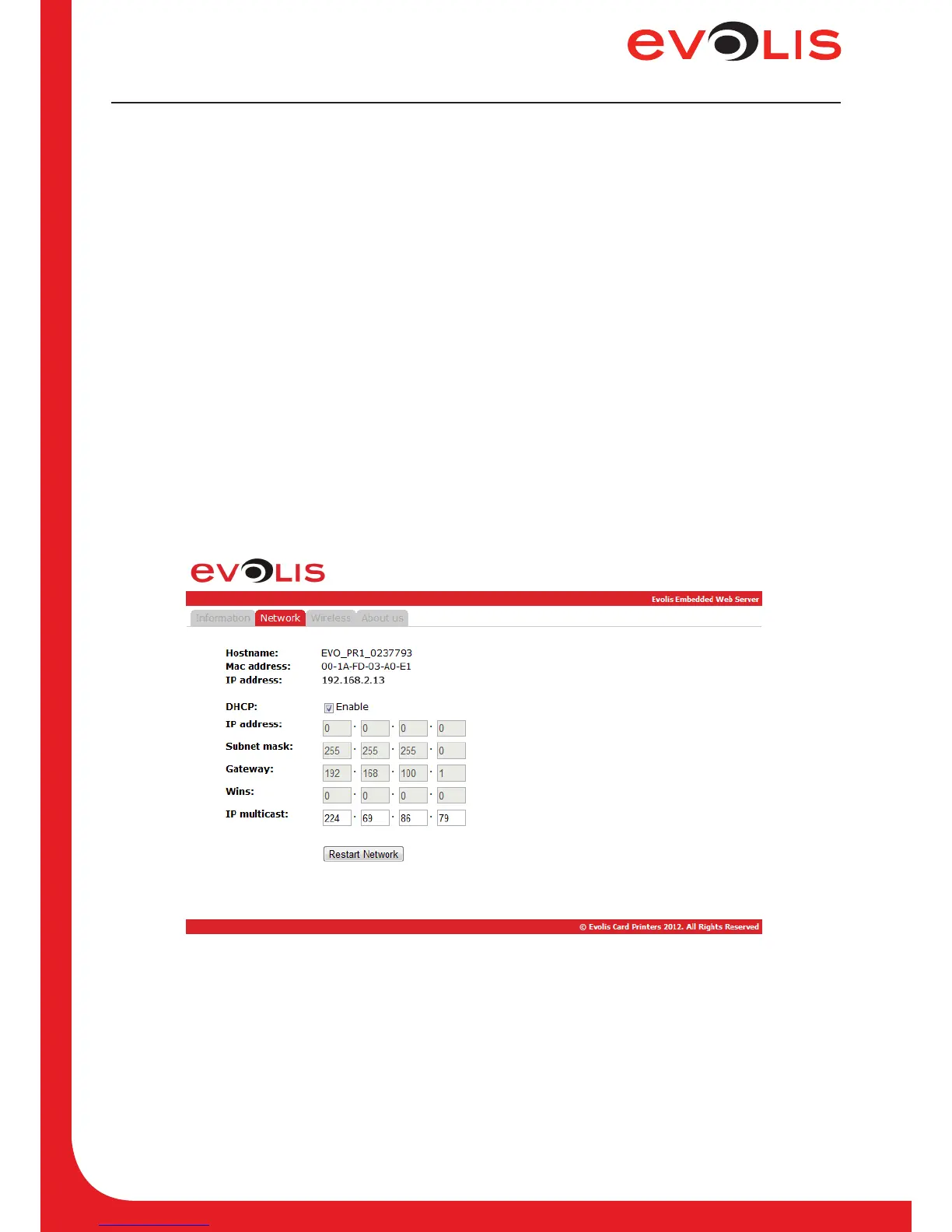
Two web pages display all the network settings. The tab “Network” to congure the TCP/IP parameters
and the tab “Wireless” to congure the Wi-Fi parameters.
5.2.1 Network
Figure 6: Web interface - Network
On the Network web interface, you can enable or disable the DHCP mode. When the DHCP mode is
enabled, only IP Multicast eld can be lled.
Other elds can be lled only if DHCP mode is disabled.



 To Next Page