GUIDANCE FOR MAINS POWER CONNECTION
We recommend that all electric work on your EazyPod Automatic
be done by a suitably qualified electrician.
ALWAYS DISCONNECT FROM MAINS BEFORE OPENING THE FRONT OF THE BOX.
For the avoidance of doubt: GREEN/YELLOW = EARTH, BROWN = LIVE, BLUE - NEUTRAL
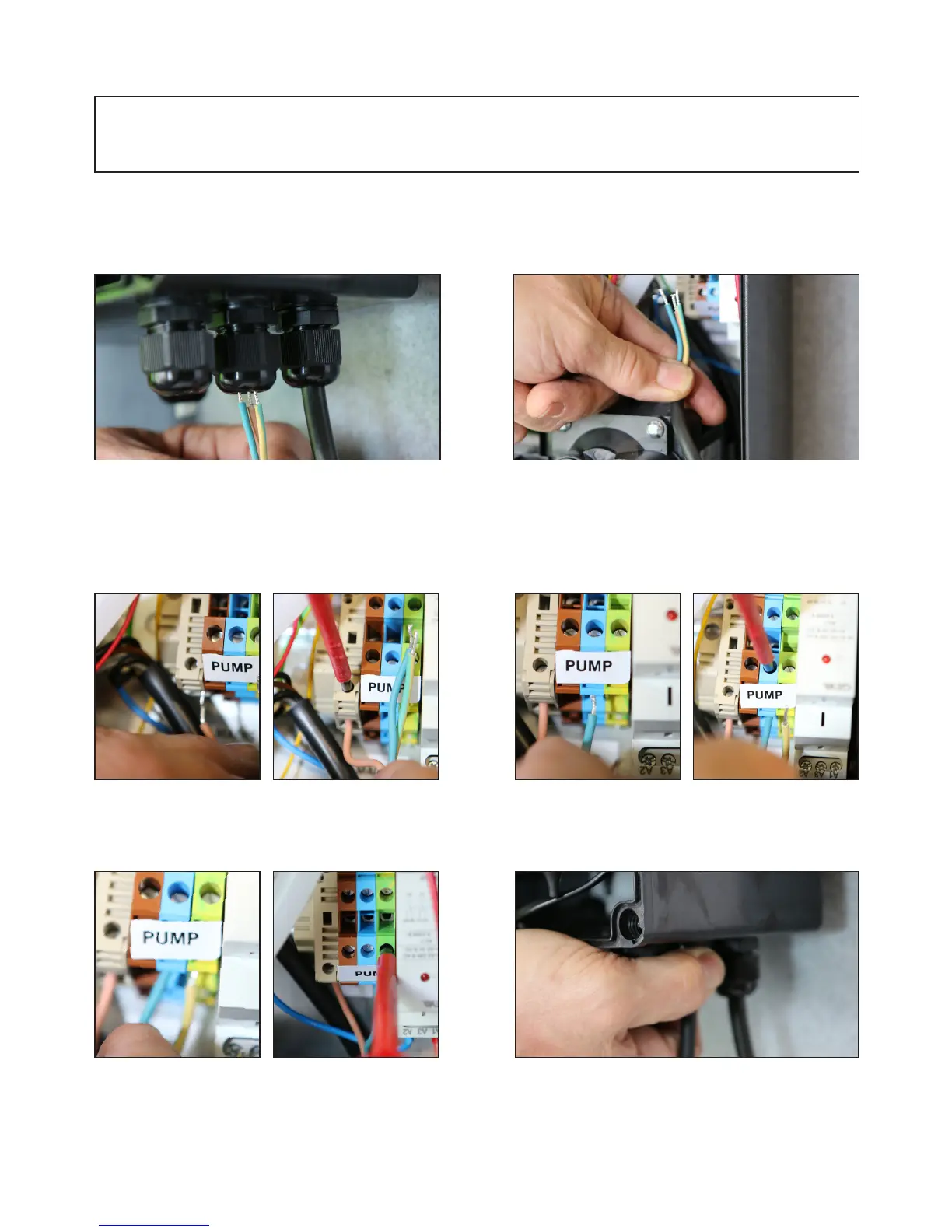
5. Ensure the 3 core mains cable you intend to
use is long enough to reach the control box from
your incoming mains supply. Feed this mains wire
through the second gland nut on the base of the
control box.
7. Push the exposed LIVE wire into the bottom of
the FUSED CONNECTOR BLOCK and tighten up
screw to secure the wire.
9. Push the exposed EARTH wire into the bottom
of the GREEN connector block and tighten up
screw to secure the wire.
8. Push the exposed NEUTRAL wire into the
bottom of the BLUE connector block and tighten up
screw to secure the wire.
10. Now all three wires are connected up, tighten
up the gland nut to hold the mains cable in
position.
6. Feed enough wire into the control box to allow
you to make the connections to the relevant
connector blocks.
ENSURE ALL GLAND NUTS ARE TIGHTENED TO PREVENT WATER INGRESS.
15



 To Next Page