EasyManua.ls Logo

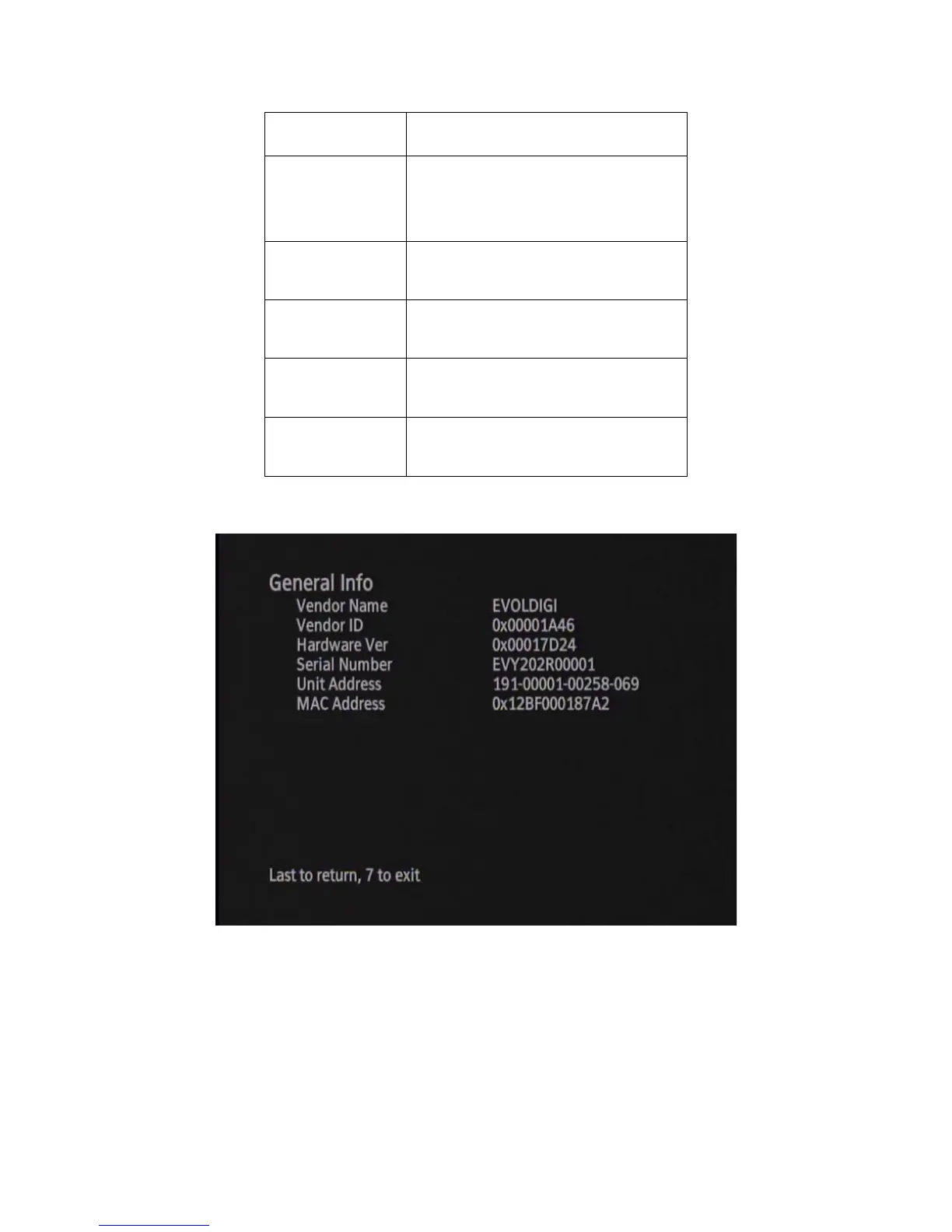
Evolution Digital HD uDTA - HD DTA Status; Figure 26 Diagnostic Menu - General Info

Evolution Digital HD uDTA
131 pages
Print Icon
To Next Page IconTo Next Page
To Previous Page IconTo Previous Page
Loading...
Evolution Digital
EVO-SUP-DMS2002HD-U-001-v1r0 Page 47
“EVOLDIGI
Vendor ID
Evolution vendor ID. Always
“0x00001A46
Hardware Ver
Hardware version
Serial Number
Assigned, unique Serial Number
Unit Address
Assigned, unique Unit Address
MAC Address
Assigned, unique MAC Address
Figure 26 shows an example of the General Info screen as presented on the DTA.
Figure 26 Diagnostic Menu General Info
6.4 HD DTA Status
The DTA Status screen indicates the current mode of the DTA as well as provides the current configuration of the
DTA including activation status. Table 14 defines the parameters displayed on the DTA Status screens.

Table of Contents

Other manuals for Evolution Digital HD uDTA

Related product manuals