Functional characteristics
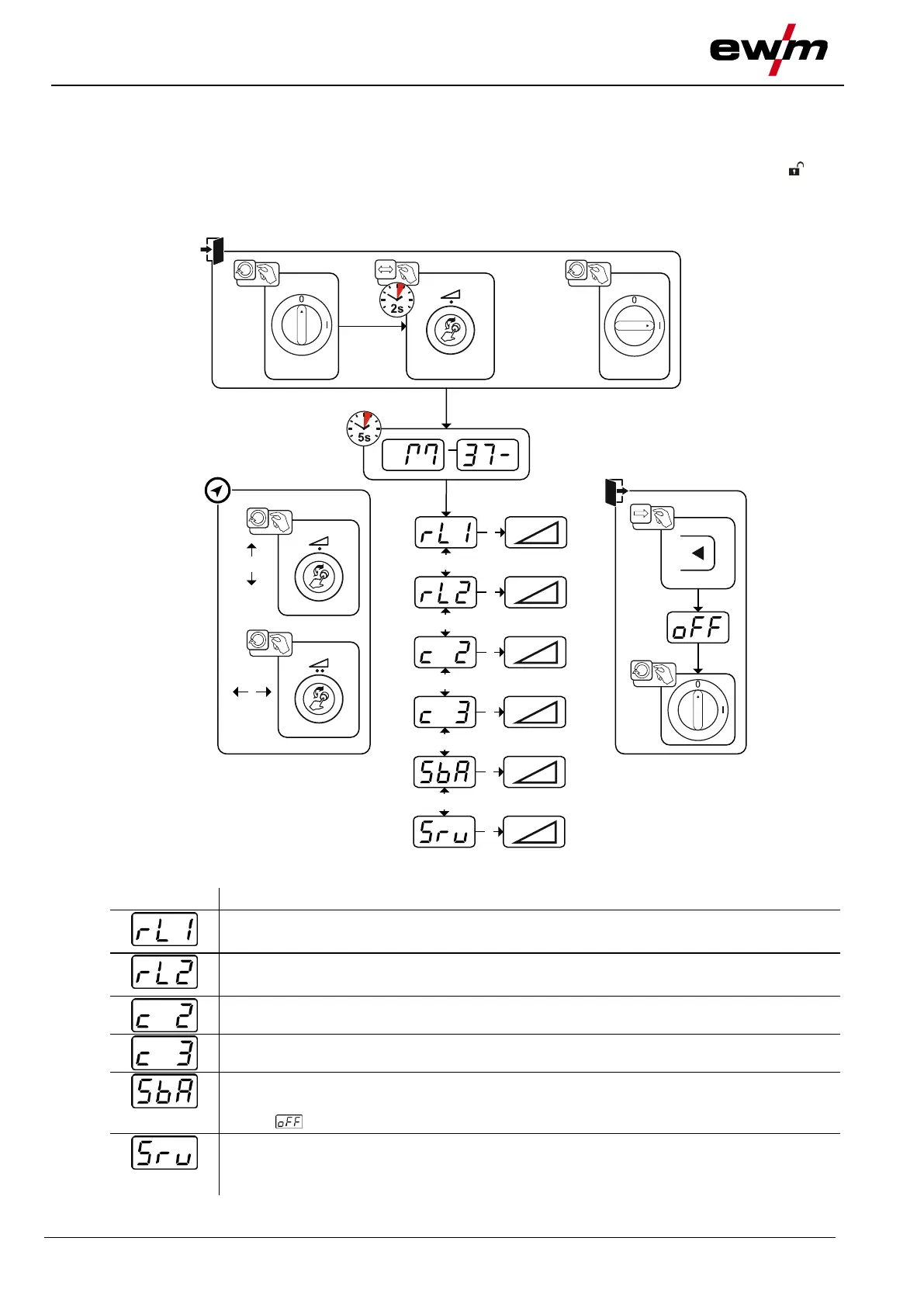
Machine configuration menu
099-5TLPXQ-EW501
29.01.2021
5.8 Machine configuration menu
5.8.1 Selecting, changing and saving parameters
Changes to the welding parameters are only possible if the key switch is set to key position .
If the Xbutton function is activated, the key switch function is deactivated (see corresponding
operating instructions "Control").
Figure 5-43
Lead resistance 1
Lead resistance for the first welding circuit 0 mΩ–60 mΩ (8 mΩ ex works).
Lead resistance 2
Lead resistance for the second welding circuit 0 mΩ–60 mΩ (8 mΩ ex works).
Only qualified service personnel may change the parameters!
Only qualified service personnel may change the parameters!
Time-based power-saving mode > see 5.9 chapter
Time to activation of the power-saving mode in case of inactivity.
Setting = disabled or numerical value 5-60 min..
Service menu
Modifications to the service menu may only be carried out by authorised maintenance
staff!








 To Next Page