EasyManua.ls Logo

EWM LP-XQ - Explanation of Icons

EWM LP-XQ
78 pages
Print Icon
To Next Page IconTo Next Page
To Previous Page IconTo Previous Page
Loading...
For your safety
Explanation of icons
099-5TLPXQ-EW501
29.01.2021
7
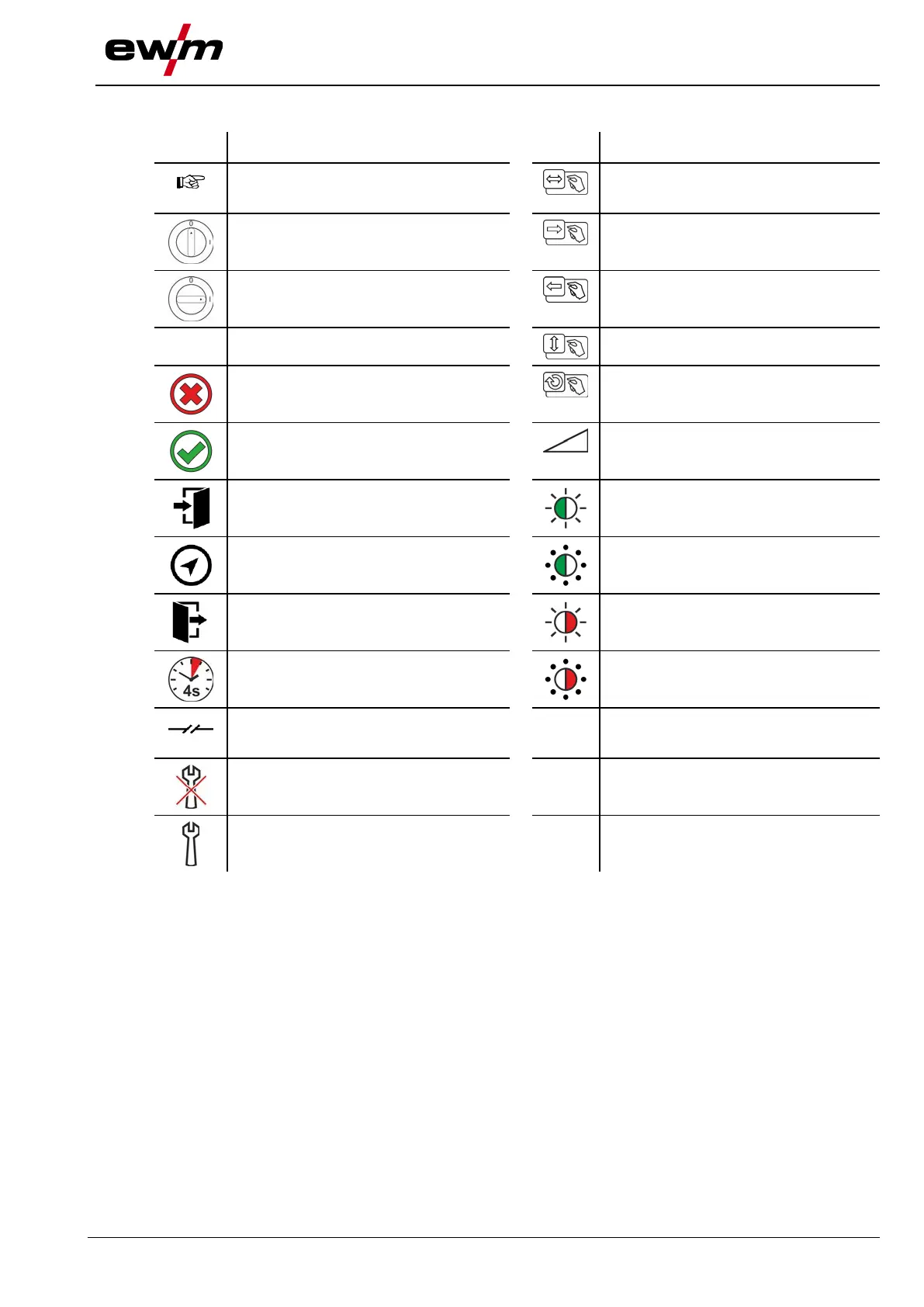
2.2 Explanation of icons
Symbol
Description
Symbol
Description
Indicates technical aspects which the u-
ser must observe.
Activate and release / Tap / Tip
Switch off machine
Release
Switch on machine
Press and hold
Switch
Incorrect / Invalid
Turn
Correct / Valid
Numerical value – adjustable
Input
Signal light lights up in green
Navigation
Signal light flashes green
Output
Signal light lights up in red
Time representation (e.g.: wait 4 s / ac-
tuate)
Signal light flashes red
Interruption in the menu display (other
setting options possible)
Tool not required/do not use
Tool required/use

Table of Contents

Related product manuals