IN1604 DTP and IN1604 HD Scalers • Operation 12
Operation
This section contains information on the front panel operation, On-screen Display Menu
System, and reset modes of the scalers. Topics in this section include:
• Front Panel Overview
• Powering Up
• Input Selection
• Output Resolution Change
• Auto-Image from the Front Panel
• On-Screen Display (OSD) Menu System
• Front Panel Lockout (Executive Modes)
Front Panel Overview
IN1604 DTP
Extron
HDCP
MENU
2
4
1
3
ENTER
AUTO-
IMAGE
INPUT 2
HOLDFOR XGA/720p
INPUT 3
INPUT 4
OUTPUT
CONFIG
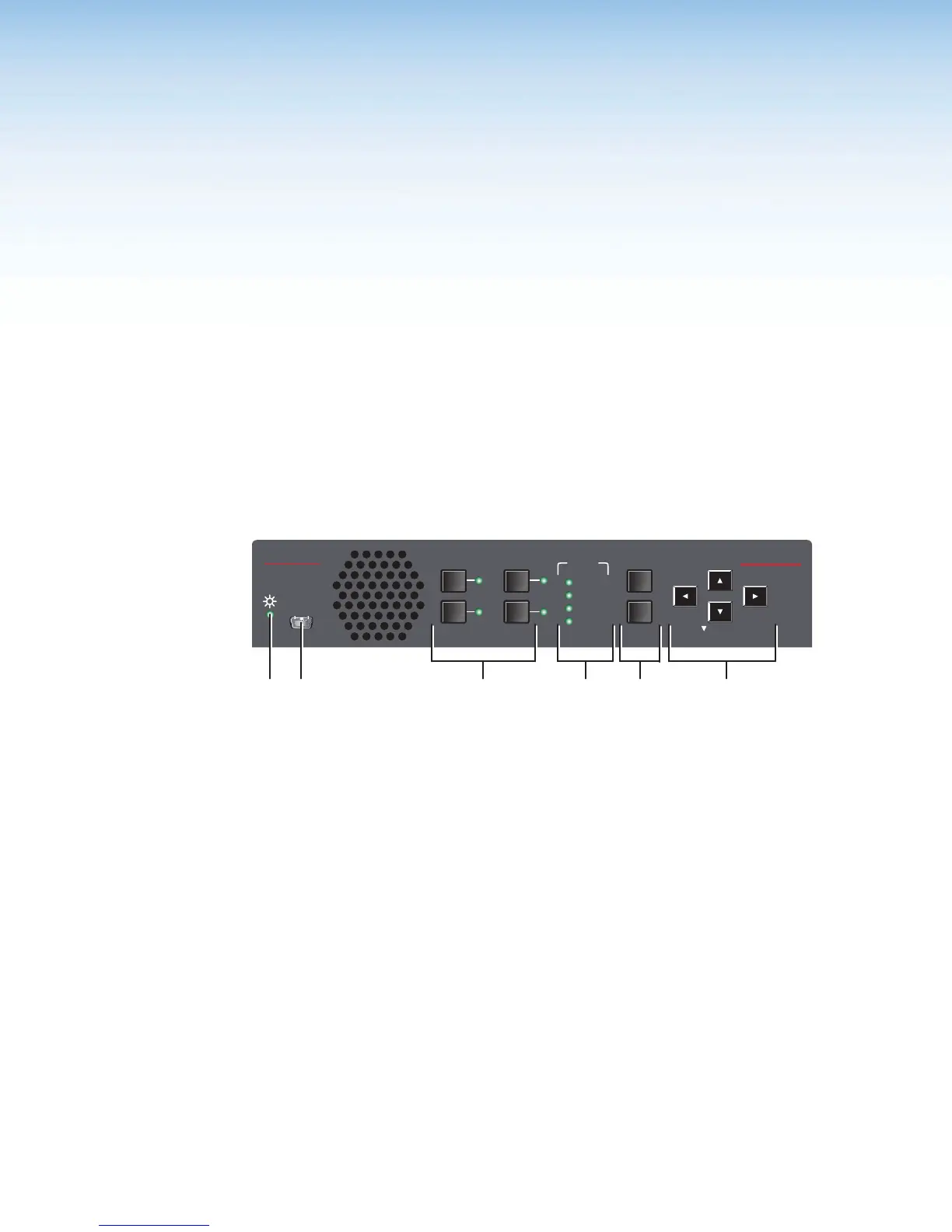
Figure 8. Front Panel Features (IN1604 DTP Shown)
A
Power LED indicator — Lights green when the scaler is receiving power and an input
signal. Lights amber when it is receiving only power.
B
Config port — Connect a host device to the USB mini-B connector.
C
Input selection buttons and LED indicators — Press one of these buttons to select
an input. The buttons light when the input is selected.
D
HDCP status LED indicators — Light when the HDMI input or the output is
HDCP-compliant.
E
Menu and Enter buttons — Press this button to enter the OSD menu system, select
options, or exit the OSD menu system.
F
Navigation buttons — Press any of the four buttons to navigate the OSD menu
system or change values of adjustable features.













 To Next Page