IN1604 DTP and IN1604 HD Scalers • Introduction 2
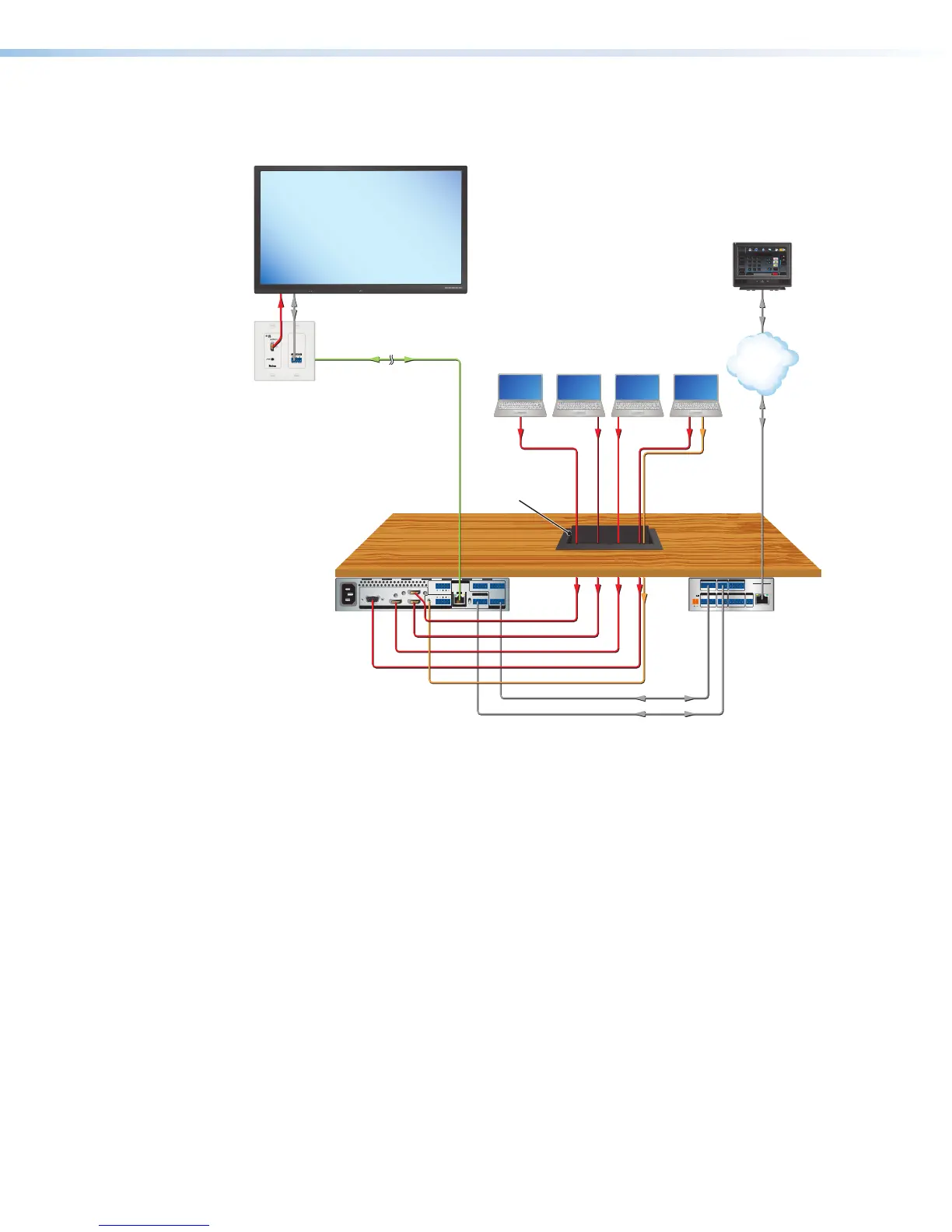
The following diagram shows the IN1604 DTP mounted under a table with four inputs and
one output.
HDMI
HDMI HDMI3
4
21CONFIGURABLE
100-240V ~ 0.5 A MAX
50-60 Hz
REMOTEAUDIOINPUT
OVER TP
OUTPUT
TALLY OUTCONTACT IN
HDBT
DTP
L
12
R
L
R
Tx Rx G
3214+V1234G
Tx RxTx
GRx
RS-232
OUT
IN
RS-232 IR
SIG
OUT
LINK
POWER
12V
--A MAX
G
Tx Rx RTSCTS
COM 1
G
Tx Rx
COM 2
VCG
VOL
RELAYS
1 2 C
1 2 3 4 G
DIGITAL I/O
PWR OUT = 6W
eBUS
+V +S
-S
G
LAN
IPCP PRO 250
IR/S
S G
Extron
OUTPUTS
AUDIO
Tx Rx GTxRx
RS-232 IR
OVER DTP
OUTPUTS
AUDIO
Tx Rx GTxRx
RS-232 IR
OVER DTP
MODEL 80
FLAT PANEL
HDMI
HDMI
HDMI
HDMI
VGA
VGA
Audio
Audio
RS-232
RS-232
Ethernet
Ethernet
RS-232 to Display
DisplayPort
HDMI
Laptops
Extron
IN1604 DTP
Four Input Scaler
with DTP Extension
Shielded Twisted Pair Cable
up to 330' (100 m)
TCP/IP
Network
Extron
IPCP Pro 250
IP Link Pro
Control Processo
Extron
Cable Cubby 1200
Cable Access
Enclosure
ron
HDMI 330 D Rx
er
Extron
TLP Pro 720T
7" Table Top
TouchLink Pro
Touchpanel
Help
System
Off
Display
Room
Control
Off
Mute
Screen
Lighting
December 15, 2013 - 7:58 AM
Audio
Control
Volume
Mute
Tuner
1 2 3
VCRLaptop PC DVD
Doc
Cam
Tuner
On
Channel
Last
Presets
More
Presets
321
654
987
Enter
0
Figure 1. Typical IN1604 DTP Application Diagram
Key Features
Video
• Three HDMI inputs and one configurable analog video input — Allow for
switching between HDMI and analog video sources. One configurable analog input
accepts most standard analog video formats, including RGB, SD and HD component
video, S-video, and composite video signals.
• HDMI, analog video, and audio source integration into presentation systems
with audio switching — Provides centralized switching for a wide range of AV
sources.
• Interface format correction — Automatically reformats HDMI source signals for
output to a connected DVI display.
• Auto-switching between inputs — Enhances presentations by eliminating
distractions during switching with glitch-free cut through black and fade through black
transition effects.













 To Next Page