Network Button Panels • Introduction 5
POWER
12V
2.0A MAX
INPUTS
OUTPUTS
1
TP
HDMI
L R
AUDIO
HDMI/CEC
SIG
LINK
IN
COM IR DIGITAL I/O
1 2S GTx Rx G G 3 4 G
HCR 102
LAN
AUDIO IN
HDMI IN
AUDIO IN
VGA IN
Extron
HDMI
MEDIA PLAYER
VIDEO
LAPTOP
PC
NBP 105 D
Network
Button
Panel
MEDIA
PLAYER
MUTE
HDMI 1 HDMI 2
PC LAPTOP
ON OFF
NBP 110 D
Network
Button Panel
Ethernet
ShareLink 200 N
AUDIO
OUT
LAN / PoE
VGA OUT HDMI OUT
USB 3
POWER
5V
2.3A MAX
TCP/IP
Network
HCR 102
Scaling Receiver
Display
Extron
ShareLink 200 N
Collaboration
Gateway
HDMI
HDMI
RS-232
Twisted Pair
Cable (AV)
230'
HDMI
Ethernet
MODEL 80
FLAT PANEL
HCT 102 D
Switching Transmitter
Side Front
Extron
OCS 100W
Wall Mount
Ethernet
Room
Wireless Access
Point
Tablet
TCP/IP
Network
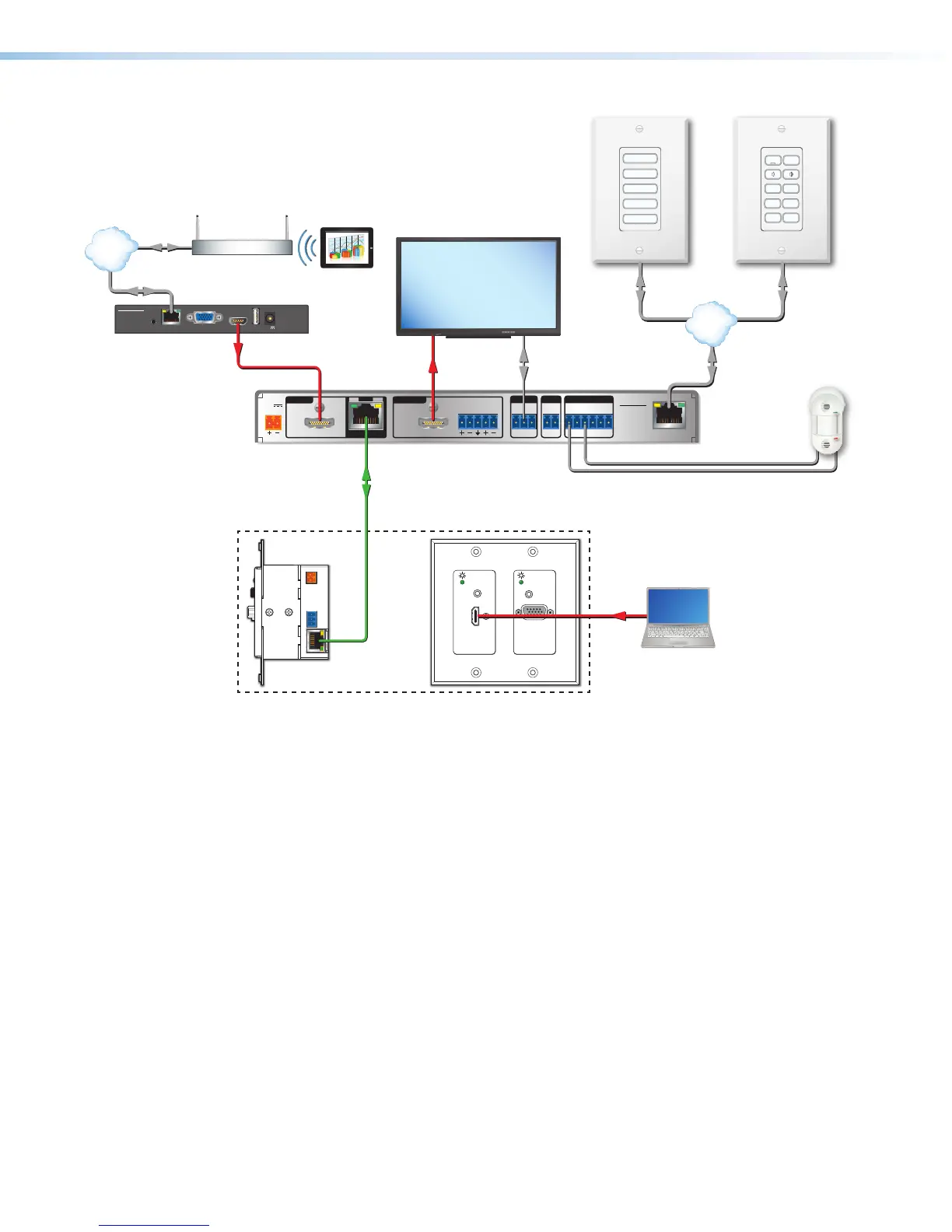
Figure 5. A Collaboration System Featuring Network Button Panels
PC System Requirements
To find the minimum hardware and software requirements for the PC you use to configure or
program the system:
• Visit the Download page (http://www.extron.com/download/index.aspx) on the
Extron website and navigate to the web page for the specific software package (such as
Global Configurator). Minimum system requirements are listed in the description section.
In some cases, minimum device firmware version requirements are also listed there.
• If system requirements are not listed on the software package web page, contact an
Extron support representative.



 To Next Page