Network Button Panels • Hardware Features and Installation 14
Installation Step 4: Cable All Devices
1. For the US gang models (NBP 100, NBP 200), if the button panel is not mounted to a
grounded metal junction box or a grounded metal equipment rack, Extron recommends
connecting the unit to an earth ground to protect the unit from electrostatic discharge.
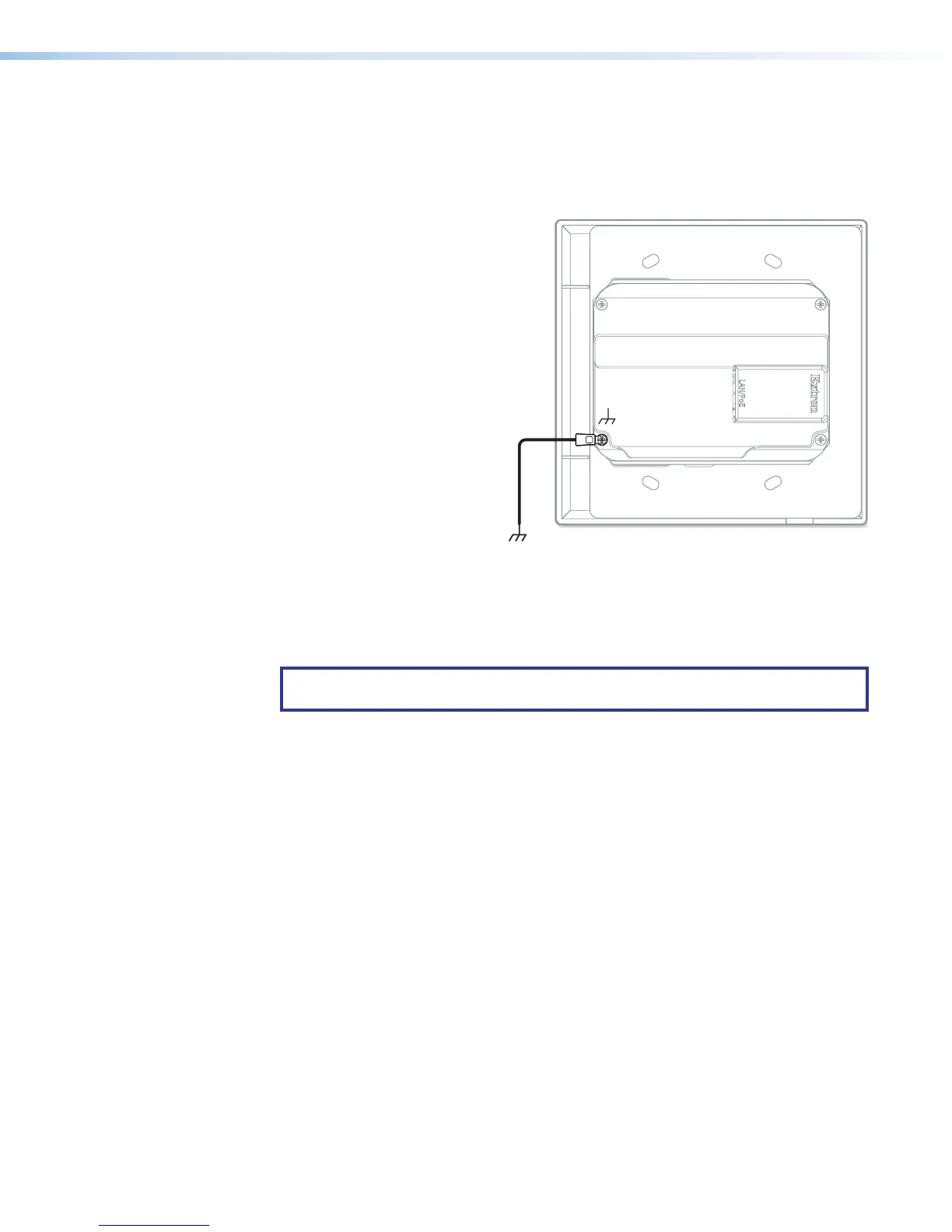
To ground the unit:
a. Securely terminate a
grounding cable with a
ring terminal.
b. Remove the grounding
screw in the lower left
corner of the rear panel,
insert the grounding
cable, replace and
securely fasten the
screw (see the figure
at right). Do not over-
tighten the screw.
Maximum torque is
2inch-pounds
(0.2Newton-meter).
c. Connect the other end
of the grounding cable
to an earth ground.
2. For all models, connect the NBP to the network (see Rear and Side Panel Features
and Cabling on the next page), and cable devices to the control processor or HCR
receiver (see the user guide for the appropriate device).
NOTE: Examples on the following pages show the NBP105D. However, connector
wiring functions are identical for all models.
3. Connect power cords and power on the control processor or receiver and other
devices.
LAN
/
PoE
Figure 12. Connecting a Grounding Wire to
the NBP



 To Next Page