Network Button Panels • Hardware Features and Installation 13
Instructions for US Gang Models
The faceplate, button labels, and knob can easily be changed at any time. Some button
labels ship with the unit. You can create and print your own customized labels using Extron
Button Label Generator software.
Replacing a faceplate
To replace a faceplate:
1. Remove the faceplate by holding the body of the unit with one hand, gripping the sides
of the faceplate with the other hand, and pulling the faceplate away from the unit.
2. Align the openings of the new faceplate with the buttons and knob and with the LEDs
and place the faceplate against the unit. The magnetic catches fasten the faceplate
onto the unit.
TIP: You can wait until the unit is mounted to the junction box or mud ring before
placing the new faceplate on the unit.
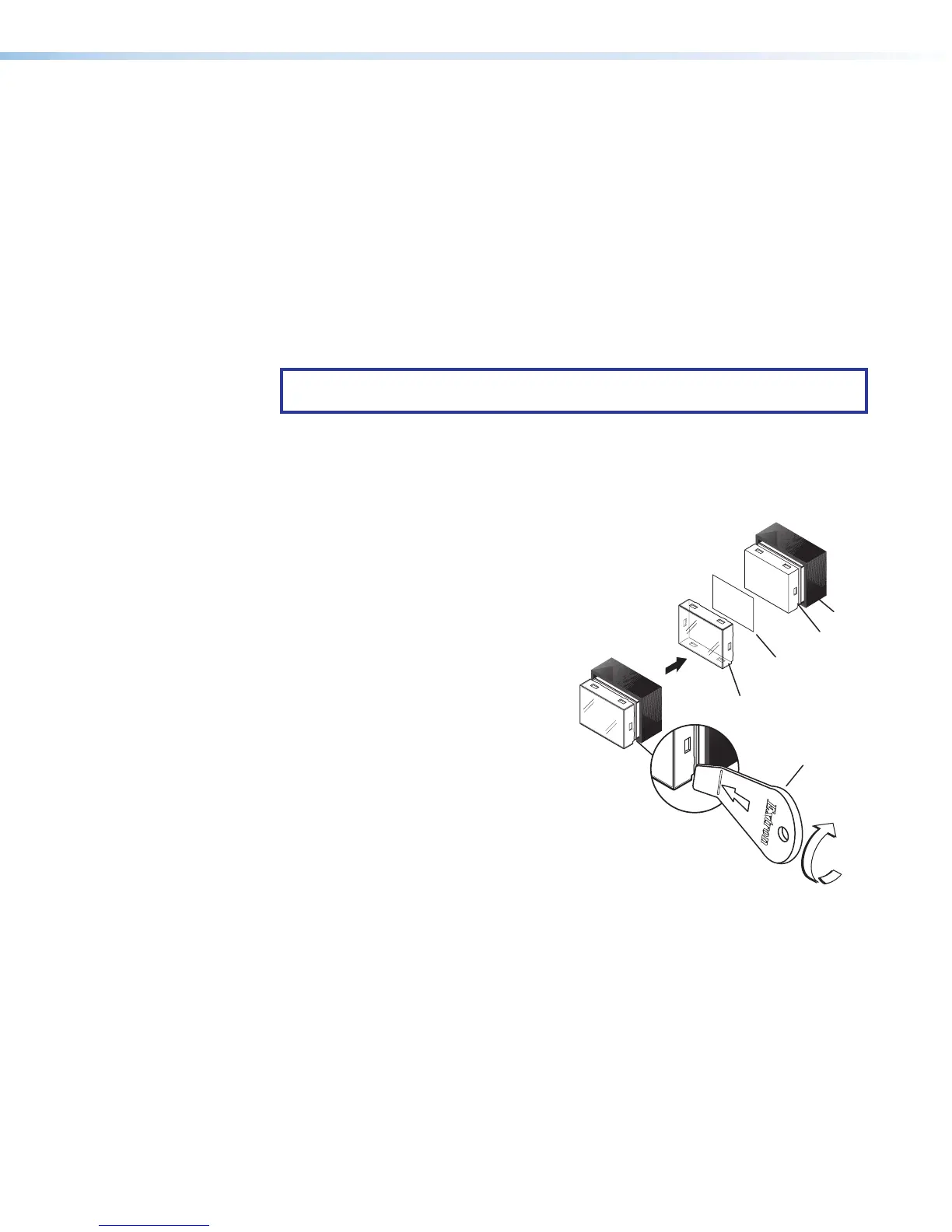
Replacing button labels
To change a button label:
1. Remove the faceplate as mentioned in step 1 of “Replacing a faceplate”, above.
2. For each button label to be replaced, gently separate
the button lens cap from its white diffuser. To do
this, insert the end of the provided Extron
removal (pry) tool into the corner notch
and gently twist the tool (see
1
in the
image at right).
3. Remove the label insert from
the translucent button cap.
4. Select one of the button
labels from the printed label
sheets included with the
unit. Remove the label from
its backing and remove the
clear, protective film from the
front of the label.
5. Insert the button label into
the button cap (see
2
at
right). Check for correct label orientation.
6. Align the cap with the white diffuser and
the panel opening, and press the clear
cap into place on the button.
7. Reattach the faceplate to the unit (see step 2 in “Replacing a faceplate”, above).
Changing a knob
To change a knob:
1. Remove the faceplate as described in step 1 of “Replacing a faceplate”, above.
2. Firmly grasp the knob and pull it away from the NBP.
3. Align the ridge inside the new knob with the channel on the knob control and allow the
magnet in the knob to snap into place.
4. Reattach the faceplate to the unit (see step 2 in “Replacing a faceplate”).
TEXT
Separate the
two-piece button
her
e at the corner.
Dif
Insert
button label.
Button
Lens Cap
Removal
Tool
2
Figure 11. Replacing Button Labels
on a US Gang Model NBP



 To Next Page