Network Button Panels • Operation 25
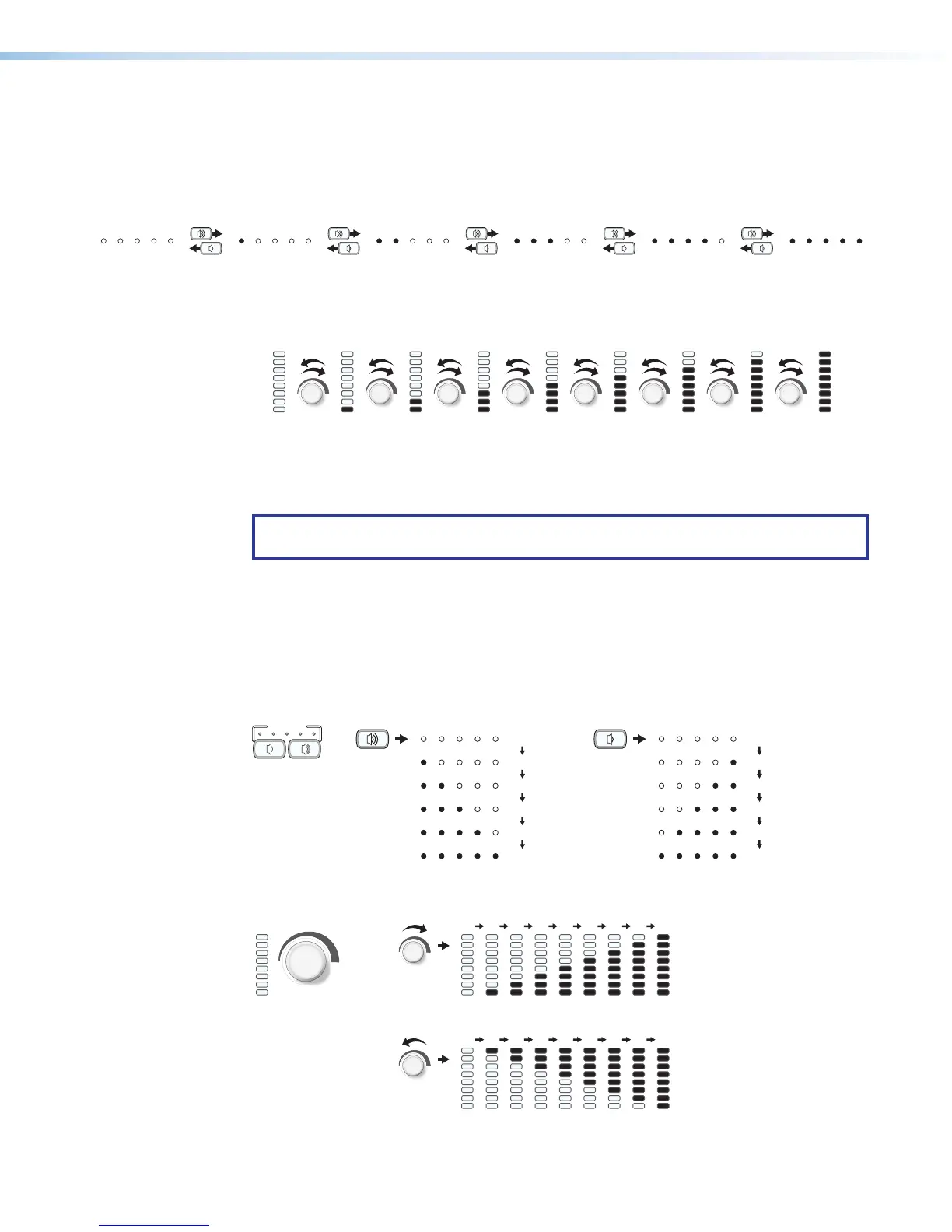
Range-based volume adjustment
If the system is configured for use with some projectors, the most common way to configure
the LEDs on the NBPs is to indicate volume ranges (with steadily lit LEDs), as shown in the
following diagrams.
L
M
L
M
L
M
V
L
M
L
M
L
ME
Range-based Volume Adjustment — NBP 105 D, NBP 106 D
Minimum, 0%
1% to 20%
21% to 40%
41% to 60%
61% to 80%
81% to 100%
Figure 24. Range-based Volume Adjustment LED Behavior, NBP 105 D, NBP 106 D
Range-based Volume Adjustment – NBP 100, NBP 200
1% to
12% of
Max.
13% to
25% of
Max.
26% to
37% of
Max.
38% to
50% of
Max.
51% to
62% of
Max.
63% to
75% of
Max.
76% to
87% of
Max.
88% to
100% of
Max.
Minimum,
0% of
Max.
Figure 25. Range-based Volume Adjustment LED Behavior, NBP 100, NBP 200
NOTE: Volume LEDs light based on the percentage of the user-set minimum-maximum
range.
Increment/decrement volume adjustment
If the system is configured for increment/decrement volume adjustment, typically you
would configure the volume LEDs to be off except during adjustment. In the most common
configuration, when the volume is adjusted, the LEDs light briefly in a scrolling pattern to
the right or top (increment) or to the left or down (decrement), as shown in the following
examples.
VOLUME
Increment/Decrement-based Volume Adjustment
NBP106D,
NBP108D
Figure 26. Volume LED Increment/Decrement Behavior for NBP 105 D, NBP 106 D
Increment/Decrement-based Volume Adjustment – NBP 100, NBP 200
NBP 100,
NBP 200
Figure 27. Volume LED Increment/Decrement Behavior for NBP 100, NBP 200



 To Next Page