FX16 Master Controller Technical Bulletin
32
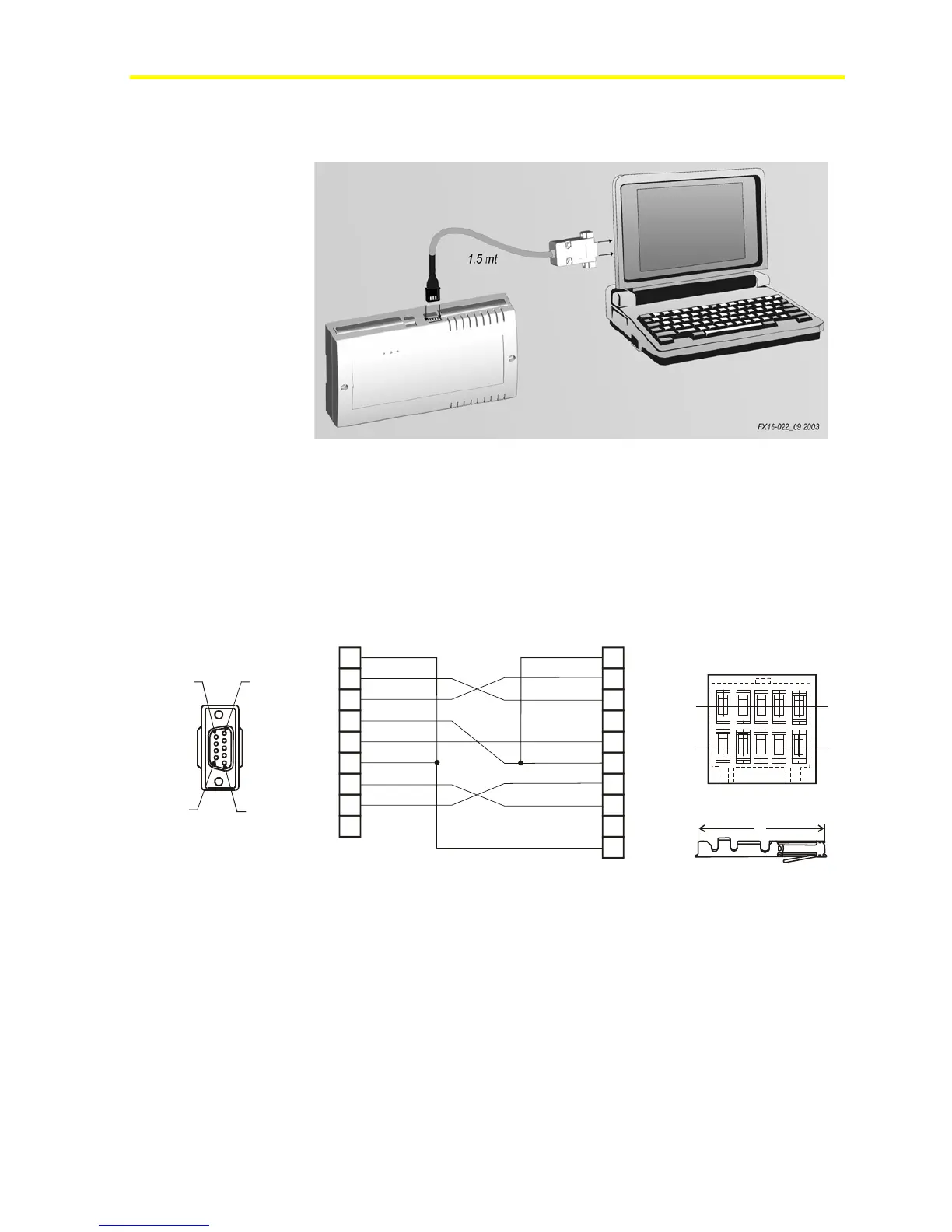
controller and use Internet Explorer to navigate the FX16 Master
Controller Web pages. See Figure 27.
Figure 27: Connection Details for the Null-Modem Cable
There are two codes available for cables:
• LP-KIT007-013C: null modem cable 3 m (9.8 ft) long
• LP-KIT007-014C: null modem cable 15 m (49.2 ft) long
The maximum RS-232C connection length is 15 m (49.2 ft).
Figure 28 displays the connection details of the null modem cable.
11
22
33
44
55
66
77
88
99
10
FX16-014_10 2003
Modem-CD Modem-CD
RX-Data
RX-Data
TX-Data
TX-Data
Modem-DSR Modem-DSR
Modem-RTS Modem-RTS
Modem-CTS Modem-CTS
Modem-DTR
Modem-DTR
White
White
Yel lo w
Yel lo w
Grey
GreyRed
Red
Black
Black
Green
Green
Blue
Blue
Put a jumper between
Pin 1 and Pin 6
Put a jumper between
Pin 1 and Pin 6
Signal GROUND
PC side FX16 side
1
6
9
5
DB9 female connector to pc
12
AMP crimp
9
5
1
10
2
AMP 5x2 AMPMODU II
Figure 28: Wiring Connection of the Null Modem Cable
Consider the following information when you work with the wiring
connection for the null modem cable:
• Run the null modem cable separately from line voltage/power
cables. Use a minimum of 30 cm (12 in.) separation for 230 V/30 A
circuits.
• Do not run the null modem cable parallel to power cables for long
distances (> 3m [9.8 ft]).



 To Next Page