NOTE: YoucanalsocreateprojectsinSCENE,andimportscannedimagesintotheproject.
ManagingOcclusions
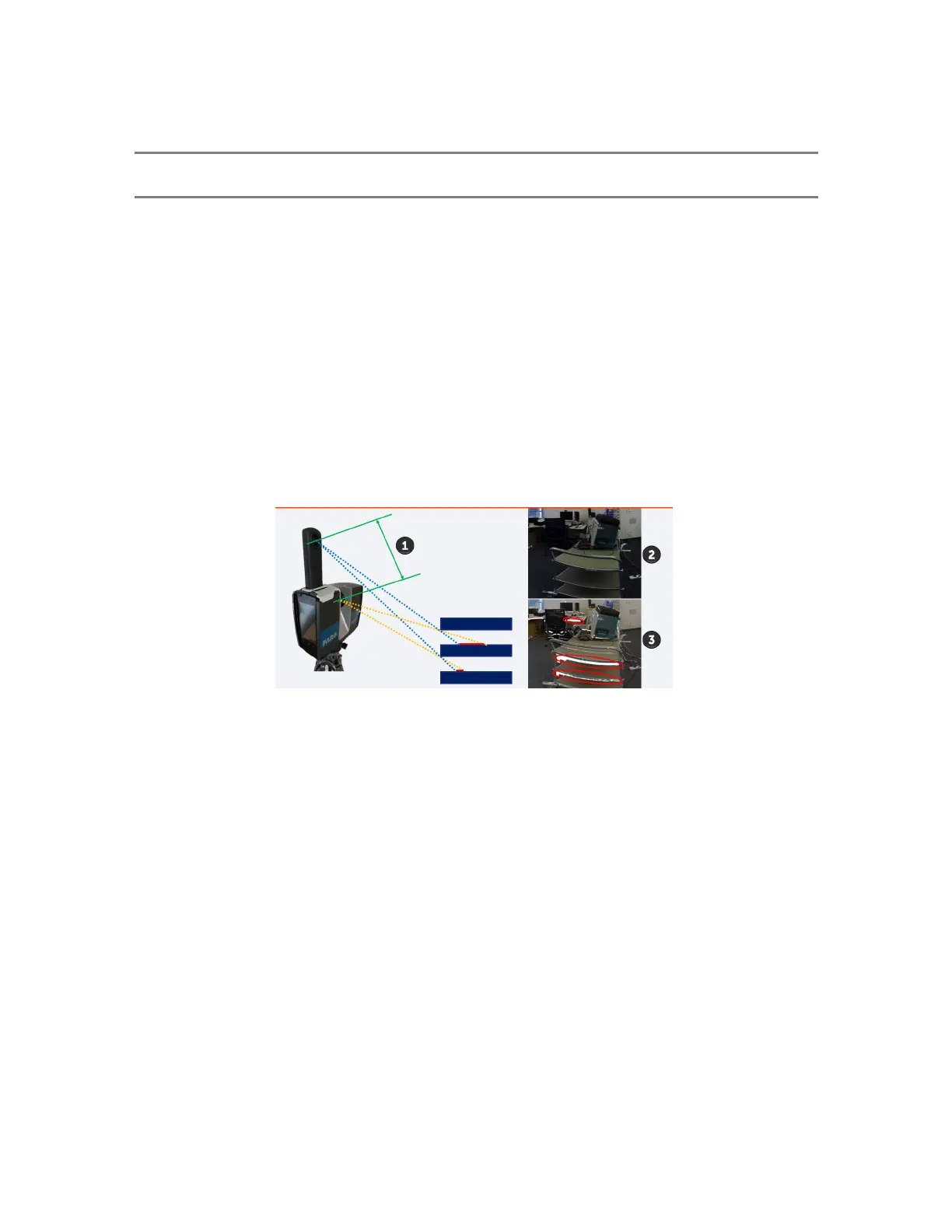
Anocclusionisanareaontheobject'ssurfacethatisrecordedbyonemeasurementdevice(eitherthelaser
scannerorthecamera),butmissedbytheother.Thisconditionisalsoknownas"parallax",wherethe
camerafailstocaptureanareathatisrecordedbythelaserscannerduetotheoffsetfromthelaserbeam
centertotheRicohThetaZ1lenscenter.Theareaisincludedinthepointcloudbutnotcapturedinthe
PanoCampicture,andasaresultnotcolorizedinthepointcloud.
Occlusionsoccurduetoparallaxissues,similartohowyourleftandrighteyesseeclose-upobjects
differently.Occlusionsoccurmoreoftenforclose-upobjects,andtheyoccurlessfrequentlywithobjects
thatarefurtheraway.
!
Parallaxarea
"
LaserScannercamera
#
Panoramiccamera(occlusionshighlightedinred)
Followingisanocclusionwherethesurfaceiscapturedbythelaserscanner,butmissedbythecamera.
FARO
®
FOCUS® Laser Scanner Accessories Manual
Chapter 5: PanoCam
FARO FOCUS® LASER SCANNER (00.00) Page32of36



 To Next Page