AttachtheCamera/MountingBracketAssemblytotheScanner
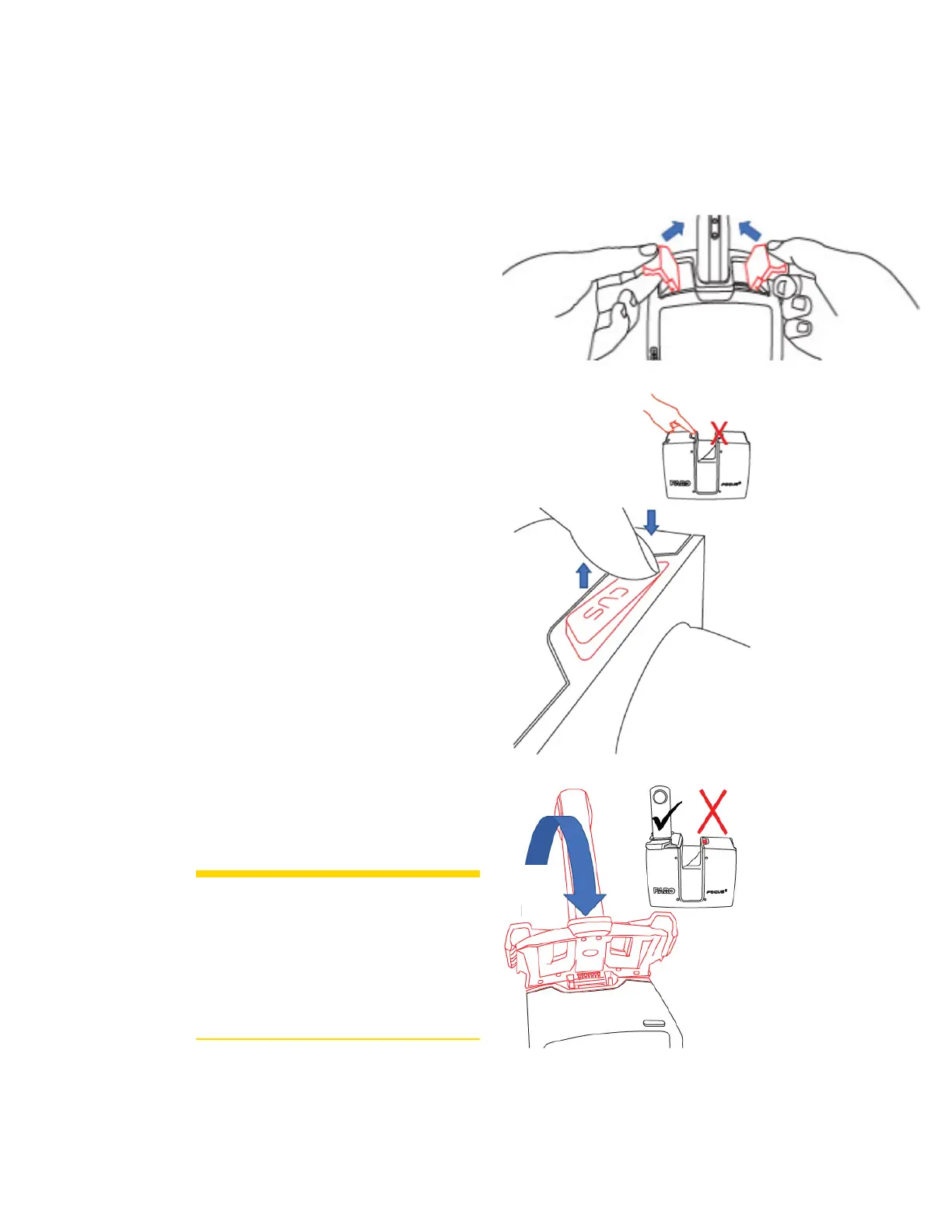
AfterattachingthecameratothePanoCammountingbracket,mounttheassemblyonthescanner.
!
Rotatethelatchesinwardsothattheyareout
ofthewaywhileyouplacetheassemblyon
thescanner.
"
Removetheprotectivecoverfromthe
accessorybay(locatedonthesideofthe
scannerwiththeon/offbutton).Pressdown
ononesideofthecover,whichcausesthe
othersidetopopup.Grasptheelevatedside
andremovethecover.Retaintheprotective
cover.
#
Mounttheassemblytothescannerbyfitting
theconnectoronthemountassemblytothe
slotopening.Rotatethemountdownward.
CAUTION: Mounttheassemblyonthe
sideofthescannerwherethe
on/offbuttonislocated.
Attemptingtomountthe
assemblyonthewrongside
coulddamagethescanneror
mountingbracket.
FARO
®
FOCUS® Laser Scanner Accessories Manual
Chapter 5: PanoCam
FARO FOCUS® LASER SCANNER (00.00) Page23of36



 To Next Page