54
NISEA
4.2 Menu architecture
● Home
● Sterilisation programs
● Last sterilisation program run*
● Test programs
● Last test program run*
● Settings
● User management*
● Date and time
● Printer
● Language
● Measurement unit*
● Waterparameters*
● Connectivity*
● Service
● Data output
● Usb
● Printer
● Info
● Open door
● Waterlling
* In the Premium version only
9393
NISEA
Temperature
indicator
Indication icon only.
Cannot be selected.
Shows the temperature in the selected cycle
Maximum textile
load indicator
Indication icon only.
Cannot be selected.
Shows the maximum textile load for the selected cycle
Door lock
indicator
Indication icon only.
Cannot be selected.
Shows that the door is closed and locked
Cycle count
indicator
Indication icon only.
Cannot be selected.
Shows the cycle counter
Stop cycle/test
Stops a cycle/test at any time.
Press the icon for at least 3 seconds to activate it.
After 3 seconds, the cycle/test will stop and the machine is put
in a safe state
Cycle completed
confirmation
Indication icon only.
Cannot be selected.
Appears when the cycle has ended correctly.
Cycle error
Indication icon only.
Cannot be selected.
Appears when the cycle has been stopped by an error or
manually by the operator.
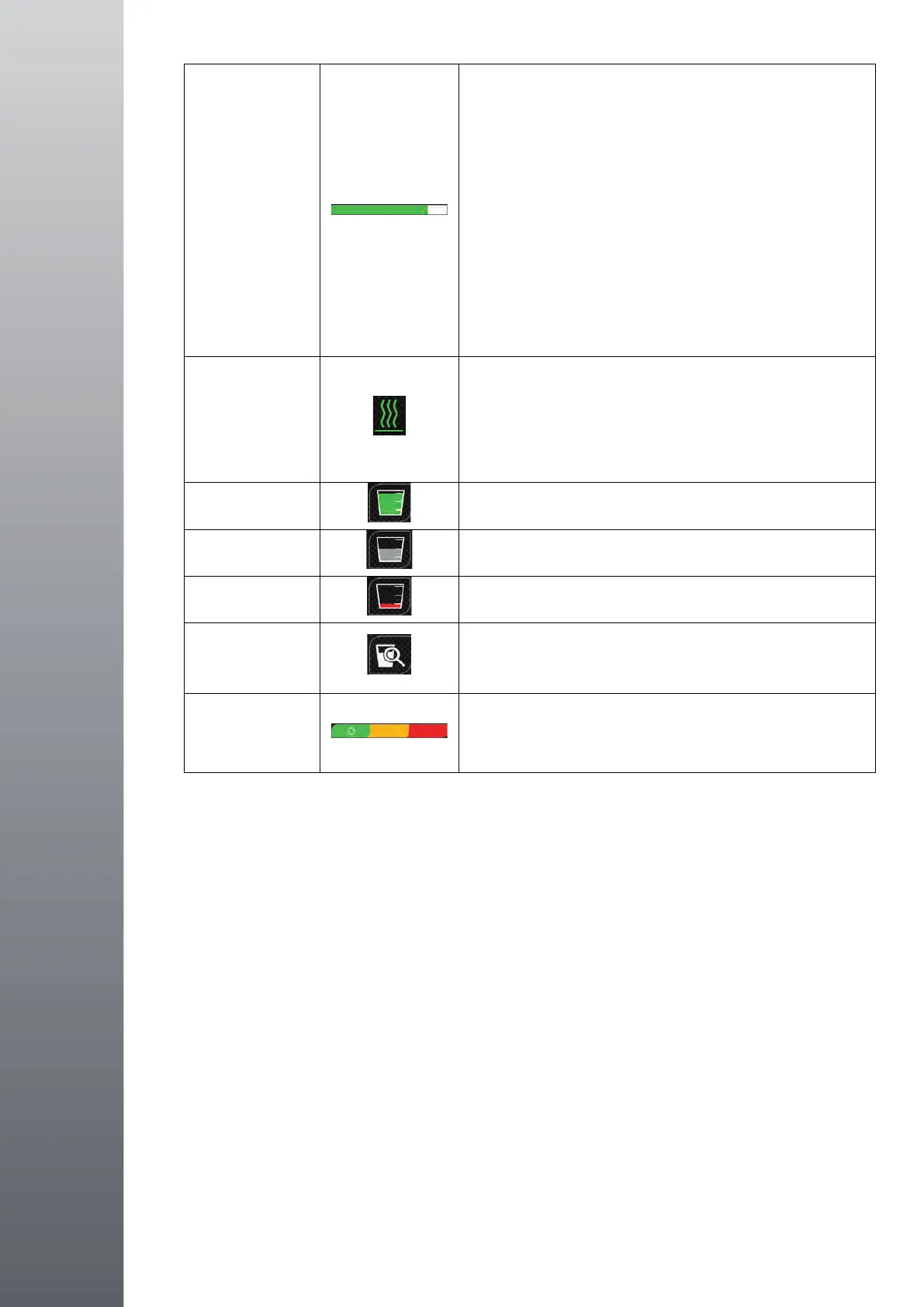
Cycle progress
bar
The cycle progress bar advances according to the following
phases:
1. Preheating phase
2. Vacuum phase 1
3. Pressure ramp-up phase 1
4. Vacuum phase 2
5. Pressure ramp-up phase 2
6. Vacuum phase 3
7. Pre-sterilisation phase
8. Balancing phase
9. Sterilisation phase
10. Discharge phase
11. Drying phase
12. Pressure balancing
94
NISEA
Sterilisation
complete
Indication icon only.
Cannot be selected.
Appears when the sterilisation phase is complete (not the
cycle).
Allows the user to stop the cycle to remove the instruments,
skipping the drying phase
Feed tank
maximum level
Appears when the water in the feed tank reaches the maximum
level. Water filling stops automatically.
Feed tank
intermediate level
Appears when the water in the feed tank is between the
minimum and maximum levels.
Feed tank
minimum level
Appears when the water in the feed tank is close to the
minimum level.
Water quality
Indication icon only.
Cannot be selected.
Shows the water quality bar
Water quality bar
The cursor position indicates the water quality.
Green: quality OK
Yellow: critical quality area message generated
Red: quality not OK message generated and machine stops
4.2 Menu architecture
• Home
• Sterilisation programs
• Last sterilisation program run*
• Test programs
• Last test program run*
• Settings
• User management*
• Date and time
• Printer
• Language
• Measurement unit*
• Water parameters*
• Connectivity*
• Service
• Data output
• USB
• Printer
• Info
• Open door
• Water filling
* In the Premium version only
4.2 Menu architecture


 To Next Page