5555
NISEA
2929
NISEA
4.3 Selezione dei programmi di sterilizzazione
*Opzioni 06 e 07 disponibili solo nella versione Premium
4.3 Selecting sterilisation programs
4.3.1 Sterilisation program types
Whenthemachineiscold,thepreheatingtimeisapproximately10minutes.Selectingthe“Programs”submenu
accessesthelistofsterilisationcyclesthattheautoclavecanrun:
B CYCLES
- 134°C Standard Cycle: 4 min. of sterilisation plus the drying phase
- 134°C Prion Cycle: 18 min. of sterilisation plus the drying phase
- 134°C B-Flash Cycle: 3,5 min. of sterilisation plus the drying phase
- 121°C Standard Cycle: 16 min. of sterilisation plus the drying phase
S CYCLES
- 134°C Universal Cycle: 3,5 min. of sterilisation plus the drying phase
- 121°C Softprogramm Cycle: 15,5 min. of sterilisation plus the drying phase
SPECIAL CYCLES
- Drying cycles: drying phase only
NOTE:Foreachavailablesterilisationcycles,themanufacturermustperformtheWorksTestsinaccordancewithEN
13060(par.7.3).AnyavailablecyclesforwhichthemanufacturerhasnotperformedtheWorksTestsmustundergo
Installation Tests in accordance with EN 13060 par. 7.4.
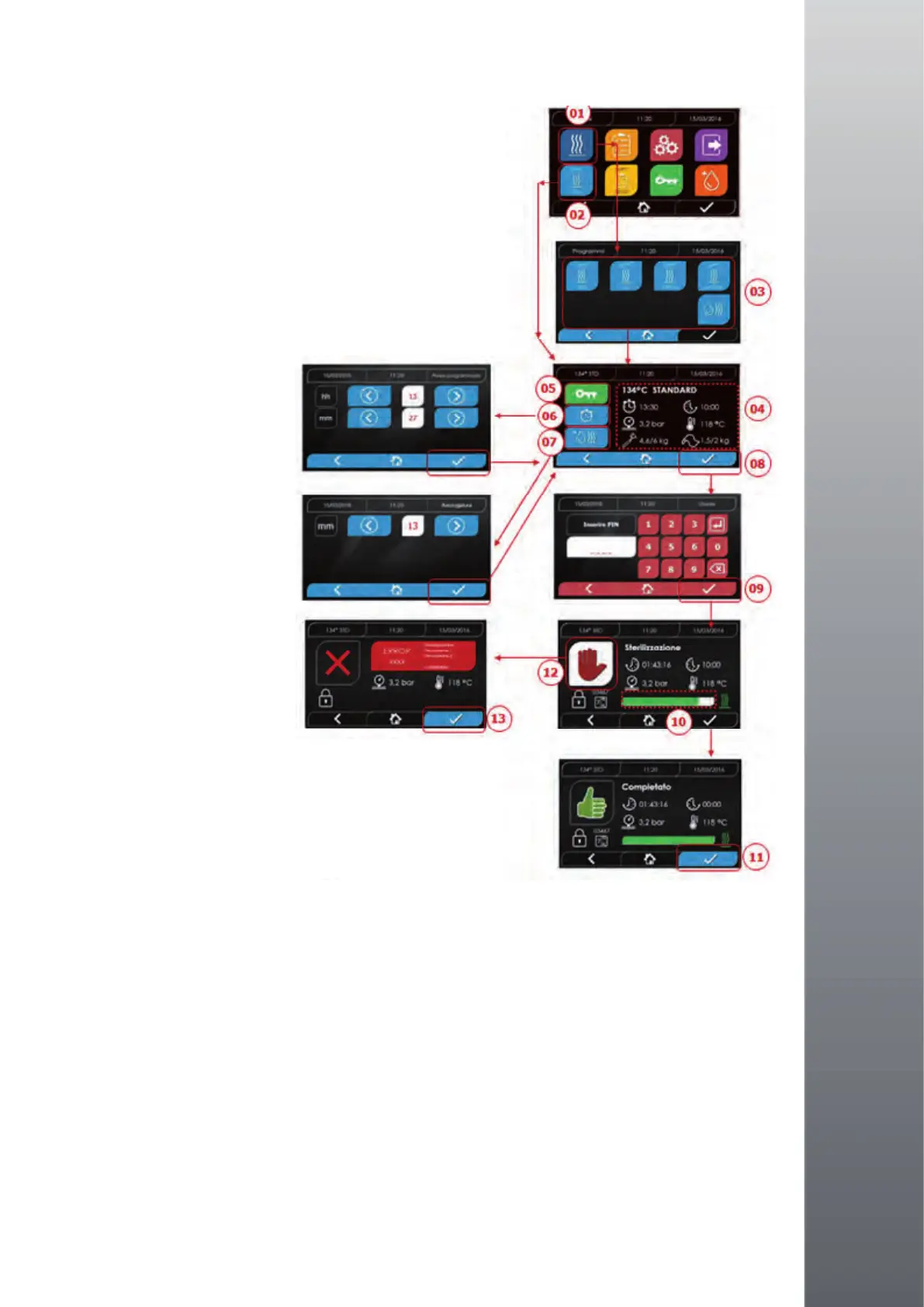
01 Select the “Sterilisation cycles” menu
02 Alternatively,directlyselect“Lastcyclerun”andogo
to step 04
03 Select the desired cycle
04 Screen with all the parameters of the selected cycle
05 (Optional) You can open them door to insert other instruments
06 (Optional) Select the programmed start button to set
the start time
07 (Optional) Select the increment drying button to increase
the cycle drying time
08 Start the cycle
09 (If active) enter the user PIN.
Onconrming,thecyclewillstart
10 You can use the green bar to monitor the cycle progress
11 Whenthecyclenishes,presstheconrmbuttontoreturn
to the Home screen
12 You can stop the cycle manually by holding done the
“Stopcycle”buttonhfor3seconds.Waitforthemachine
tobeputinasafeconditionandpresstheconrmbutton(13)
for 2 seconds and then press Home to return to the home screen.
*Options 06 and 07 are only available in the Premium version


 To Next Page