Operation
4812163801.pdf 2019-04-30
Driving
Operating the roller
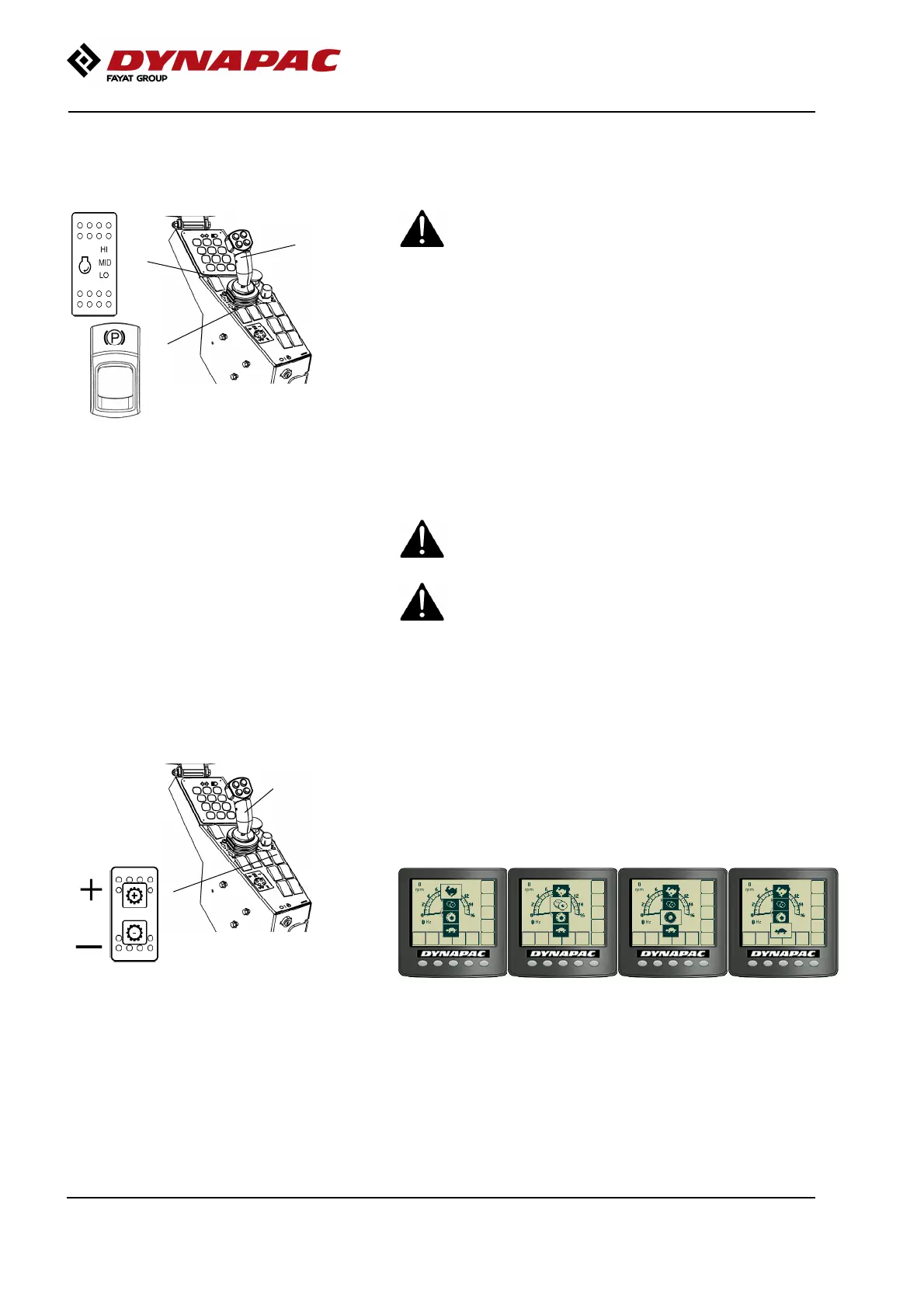
Fig. Control panel
1. Speed selector
2. Parking brake
3. Forward/Reverse lever
3
1
2
Under no circumstances is the machine to be
operated from the ground. The operator must be
seated inside the machine during all operation.
Under no circumstances is the machine to be
operated from the ground. The operator must be
seated inside the machine during all operation.
Activate working speed (1) = HI or ECO if available.
In ECO, the machine automatically regulates the
engine speed according to requirements.
If the machine is only to be transported, MID or ECO
should be selected instead.
Check that the steering is working correctly by turning
the steering wheel once to the right and once to the
left while the roller is stationary.
Make sure that the area in front of and behind the
roller is clear.
Make sure that the area in front of and behind the
roller is clear.
Release the parking brake (2).Release the parking brake (2).
Machine with gear change in separate
spring-return switch (gear position switch)
Fig. Control panel
1. Gear position switch
2. Forward/Reverse lever
2
1
Switch (1) is a spring-return gear position switch,
where gear change is performed by advancing through
the four different gear positions: Hare, Drum spin,
Wheelspin and Tortoise.
74




 To Next Page