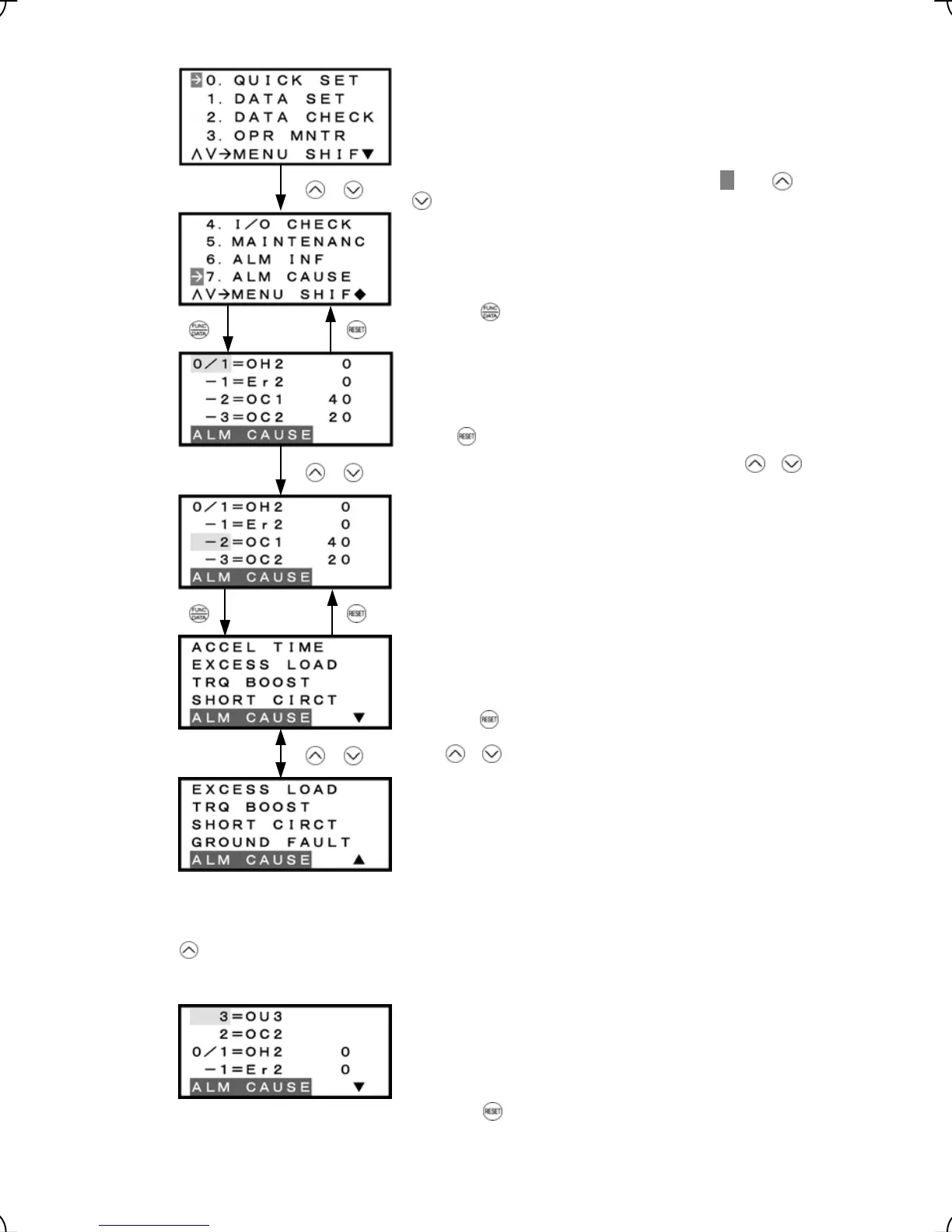
Select the target menu by moving the pointer
Æ
with
Cause & No. of occurrences of alarm history (last)
Cause & No. of occurrences of alarm history (2
nd
last)
Cause & No. of occurrences of alarm history (3
rd
last)
Cause & No. of occurrences of alarm history (4
th
last)
Press
key to return to Menu.
Alarm cause (1
st
page)
Press the
key to return to alarm list screen.
Alarm cause (2
nd
page)
Figure 3.17 Screen Transition for "ALM CAUSE"
Pressing the
key on the “Alarm list screen” allows you to select the alarm cause of a multiple alarm to
check.
Multiple alarm 2
Multiple alarm 1
Cause & No. of occurrences of alarm history (last)
Cause & No. of occurrences of alarm history (2
nd
last)
keys.
Press the key to establish the target menu.
Select the target alarm by moving the cursor with /
keys.
Use / keys to check all alarm causes.
/
Alarm list screen
/
/
Press the key to return to Menu.
3-27



 To Next Page