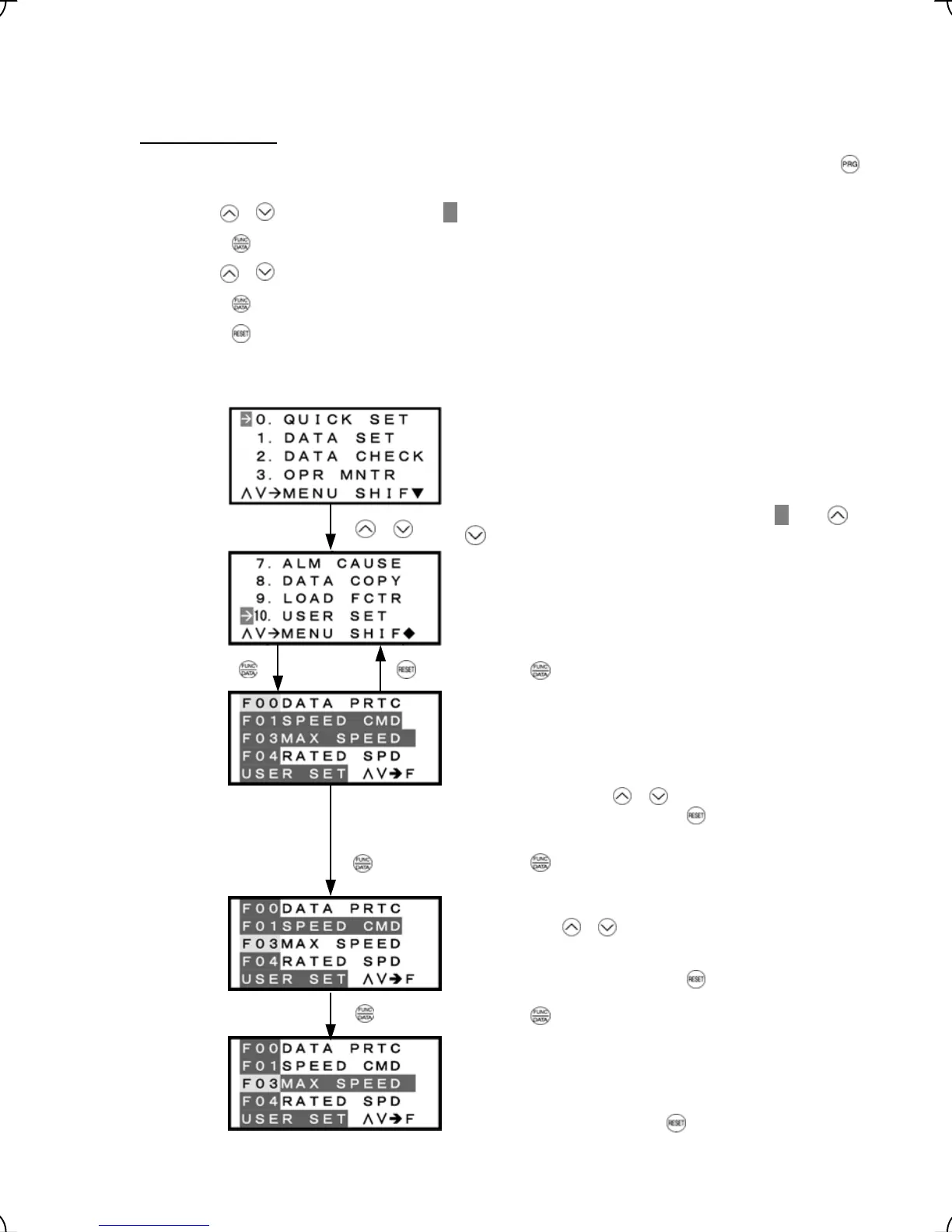
3.4.11 Changing function codes covered by Quick setup -- Menu #10 "User Setting" --
Menu #10 "User Setting" in Programming mode allows you to change the set of function codes that are covered
by Quick setup.
Basic key operation
(1) When the inverter is powered on, it automatically enters Running mode. In Running mode, press t e h
key to enter Programming mode. The menu for function selection will appe
ar.
(2) Use the / keys to move the pointer
Æ
to "10. USER SET."
(3) Press the
key to call up the list of function codes.
(4) Use the
/ keys to select the function codes to be added or deleted.
(5) Press the
key to perform the addition or deletion.
(6) Press the
key to return to the menu.
Figure 3.27 shows the LCD screen transition for "10. USER SET."
List of function codes
Lists function codes with their names.
The function codes covered by Quick setup are highlighted
(names are highlighted).
Select the function code to be added (not highlighted) by
moving the cursor with
/ keys.
To go back to the menu, press the
key.
Select the function code to be deleted (highlighted) by moving
the cursor with
/ keys.
To go back to the menu, press the key.
Figure 3.27 Screen Transition for Changing Quick Set Menu
Select the target menu by moving the pointer
Æ
with
Press the key to establish the target menu.
Press the key to add it to Quick setup menu.
Press the key to delete it from Quick setup menu.
/
keys.
To go back to Menu, press the key.
3-38



 To Next Page