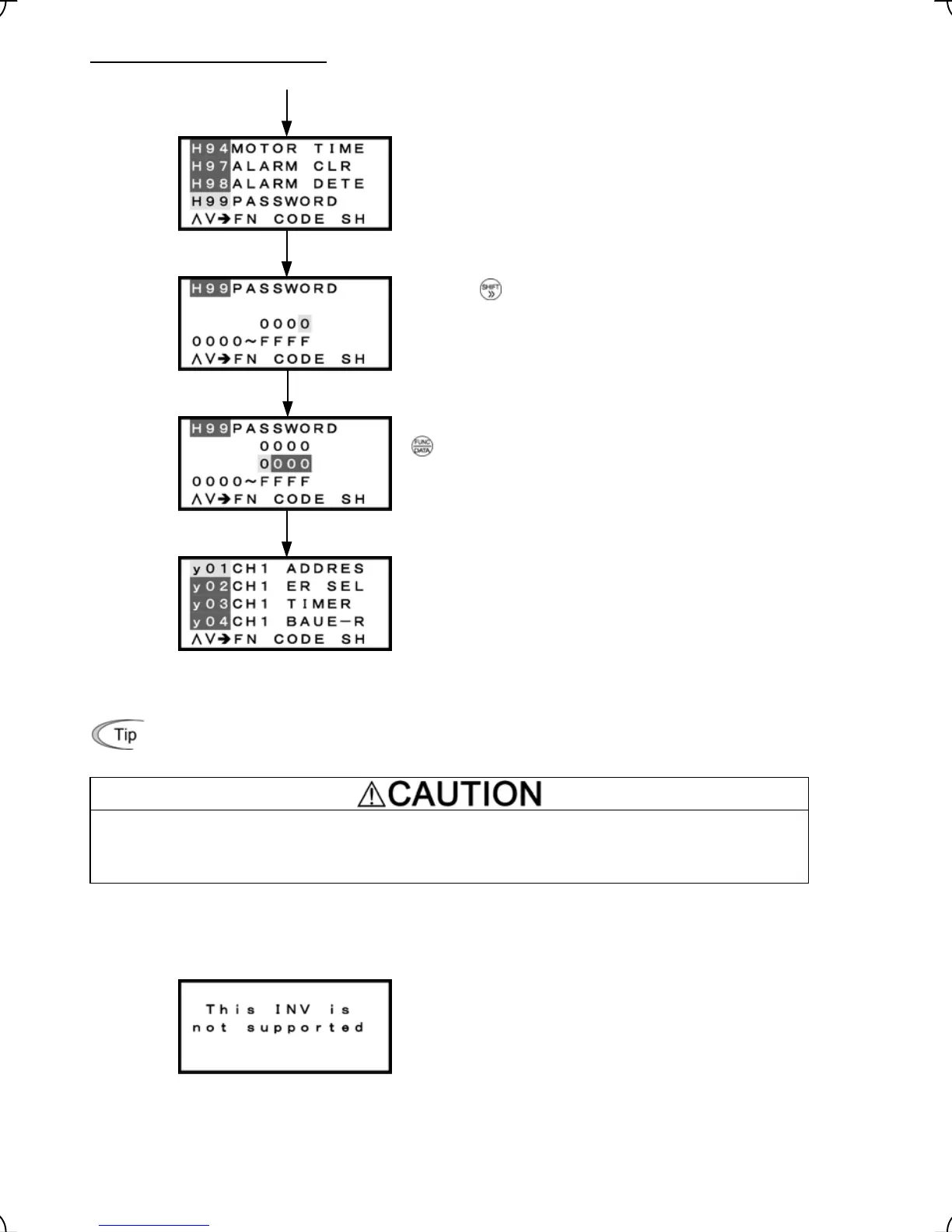
Canceling the password protection
The password protection temporarily canceled with the procedure given on the previous page.
Select H99 from Menu #1 "Data Setting."
key once.
Press the
Check that the screen shown at left appears and press the
key. (H99 is set to "0000.")
The password protection is canceled.
Figure 3.38 Screen Transition for Canceling Password Protection
If you forget your password, you can reset the password protection by performing “Initializing” with
H03.
Initializing with H03 resets all the function code data to the factory defaults. Be sure to restore the proper
settings that match the specifications of the system.
Accidents or injuries may result.
3.6.3 Connecting to other inverter series
Connecting the multi-function keypad
TP-G1-CLS / TP-G1-ELS to an inverter other than
FRENIC-Lift series displays this ERROR screen.
3-47



 To Next Page