3.6 Other Notes
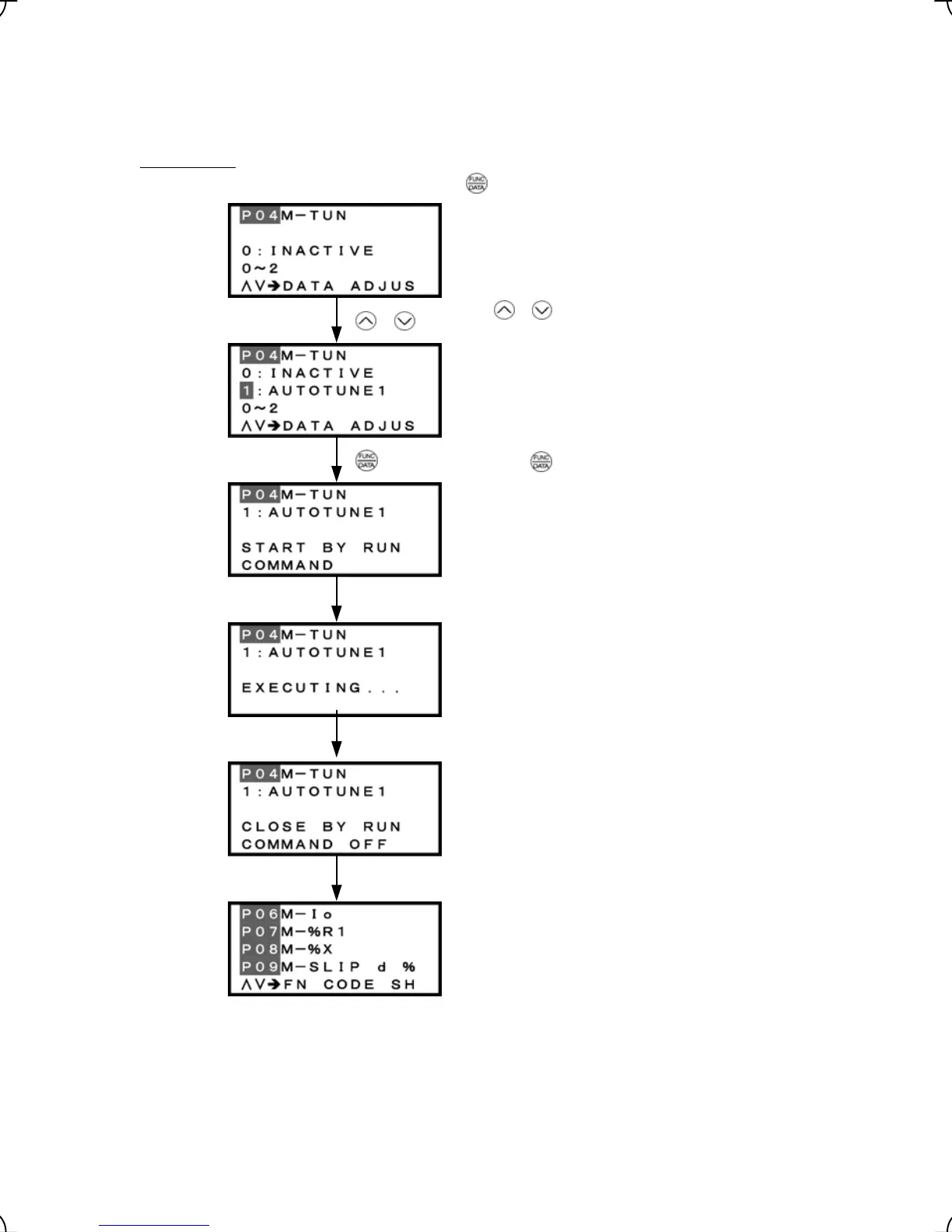
3.6.1 Tuning motor parameters
Selecting Menu #1 "Data Setting" in Programming mode and proceeding to function code P04 or L03 screen
enables tuning operation.
Motor tuning
key.
Set function code P04 to "1" or "2," then press the
Wait for a run command.
Wait for the completion of tuning of the motor parameters.
(Note 1)
Figure 3.33 Screen Transition for Motor Tuning
(Note 1) Time for tuning: Approx. 15 sec when P04 = 1
Approx. 25 sec when P04 = 2
Use /
keys to set P04 to either 1 or 2.
/
key to establish the current tuning mode.
Press the
Run command ON
End of tuning
Run command
OFF
Turn the run command off. (The run command given b
the keypad or the link operation is automatically turned
off.)
Tuning completes. The lead-through on the keypad
ends the tuning process and moves to the next function
code P06.
3-42



 To Next Page