Chapter 9 External Interface
PAGE 9-32
9-6-4 Fieldbus Setup
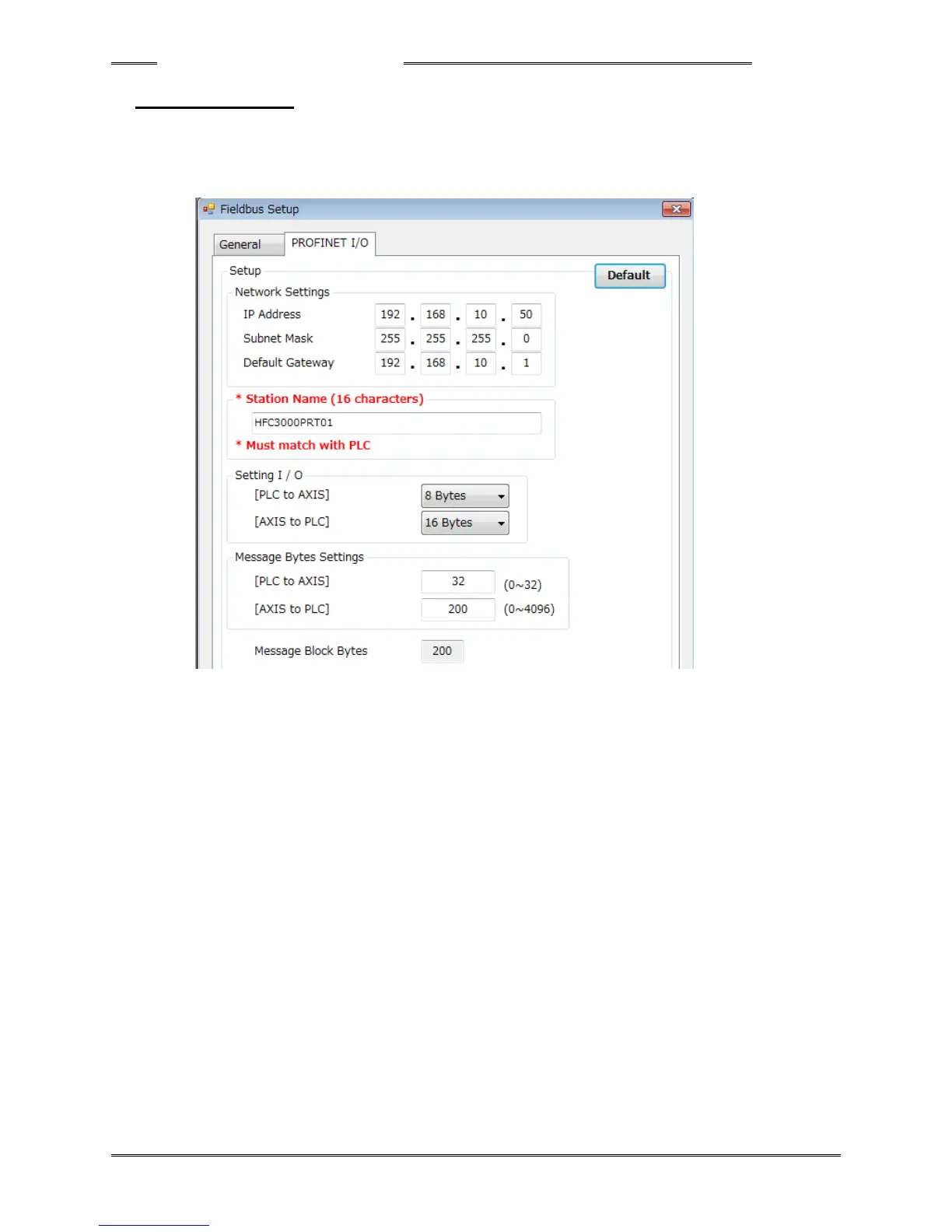
In the PROFINET I/O tab, setting of the Anybus-CompactCom PROFINET IO is performed. The network
settings, the station name, the I/O settings, and the message settings can be changed.
●Default (the settings are set to the factory settings)
・Network Settings
IP Address: 192.168.10.50
Subnet Mask: 255.255.255.0
Default Gateway: 192.168.10.1
・Station Name: HFC3000PRT01
・Setting I/O [PLC to Axis]: 8bytes[64bits]
・Setting I/O [Axis to PLC]: 16bytes[128bits]
・Message Bytes Settings [PLC to Axis]: 32bytes
・Message Bytes Settings [Axis to PLC]: 200bytes
* Message Block Bytes is fixed at 250 bytes.
●Network Settings
・IP Address: 0.0.0.0 ~ 255.255.255.255
・Subnet Mask: 0.0.0.0 ~ 255.255.255.255
・Default Gateway: 0.0.0.0 ~ 255.255.255.255
●Station Name
Setting range: ASCII characters (half-width alphanumeric characters・ 16 characters at max.)
Please make sure that the name is the same as the name registered at the PLC side.
If the names are not the same, network connection with the PLC side cannot be established.



 To Next Page