11
1120
1121
1122
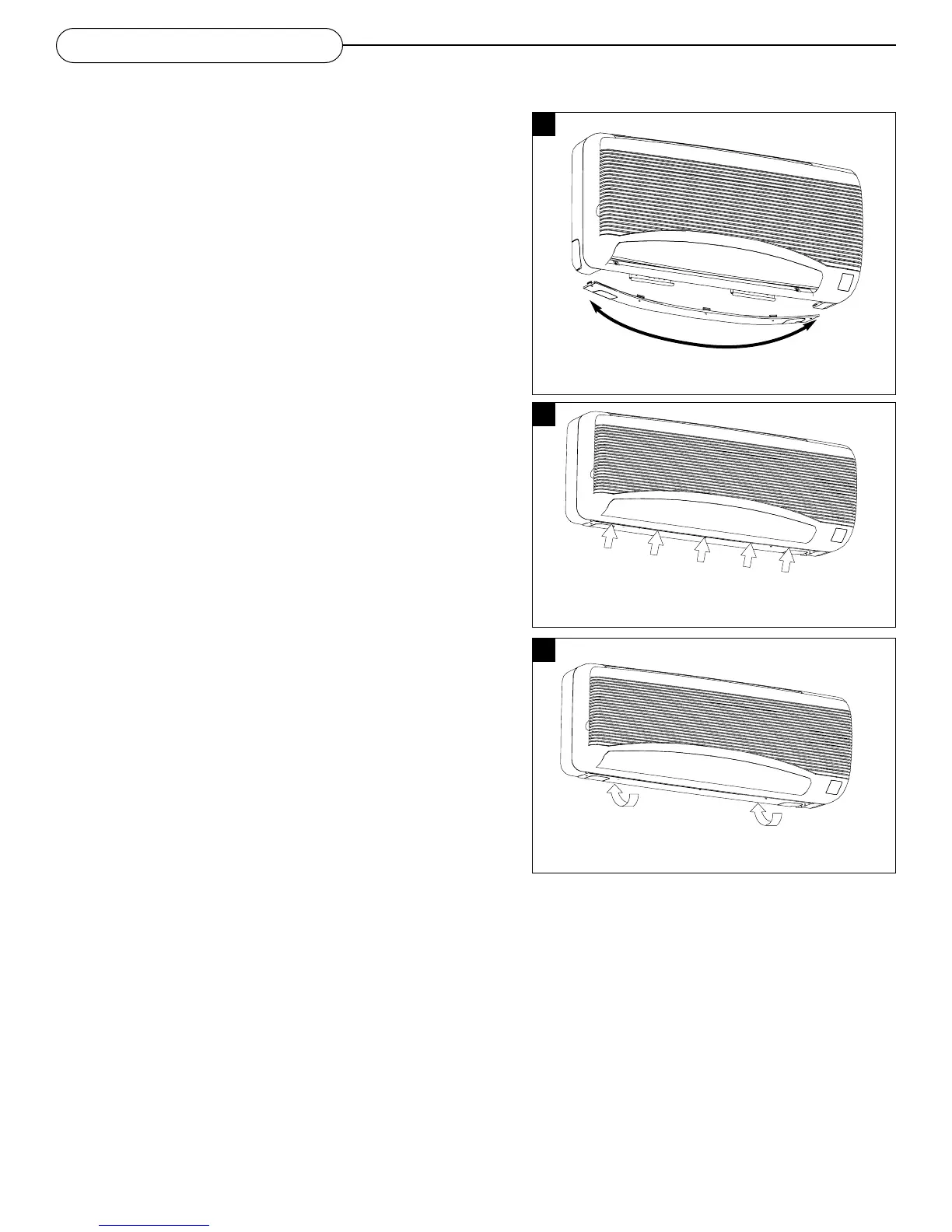
Slightly bend the base cover in the center and
press both end tabs onto the indoor unit.
Press the five front tabs up and onto the unit.
You will hear a ‘snap’ when the tab is fastened.
Push the two rear tabs back and up to lock the
base cover onto the wall bracket.
Re-installing the base cover
• Slightly bend the base cover in the center and press both tabs
into the indoor unit as shown in figure 20
• Snap closed the other three tabs by pressing onto the unit and
towards the wall
•All tab locations are indicated by embossed triangles as shown in
figure 21
• Push the last two tabs into the indoor unit
• Push the triangles towards the wall to lock the tabs into the wall
bracket as shown in figure 22
• Ensure there is no bulging on the base cover after installation
Switching on the power supply
• Turn the main switch on the outdoor unit to ON
• Operate the Indoor unit at Cooling or Heating mode (if
applicable) for fifteen minutes or more
• Check operation
FINAL INSTALLATION



 To Next Page